

tl;dr — it's broken for me; all text is garbled, and I don't know why.
I'd really like to give it a proper try, because it looks interesting.
Long version:
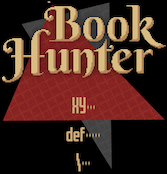
I tried it out and thought the scrambled text was part of the ambience or something, but ultimately it makes it impossible to discover the game just by playing. I guessed that “XY” is "play", “def” is "settings" (or something), and “\” must be "About." That's a little uninviting, but still pretty simple, and easy to get past… except that it turns out all of them are "play"!
Hmm… other people in the comments talked about easy and hard mode, so maybe “XY”=easy, “def”=medium, “\”=hard. Okay. That's weird, but still doable. But how did everybody else figure out how to play the game?
I never discovered the two stats (sanity and resolve?) on my own — those are displayed as meaningless non-numbers that changed randomly… I only discovered their existence by reading through all the comments. And the books… what do they do? Why are people talking about the fun title generator? It feels like it's taking the "insanity is just around the corner" schtick just a little far.
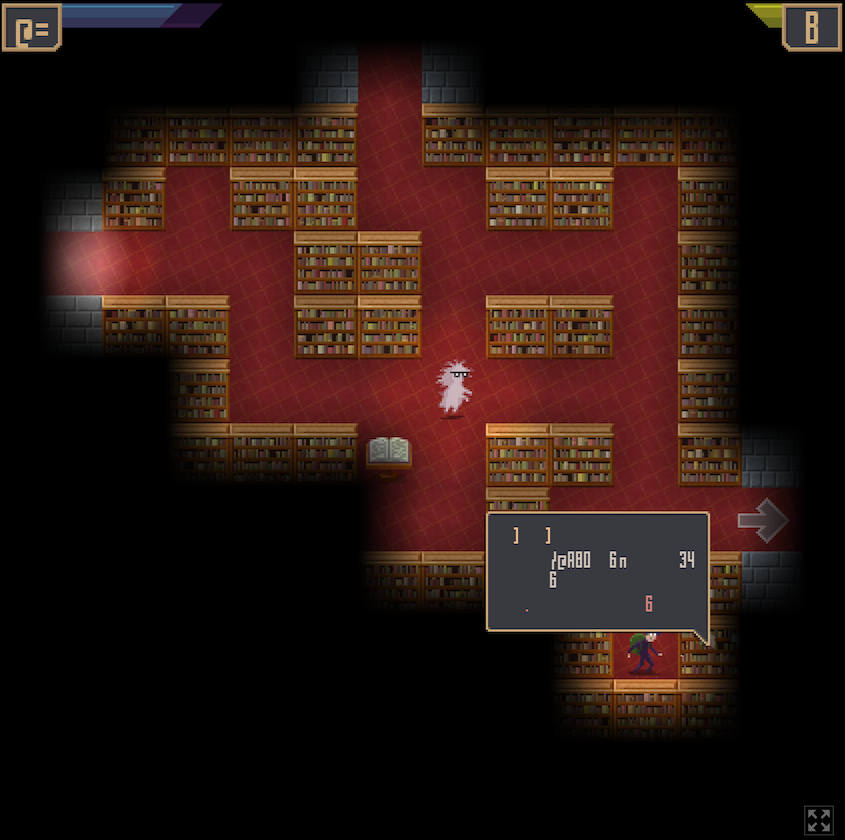
Eventually I decided it must be a problem with my browser (or maybe a bug introduced after everyone else played it and left their comments?). I was able to confirm this by finding someone on YouTube successfully playing it. What a shock to see that all the messages really display something readable!
Anyway, it's weird. Still not sure if it's a genuine bug or just an issue with my own computer/browser.
I'm running Brave 1.83.118 (Chromium 141.0.7390.108) on Mac.
(Additionally, I tried this in a private window and it had the same problem, though the main menu is scrambled to different letters.)