

I tried changing how the download works so it's more robust and doesn't immediately cancel when it encounters an error on an unstable connection.
Unfortunately, from what I've seen so far, this requires using HttpClient, which is for some reason very slow in Unity (1 mb/s).
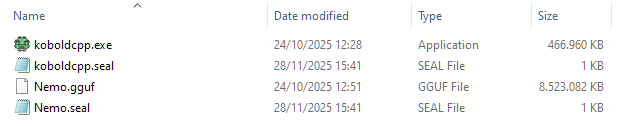
You can download the required files manually by following these steps:
- Download https://github.com/LostRuins/koboldcpp/releases/download/v1.81.1/koboldcpp.exe and place it in Silverpine_Data\StreamingAssets\KoboldCPP
- Download https://huggingface.co/bartowski/Mistral-Nemo-Instruct-2407-GGUF/resolve/main/Mi..., rename it to "Nemo.gguf" and place it in Silverpine_Data\StreamingAssets\KoboldCPP
- Create a file called koboldcpp.seal and edit it to contain this: {"url": "https://github.com/LostRuins/koboldcpp/releases/download/v1.81.1/koboldcpp.exe","size": 478166467}
- Create a file called Nemo.seal and edit it to contain this: {"url": "https://huggingface.co/bartowski/Mistral-Nemo-Instruct-2407-GGUF/resolve/main/Mistral-Nemo-Instruct-2407-Q5_K_M.gguf?download=true","size": 8727635072}
I will release an update when I have figured out how to make the download work better over VPN.