

Here's some further screenshots proving that your desired orientations wouldn't get messed up in Godot:
Side by side (left is without rotation applied, right is with rotation applied) comparison of your toy brick 1_3:
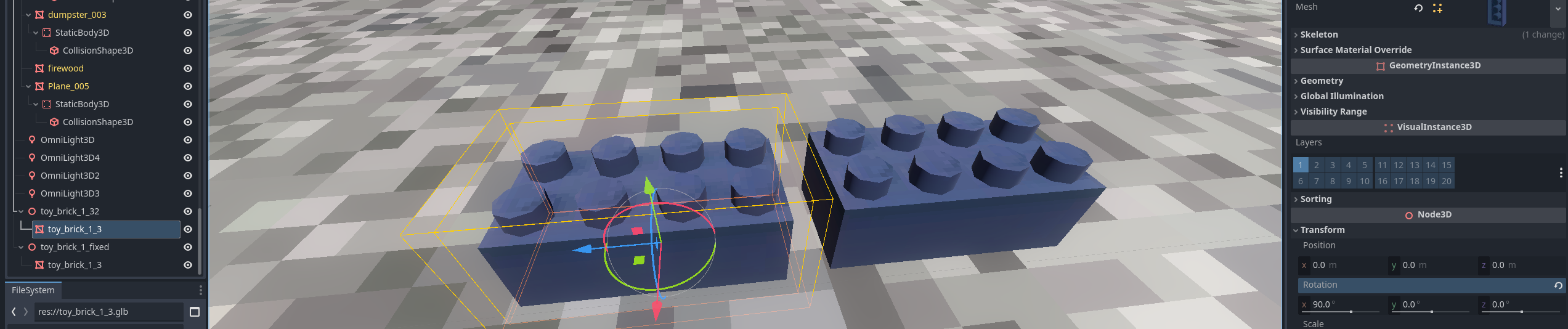 In the inspector window, you can see that the original model's mesh has the 90 deg rotation applied. Godot recognizes that this is not zeroed out, so there is a small 'undo' icon that will let you click on it to zero it out. If you do, the actual mesh will have this orientation:
We don't want that!!
The brick to the right is the brick I have applied rotation to. You can see that the mesh is already zeroed out and is in the orientation you've intended it to be in.

That's all I'm asking for! I realize that this is not a problem usually if the developer wants to use these objects simply for decoration, but in my case it is problematic. It is also the industry standard to zero out all the data to prepare it for export as for the aforementioned physics interactions (and other stuff) it can be an issue, i.e. "I want to rotate this RigidBody 90 deg but the mesh itself is rotating another 180 deg for some reason!!".
Here's my use case:
Thank you for your consideration!