

Hi and thanks for the suggestions. Here's some feedback - some which may help you right now, and some which may help later.
1. For palettes, this exists already (Menu > Palettes > Put to clipboard as... >. I might change the name to "copy as" to make it more visible.
For Attributes, i'll add it. It will probably end up as a submenu under Menu > Canvas > Copy map as text
2. The binary format doesn't allow this as is. I recommend using ca65's .incbin directives to slice out the portion you want if you need to.
The export options are mainly intended for text formats.
3. If i understood you correctly, this either already exists (shift + right drag moves the anchor; all sprite positions are compensated), or if you mean some tool to place sprites/metasprites on a map, that is pending an entire suite of new tools for a later major update.
1. Oh, I didn't know that, thank you!
2. Understood. I mentioned the binary format because it's more practical for creating small data post-processing applications. Although, I confess that this little challenge encouraged me to learn how to handle attributes like color.

(Hummer Team Level Block Converter)
Note: The GUI values are a rudimentary way to edit the canvas resolution.
3. I'm not sure I understand, as I currently had to start using my own application to package the sprite animations.
For context: When using NEXXT to modify existing game animations, the most common obstacle I found was that the actual position of the elements usually exceeded the work area (with positive or negative values).
My proposal, therefore, was to add a "simulated" offset (exclusive to the application), not to change the real position of the tiles, since the sprites are constrained by their source format.
3. Some updates... if i understood you right this time, here's a 2- (or 3-) pronged approach to the problem
First, shift+alt+right drag will let you move both the global anchor, and *all* metasprites relative to it. This is effectively pretty much the same as dragging the entire canvas to see 'more' workspace without affecting the individual sprites' positions relative to the anchor. 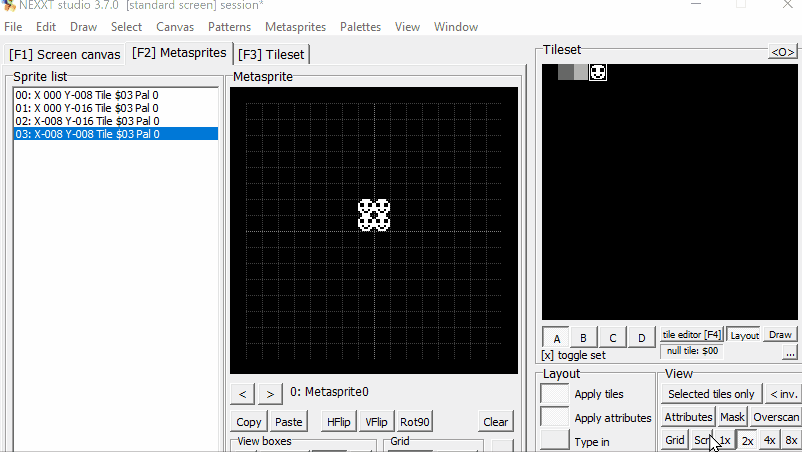
(edit: it doesn't seem like this gif attachment is playing back on my system.. so anyway, it was meant to showcase dragging both sprite, anchors, effectively the whole thing around the canvas without sprite x/y position readouts changing)
Secondly, i'm adding a "miscellaneous export settings" toolbox.
The reason is, after reading some discussion on nesdev, that some actually don't use signed 0,0 as their center position. This lets you set up an offset that only affects the generated text, not the workspace, which i think is what you requested initially. 
Thirdly, since these offsets make it more likely to run out of bounds (depending on what the specific engine requires; everyone makes different shortcuts and assumptions), you can set ranges for X and Y individually so the program warns and/or stops you if you're outside the desired value range with any of the metasprites exported.