
Indie game storeFree gamesFun gamesHorror games
Game developmentAssetsComics
SalesBundles
Jobs
TagsGame Engines

CHAINSAW DANCE DEMO

You just worked at the famburger, but now you're on a date with the Chainsaw Man. DANCE if you want to survive! · By Benedique, Fataliti // Reifshneider, Vishen

How to Mod?

A topic by CalloustheFool created 90 days ago Views: 231 Replies: 2
Viewing posts 1 to 3
(1 edit)

This is weird because I'm trying very hard to mod but there is just no way to get my character to work or even get songs into the game too. I looked everywhere on this forum, I know there is not a lot of convo on this game but i know ive done it before but i cannot get it to work at all. I watched the tutorials and read everything on this.
You can add custom songs by downloading an osu rythym charts (4 notes) and once you do that you go into the game and click the little plus sign next to the dancer sprite (bottom right). That plus sign is used both for adding custom dancer sprites and adding custom songs/maps. There's an official guide for it on the game page and this is how ya do it according to it.

Instructions:

Hopefully this helps with song modding, now for your query about dancer sprites.

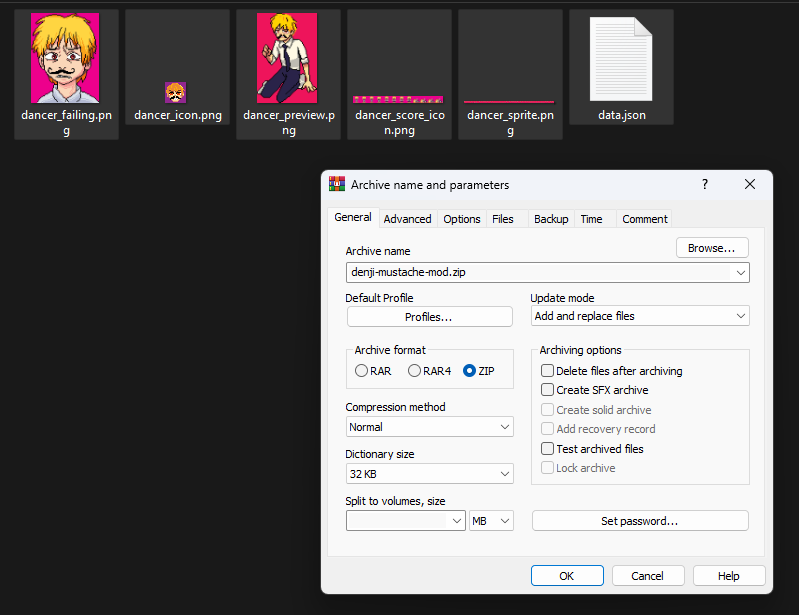
You gotta compress your sprite files as shown here, you can't compress the folder they're in. (Shown below)


Once compressed, open the application and press the plus sign then open the newly made zip file and viola! when you click through you should see it.

Happy modding!

Okay so further experimenting led me to realise that even if you successfully import an osu song as intended, all the tracks overlap if there's multiple difficulties, which is quite the conundrum.