
Indie game storeFree gamesFun gamesHorror games
Game developmentAssetsComics
SalesBundles
Jobs
TagsGame Engines

Thank you for getting back to me! So I have restarted the game a few times, and sadly that didn't work. I have just downloaded v.0.2.3 and also, it doesn't show any saved files in the 'load' menu. The odd thing is that when I started a new game now, it started with the story line on the beach, which it didn't do for me in the previous version of the game. Also, I created a new game, left the game again, and when I started it up again no new files were saved as well. So it seems that now I can't leave the game or I will lose all progress each time. It doesn't create any new saved files at all.

I launched v.2.2.2 again, also no luck. :(

I'm not super tech/code savvy, but is there possibly a way for me to locate the file to see if it still exists, if it is a separate file?  Where will it be stored/what will the file name or extension/type be? 
The story bit at the start was disabled before due to a bug in the engine, I fixed and re-enabled them in v0.2.3. That cutscene has no effect on anything though. As for saves it’s not really a single file, more like an entire folder. Assuming you are on a Windows machine you go to “C:\Users*INSERT YOUR USERNAME HERE*\AppData\Local\VerdantVillage”. I’m still looking into things on my end. When you closed the game was it right after you had saved by chance?

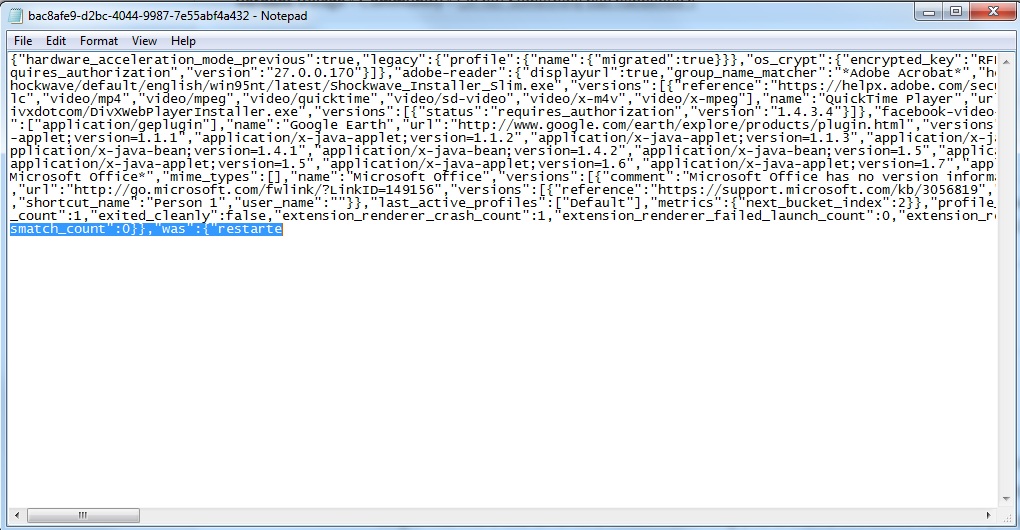
Hello! Okay, so the saved file seems to be corrupt. Obviously we don't have the source code, so we can't see exactly why/what, but when opening the file in notepad, the code cuts off at the end with ...smatch_count":0}},"was":{"restarte  — and that's it. This is in v.2.2.2 and v.0.2.3.


Also, when I started a new game, waited until 12am for the daily profit roll, and then exited, it seemed to save my game. But we have to delete the original file in order for it to do so. And now, just to be safe, I have to copy and save that file somewhere as a backup each time, just in case it disappears again. I can't recover the old file with my progress which I lost initially.

Can I email a zip file with my copy of the save files and game data over to you, so that you can take a look? Maybe that will help with finding the issue? Thanks again for all your help so far! :)

Hey there, sorry I’m a bit late to reply, sleeping and all that. So my email is at the end of this message. If you can send the entire Verdant Village Folder to that would be good. I’m looking at my own copy of that file. It might honestly be the engine at this point, something I wanted to believe, but couldn’t ever confirm. I mean the game is coded in Construct 3 so all I’m doing on my end is just calling a built in function to save data. If it’s actually writing to the file incorrectly then it may be the engine.

Ironically that file you posted is only missing like 5 characters. But the name of the file is all wrong, its supposed to be called “Local State” that string of characters looks like a temporary file name, probably because it failed to finish writing.

In any case I’ll look into things once you send me the files. Like I said the whole folder is preferred if you can just zip it up. This may end up going to the construct devs as a problem for them. If I manage to recover your files though I’ll send things back your way. Sorry about all this, I wish I had some sort of clear answer, but this bug has only occurred I think a total of 3 times, only one of which was on my machine, and like I said it disappeared once I reloaded the game somehow. Thank you for all the help so far though, this is obviously a massive problem and needs to be solved so I really appreciate being able to hopefully track it.

exodussoftware3@gmail.com is my email.

Hey! No worries, I have sent the email over to you with the zip file. Hopefully it will help you to resolve the issue in case it happens again, or like you said, maybe the construct devs will resolve it. Thanks again for your feedback and for creating an awesome game!