Hiya Madame Berry,
There's no way to ignore specific sources currently, but you can stop your browser being picked up by turning off "media controls" (in your browser). For instructions google something like "turn off media controls chrome". Doing this will also stop the browser hijacking your media controls (play/pause) when you're using deezer etc, but will also stop Streamling from picking up youtube titles etc.
I did originally plan to add some way to ignore specific sources/apps (or browsers generally), but it's still on the to-do list.
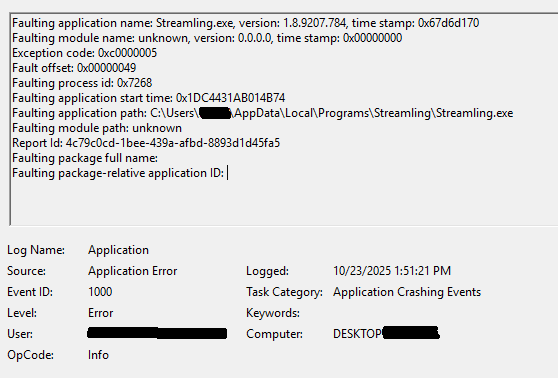
The silent crashes have been a problem and, yeah, I need to add better logging to get to the bottom of it. I noticed it crashes more when CPU usage is high but I don't know why that should be. Lately it hasn't crashed for me at all for me over many hours (which also makes debugging harder). I rarely stream these days so haven't been highly motivated to make many updates but I like to work on it occasionally.
I'd say there are no crash logs except I found some once that I think Windows makes automatically. If you can track them down I'll take a look.
Also I should mention Streamling doesn't specifically prioritize Chrome or anything else, but rather prioritizes the loudest source.
Hope that helps somewhat