

The writing and dialogs are top-notch and the game feels immersive.
The word minigame looks fun but I couldn't seem to figure out if the words were working as expected. It seems like they were floating outside the screen, and once every 10 seconds only a few letters were visible on the screen. Same issue in windowed & fullscreen modes. I mean, it's still technically possible to guess which words these are but I felt like this is more of a game-breaking bug. Also, this situation was on the main menu too, and I barely made it into the game.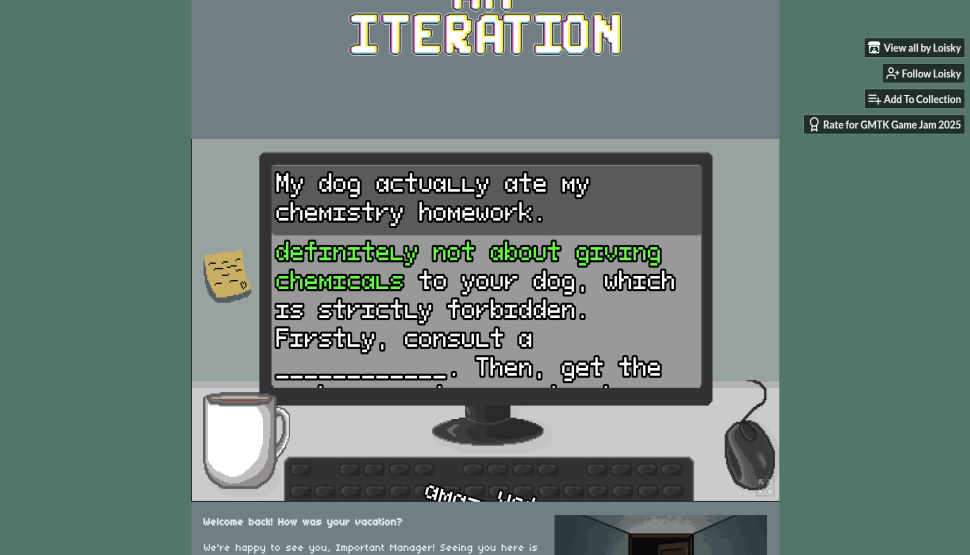
Viewing post in An Iteration jam comments
Sure, I'm on Windows with Chrome. Here's my chrome://version
| Google Chrome | 138.0.7204.184 (Official Build) (64-bit) (cohort: Stable) |
| Revision | 7ea839044480a944888296dc0cccc5afb60b736c-refs/branch-heads/7204@{#2436} |
| OS | Windows 11 Version 24H2 (Build 26100.4061) |
| JavaScript | V8 13.8.258.30 |
| User Agent | Mozilla/5.0 (Windows NT 10.0; Win64; x64) AppleWebKit/537.36 (KHTML, like Gecko) Chrome/138.0.0.0 Safari/537.36 |
I honestly think this is a resolution issue since my monitor isn't typical 16:9 but rather 16:10 - I'm having some UI bugs in other submissions too. In my monitor settings I have 3200x2000 and 200% scaling.