
On Sale: GamesAssetsToolsTabletopComics
Indie game storeFree gamesFun gamesHorror games
Game developmentAssetsComics
SalesBundles
Jobs
TagsGame Engines

Maybe with openxr-loader-git through AUR?
Neither my friend nor I had the issue, so there might be a *few* missing libraries :/
FYI LD_PRELOAD="libA libB" should work for multiple libraries (or using a semicolon).

Just in case I looked for .so files inside my engine build folder, here's the list:

slang/slang-2025.10.4-linux-x86_64/lib/libgfx.so 
KTX-Software/libktx.so 
KTX-Software/libktx.so.4 
KTX-Software/libktx.so.4.1.0 
OpenXR-SDK-Source/src/loader/libopenxr_loader.so 
OpenXR-SDK-Source/src/loader/libopenxr_loader.so.1 
OpenXR-SDK-Source/src/loader/libopenxr_loader.so.1.0.32.1 
slang/slang-2025.10.4-linux-x86_64/lib/libslang.so 
slang/slang-2025.10.4-linux-x86_64/lib/libslang-glslang.so 
slang/slang-2025.10.4-linux-x86_64/lib/libslang-glsl-module.so 
slang/slang-2025.10.4-linux-x86_64/lib/libslang-llvm.so 
slang/slang-2025.10.4-linux-x86_64/lib/libslang-rt.so

Everything related to slang should not be necessary to run the game.

I want to already thank you for your patience!
I thank you for your will to fix it! So, the issue is even more complicated. I found the openxr package on the AUR, but it doesn’t install for some mysterious issues

-> Failed to install the following packages. Manual intervention is required:
openxr-loader-git - exit status 5

I did do the LD_PRELOAD with multiple files - which works with semicolons (I forgot how environment variables worked smh), thing is… I assumed it’s also in the thirdparty folder, so this is what happened:

[surillya@americansuri linux-build-5]$ ./launch.sh 
ERROR: ld.so: object '/home/surillya/Downloads/linux-build-5/thirdparty/KTX-Software/libktx.so.4;/home/surillya/Downloads/linux-build-5/thirdparty/OpenXR-SDK-Source/src/loader/libopenxr_loader.so.1' from LD_PRELOAD cannot be preloaded (cannot open shared object file): ignored.
./Runtime: error while loading shared libraries: libktx.so.4: cannot open shared object file: No such file or directory

So, I got the same libktx error again, and another (I have honestly no idea what it means with “shared object file”), but so I looked for the file in the first place, but it doesn’t seem to be shipped :o image.png So maybe - I either need that file / those files, and / or LD_PRELOAD has an issue with multiple libraries or something - actually, I just tried again, using space instead of semicolon, and the issue changed again, I think now it just means that libopenxr_loader.so.1 is missing:
[surillya@americansuri linux-build-5]$ LD_PRELOAD="/home/surillya/Downloads/linux-build-5/thirdparty/KTX-Software/libktx.so.4 /home/surillya/Downloads/linux-build-5/thirdparty/OpenXR-SDK-Source/src/loader/libopenxr_loader.so.1"
[surillya@americansuri linux-build-5]$ ./launch.sh 
ERROR: ld.so: object '/home/surillya/Downloads/linux-build-5/thirdparty/OpenXR-SDK-Source/src/loader/libopenxr_loader.so.1' from LD_PRELOAD cannot be preloaded (cannot open shared object file): ignored.
./Runtime: error while loading shared libraries: libopenxr_loader.so.1: cannot open shared object file: No such file or directory

At least that’s what I think it is… Don’t take my word for it though.

Yes I forgot to ship some libraries :/


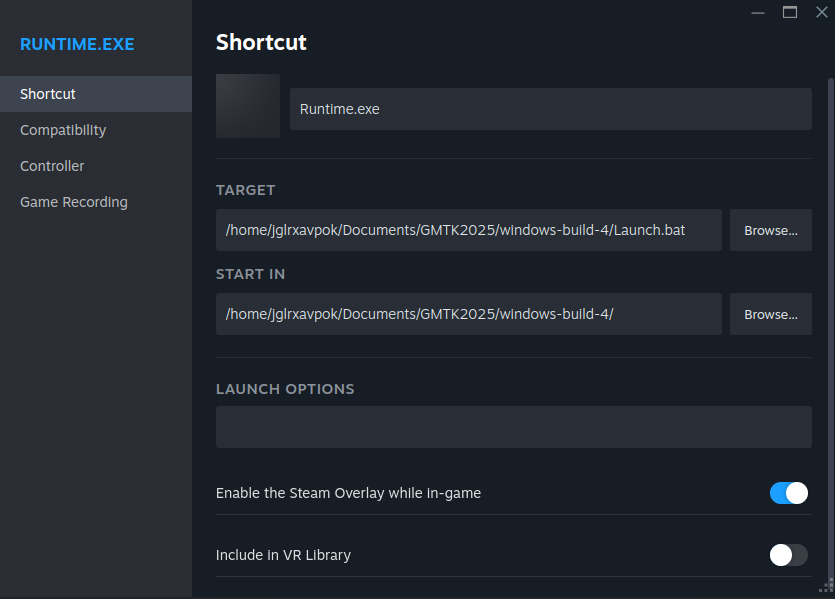
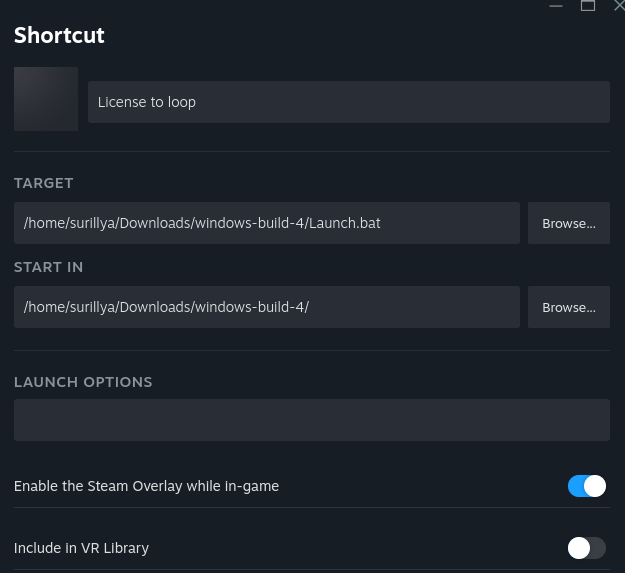
The Windows version can be launched via Steam, with the following configuration.


However it takes a long time to load, probably due to the console spam.

Hmm… I tired with no compatibility tools selected, SLR 3.0, SLR 1.0, Proton Hotfix and Proton 9.0-4, but nothing - the button just returns to “Play” again in a short time, and my PC is not crying, not showing any sign of anything happening. This is the setting: image.png So that doesn’t seem to work? What Proton do you use? I also tried both soda and syswine in bottles, not giving anything at all, so I tried the wine shell, giving me this:

Z:\home\surillya\.local\share\bottles\bottles\windont>Z:\home\surillya\Downloads
\windows-build-4\Launch.bat

Z:\home\surillya\.local\share\bottles\bottles\windont>"./RelWithDebInfo/Runtime.
exe" game_data/LoopGMTKJam.json
Can't recognize '"./RelWithDebInfo/Runtime.exe" game_data/LoopGMTKJam.json' as a
n internal or external command, or batch script.

Yeaaah… I don’t know if you want to continue error fixing, or just say it doesn’t work for me… But maybe you have some special proton version?

(+1)

I tried with Proton Experimental.
If it still does not work for you, I don't know what else to try...

Naww, I tried again with syswine, but yeah, this is not gonna work. No mesh-shader (am on vacation, and don’t have my real PC here):

Device Intel(R) Iris(R) Xe Graphics (RPL-P) is missing following extensions:
        VK_EXT_mesh_shader

Z:\home\surillya\Downloads\windows-build-4>

Thanks though. But I sadly can’t try it, apologies.