

Thank you for this extremely useful information, I'm going to try it right away!
Hotscreen using profile : default
Hotscreen Overlay starting at Max FPS : 120
Translations added from ./custom_ressources/translations.csv — languages : ["en", "zh", "es", "fr", "ar", "ru", "pt", "ko", "ja", "de"]
Using saved language code : it
Windows version : Microsoft Windows NT 10.0.26100.0
CPU : AMD Ryzen 7 7840HS with Radeon 780M Graphics, Cores : 8, Threads : 16, Max clock : 3801 MHz
Using video adapter : NVIDIA GeForce RTX 4060 Laptop GPU from NVIDIA type DiscreteGpu
Driver infos : d3d12 version 12_0 api 12_0
Adapter 0 NVIDIA GeForce RTX 4060 Laptop GPU
Screen Rect 0 : Rect { X = 0, Y = 0, Width = 2880, Height = 1800, Top = 0, Bottom = 1800, Left = 0, Right = 2880, Location = Point { X = 0, Y = 0 }, Size = Size { Width = 2880, Height = 1800 }, TopLeft = Point { X = 0, Y = 0 }, BottomRight = Point { X = 2880, Y = 1800 } } Orientation : 1
Screen Rect 1 : Rect { X = -3840, Y = -304, Width = 3840, Height = 2160, Top = -304, Bottom = 1856, Left = -3840, Right = 0, Location = Point { X = -3840, Y = -304 }, Size = Size { Width = 3840, Height = 2160 }, TopLeft = Point { X = -3840, Y = -304 }, BottomRight = Point { X = 0, Y = 1856 } } Orientation : 1
Adapter 1 AMD Radeon(TM) 780M
Adapter 2 Microsoft Basic Render Driver
Starting Screen Recorder
Failure of DuplicateOutput : 0x887A0004 (HRESULT: [0x887A0004], Module: [SharpDX.DXGI], ApiCode: [DXGI_ERROR_UNSUPPORTED/Unsupported], Message: L'interfaccia o il livello di funzionalità del dispositivo specificato non è supportato nel sistema.
)
Retrying Desktop Duplication number 1
Max FPS Record start at 120
Hotscreen version : Windows - Full version - v0.6
Max FPS of Overlay set to 120
Frame Latency of screen set to 0
MaxFPSRecord at 120
Avx is supported.
Detection starting using model : ./models/hs-real-anime-y11s-640-fp32.onnx
Detection starting using eye model : ./models/eyes-detection-01.onnx
Detection starting using device : 0
Max FPS Detection start at 120
Use double Detection start at True
Update time of eyes detection start at 0,04
Setting MaxFPSDetection at 120
Failure of DuplicateOutput : 0x887A0004 (HRESULT: [0x887A0004], Module: [SharpDX.DXGI], ApiCode: [DXGI_ERROR_UNSUPPORTED/Unsupported], Message: L'interfaccia o il livello di funzionalità del dispositivo specificato non è supportato nel sistema.
)
Retrying Desktop Duplication number 2
Failure of DuplicateOutput : 0x887A0004 (HRESULT: [0x887A0004], Module: [SharpDX.DXGI], ApiCode: [DXGI_ERROR_UNSUPPORTED/Unsupported], Message: L'interfaccia o il livello di funzionalità del dispositivo specificato non è supportato nel sistema.
)
Retrying Desktop Duplication number 3
Failure of DuplicateOutput : 0x887A0004 (HRESULT: [0x887A0004], Module: [SharpDX.DXGI], ApiCode: [DXGI_ERROR_UNSUPPORTED/Unsupported], Message: L'interfaccia o il livello di funzionalità del dispositivo specificato non è supportato nel sistema.
)
Retrying Desktop Duplication number 4
Failure of DuplicateOutput : 0x887A0004 (HRESULT: [0x887A0004], Module: [SharpDX.DXGI], ApiCode: [DXGI_ERROR_UNSUPPORTED/Unsupported], Message: L'interfaccia o il livello di funzionalità del dispositivo specificato non è supportato nel sistema.
)
Desktop Duplication doesn't seem to work. Asking for Compatible method.
Failure of DuplicateOutput : 0x887A0004 (HRESULT: [0x887A0004], Module: [SharpDX.DXGI], ApiCode: [DXGI_ERROR_UNSUPPORTED/Unsupported], Message: L'interfaccia o il livello di funzionalità del dispositivo specificato non è supportato nel sistema.
)
Retrying Desktop Duplication number 6
Switching recording method from 0 to 1
BitmapCapture initiated with a resolution of 2880 x 1800 at the location 0, 0
Closing...
Screen recorder thread ends correctly.
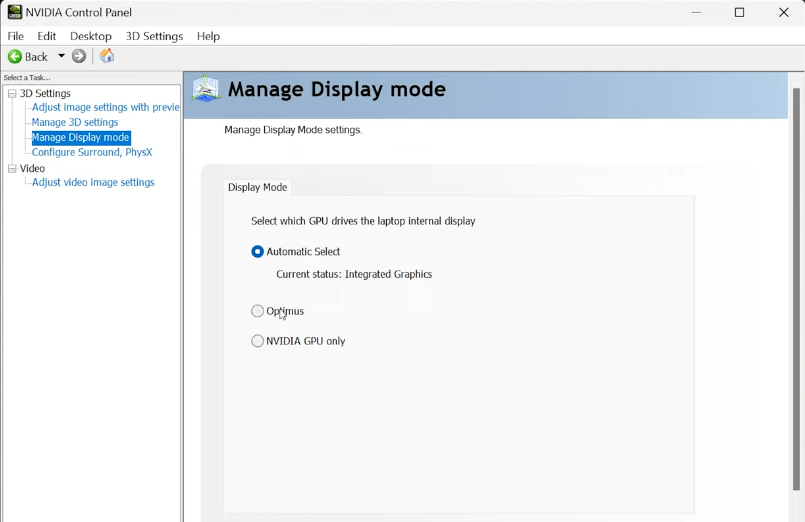 For a laptop, you have to set the internal display to Optimus or Nvidia Gpu. If these settings don't show, your laptop probably hasn't a hardware MUX switch that allows the Nvidia Gpu to manage the screen.