
Indie game storeFree gamesFun gamesHorror games
Game developmentAssetsComics
SalesBundles
Jobs
TagsGame Engines

RPG Maker Cook Tool Deluxe

The one stop shop for deploying RPG Maker MV/MZ games · By AceOfAces

Tried everything. It worked before but now it's not. No clue. I have no hair left.

A topic by Legends of Celestite RPG created Jul 07, 2025 Views: 134 Replies: 5
Viewing posts 1 to 5

I have tried literally everything under the sun. Nothing works. It launches and gives me a black screen. I had this working before and I followed the same steps. So I'm not sure what's going on. I updated to your most recent version and same problem. I have no hair left on this one after about 6 hrs. Really important that I get it to work.

(1 edit)

Hello, Legends of Celestite RPG!

There are two possible issues:

  1. You have the R1.01 version of the Advanced Save Handler. This had a bug where the scene wouldn't initialize properly if there weren't any saves. Please update to the R1.01a version.
  2. There may be a plugin issue. You can diagnose it by building a debug build (which will provide access to the dev console by pressing F12). The option is found on the project settings.

I have those and I didn't change any plugins from the last time it worked. Could it be something else?

Hmm... As a sanity check, could you turn off the the option "Source code protection"? It could be due to a conflict.

(1 edit)

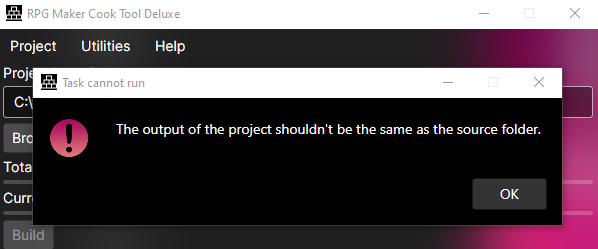
Now I'm getting this and I've moved where the output goes and it's not doing anything. I think I'm going to have to go with something else, because I'm not going to constantly relearn this if the code is going to keep changing on us. I'm pretty fusterated and I need to get my demo out. I promised 1.4 would be out yesterday and now I have to botch the release of it. Not happy, man. This an important project. 


This error is shown if the output folder is set to be on the same location as the source folder. Simply set the output to a different one.

moved this topic to Troubleshooting