
Indie game storeFree gamesFun gamesHorror games
Game developmentAssetsComics
SalesBundles
Jobs
TagsGame Engines
(+1)

What an interesting game concept! It truly feels unique and innovative, especially in how you approach the idea of breaking the loop through rocket launches to land successfully.

At first, I honestly thought it was impossible to land on a planet safely since I kept exploding every time I tried haha. So, my initial attempts were a bit frustrating.

A small tutorial would be really helpful to better understand how everything works. Maybe placing a nearby planet with detailed instructions on how to land would be a great way to help players grasp the mechanics and absorb the necessary skills, as it’s quite a complex system to master.

The sound effects and graphics are fantastic, adding great immersion to the game’s atmosphere. However, I did notice something about the rocket’s particles—they don’t seem to follow its direction when it’s tilted at an angle that isn’t straight. Tweaking this could make the combustion at the rocket’s tip feel more natural.

Speaking of particles, I have a suggestion for the intro. I found it fun and engaging, but I noticed that when the rocket takes off, it leaves the letters incomplete. Maybe if the letters had a fire-like texture similar to the rocket’s particles, it would enhance the visual impact, even though it doesn’t significantly affect the gameplay experience.

I’m genuinely curious about how you created the zooming effect on the planetary orbits. Could you share a bit about your thought process and implementation? I’d love to learn more about the techniques you used!

Congrats on the game, and best of luck with the jam!
(1 edit) (+1)

Hey, thanks for playing!

Damn, I would have written a devlog if I had known that anyone would be genuinely interested in the utilized techniques.

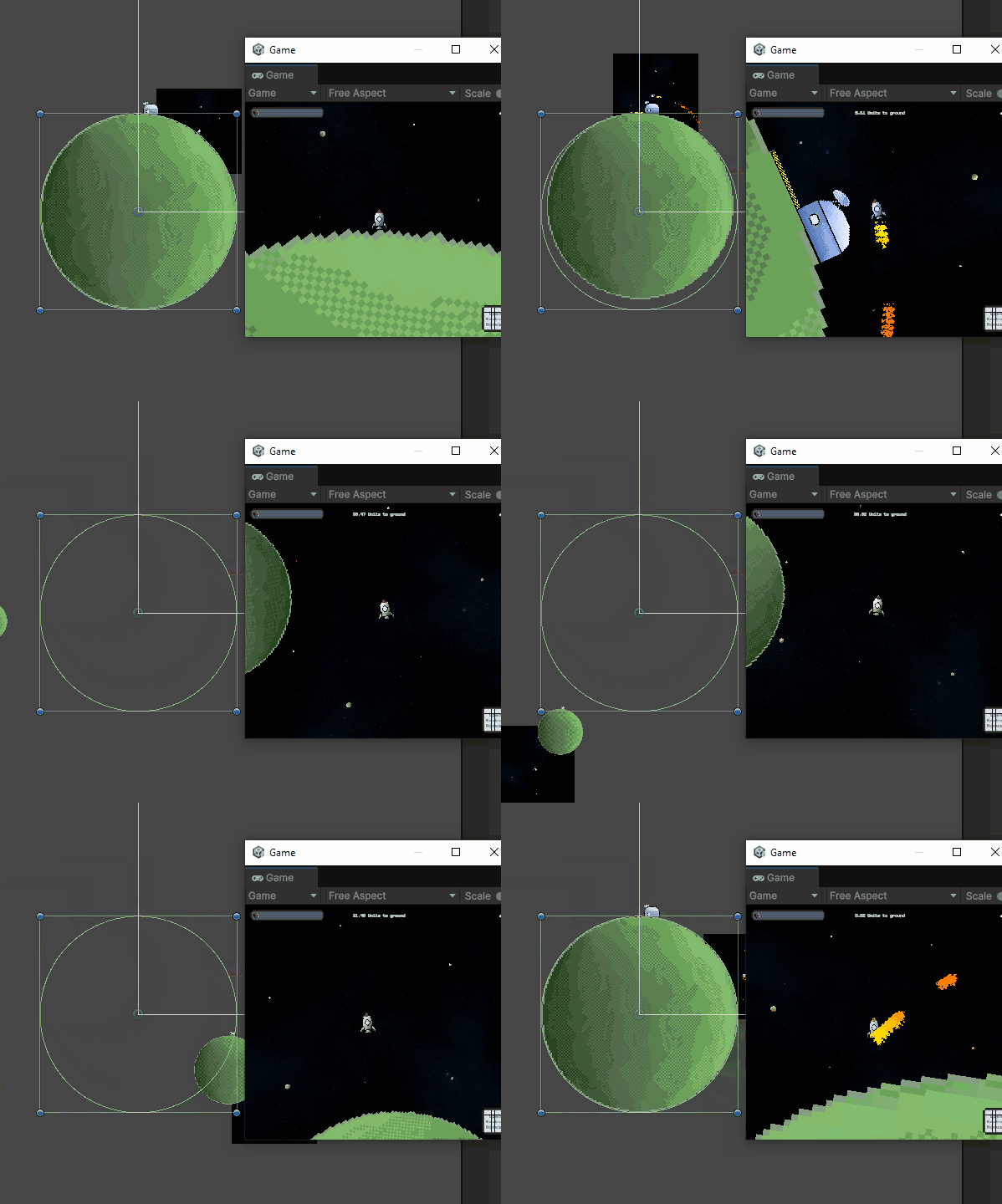
So, each planet consists of a collider that is statically positioned somewhere in the world space (where I want the planet to be) and a sprite renderer that is - by default - positioned at the same position. The collider and the  renderer have the same shape and size.

The collider remains at its original position and scale always, the sprite renderer's position and size on the other hand are computed based on the rocket's distance and direction to the planet's original position. If the distance is  smaller than a certain threshold, then this indicates that the rocket is on the planet or at least very close to it - in which case the sprite renderer should be at its original position and size (and exactly match the collider's).

Once the rocket's distance to the planet increases, the sprite renderer's scale will be reduced by a fixed rate, until a limit has been reached (this is why planets never really disappear). Also, I am computing the direction from the rocket towards the original planet's position to determine the position of the "projection" (i.e. the sprite renderer). So if the original planet's position would be somewhere in the top left direction, the projection is rendered on the top left - just as an example.

With this approach, we can distinctly compute a size and position for each planet's projection based on the rocket's position and rotation.

Interestingly, even the background is a projection that simply moves with the rocket.

I think it will become clearer with a short video:

You can see the "regular" game view on the right hand side, and on the left side you can see what is really happening behind the scenes. You can see the planet's size and position changing as well as the background and everything moving with respect to the rocket, except for the collider (the green outline). That one stays in its position always.

I hope this information is useful for you. Glad that you are interested!