

Hello! Ever since the update I have this [NaN] stuck at my quests' level recommendation in the list. It's gone if I disable the "list show rec level", but I'd prefer to keep it on.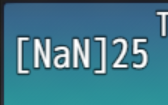
I'd also like to suggest if it would be possible to be able to add custom images into the quest description window? For example an image of the NPC, so players can find them again easier.
Thanks for your work!
1 year ago(+1)
Hi, the recommended level color parameters changed to be text code colors rather than html colors to be easier to use as this comes with the color select UI in the plugin manager and also more compatible with other plugins that affect text colors. You will need to set them up again. It should look something like this, where they are all numbers:

If you want to keep the colors you had and they are not already available as text code colors, you can create them with [CGMZ] Infinite Colors and use the id you set in that plugin by swapping to the text tab in the Quest System color parameter.
Thanks for the suggestion, I can add custom images to a future update.
Apologies, I got another problem. I read about the pin change, but how can I select a quest to scroll down its text now? :'D
I removed the usage of mouse in my game, so I cannot pull the window down, and pressing enter just gives me the option to pin it. I tested disabling the pinning option, but it still lets me do it.
Sorry again if I'm missing an option.
1 year ago(+1)
Hi, keyboard controls to always be able to scroll these kind of windows throughout [CGMZ] plugins will be added tonight with the monthly [CGMZ] Core update to version 1.25.0. The update will add keyboard keys that you can always scroll with + allowing mouse wheel to always scroll the windows (in addition to gamepad+touch screen which can always scroll already, but it sounds like you have disabled touch screen).
Selecting things to manually scroll was removed because it was causing a lot of user confusion, where they would hit enter and not realize it activated the window to scroll and instead thought it froze the game.
1 year ago (+1)
You should be able to put "PageDown" / "PageUp" or "ArrowDown" or "ArrowUp" but those keys also control the select window by default so it might be a bit awkward if using those to scroll both windows at the same time.
1 year ago (+1)
No problem, you can know what to type by going to a js key test website such as this (https://www.toptal.com/developers/keycode) and pressing the key you want. You want to use the "event.key" box (the top left box on the above website)