
On Sale: GamesAssetsToolsTabletopComics
Indie game storeFree gamesFun gamesHorror games
Game developmentAssetsComics
SalesBundles
Jobs
TagsGame Engines

so laggy anyone know how to fix

(+2)(-3)

idk maybe get a new computer

(+2)(-3)

dumbass

(+1)

if you right click the app on your desktop then click open file location then open the one that says "Hardtime (windowed)"

(+1)

its the game game is old thats why

(1 edit)

sorry i may be late but older mdickie 3d games like reach lags on modern windows OSes, watch this video, it'll help you with the lag, hope this helps!

go in to the games file and open the widowed mode less laggy but have to scale your screen resolution down for full screen hope this helped

Accept it👍

You need to download dgVooDoo for it to work on modern PCs. To do so, go to the GitHub page and download it. After unzipping it, place the .DLL files named D3D8.dll, D3D9.dll, D3Dlmm.dll, DDraw.dll, Glide.dll, Glide2x.dll, and Glide3x.dll into the games directory "C:\Program Files (x86)\MDickie\Hard Time" for it to work. It should look like this after doing so.
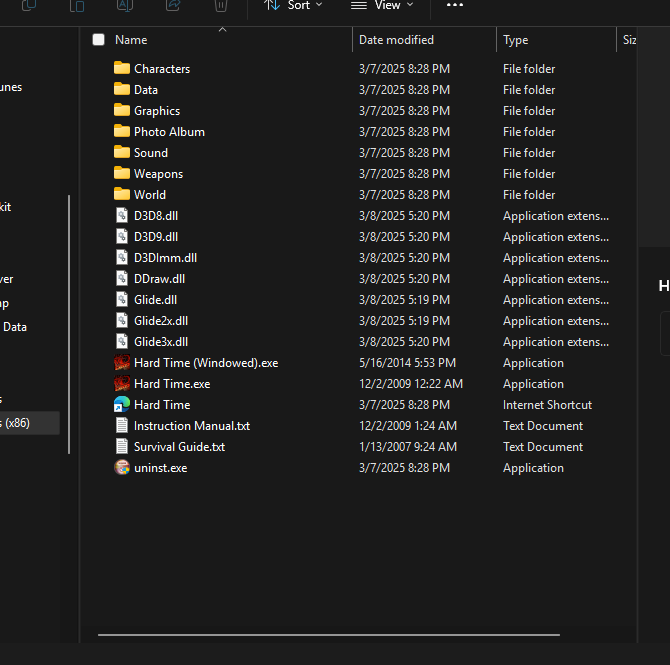
don't open the game

It's a old game Try to run it in the emulator.