
Indie game storeFree gamesFun gamesHorror games
Game developmentAssetsComics
SalesBundles
Jobs
TagsGame Engines

:D?

A topic by pleasedontleaf created 4 days ago Views: 228 Replies: 14
This topic is archived. It is unlisted and no new posts can be made.
Viewing posts 1 to 7
(+3)

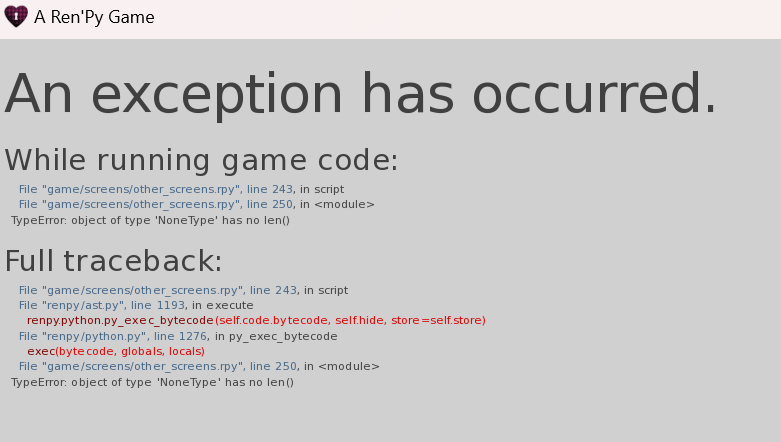
Hi there!! I'm unsure if this is just an issue on my end, but when I try to open your game, this screen pops up.
Do you possibly know what the issue is? ( ;´ - `;)
Also, congrats on posting your game :D!!! I remember seeing your TikTok about the development, and I'm so happy it's here now.
(+2)

I have the same exact issue. my guess is that since file is meant for pc, it doesn't work on laptop. maybe if you are also using a laptop that's a reason of the error

(2 edits) (+3)

I think you meant what type of operating system (Windows, Linux, Mac, etc.) they use because PC just means a personal computer which comes in either desktop or laptop. I was going through the files to see if the PC version supports just Linux since it didn’t clarify on the download page with the little icons, but it seems like the game supports both Windows and Linux. Also, in the recent Dev Log the creator mentioned that they’re looking into it and it’s supposedly a python error. I’m guessing that there’s something within the code that’s preventing it to properly run(?)

Sorry for yapping, I was troubleshooting for several days to see if it was something wrong with my laptop ˙𐃷˙

(+2)

Omg yess this explains a lot! thank you so much for such detailed clarification, it really helped a lot actually (˶˃𐃷˂˶) I'll check Dev's logs for the future updates too, thank you so much again✰

(+2)

Of course!! Any time!! ദ്ദി(。•̀ ,<)~✩‧₊ Hopefully the Dev resolves whatever the issue is within their game soon!!

(+1)

Ohh ok, thank you so much. This is very helpful!! ٩(^ᗜ^ )و ´-

Developer

I uploaded a new file w/ a fix of the album, let me know if it works!

(+1)

hey, maybe you can try this: 

find path "game/archive.rpa" and  extract it with unrpa. Then go to "game/screens/other_screens.rpy" and open in a text editor, press "ctrl + F" to search "if not hasattr(persistent, "cg_unlocked"):" this line, change it to "if persistent.cg_unlocked is None:"

That fixed the startup error for me :) hope this can help(???

Developer(+1)

I'm going to be following this thread closely because I'm by no means a genius at coding lol, I can make this edit for the future if it helps. ty for this suggestion <3!
Also could you guys let me know if it's just the current art update that caused issues if you downloaded it before? If not that's fine

Developer (2 edits)

Also, worst case scenario I can probably just remove the cg gallery for a safer version (for those that have this error) since that seems to be  the issue. I may find a better way to code it in the future too. Hopefully I can resolve it for ch2 ^o^

Developer

Also also maybe i'll just upload separate linux and pc files, i just always picked the combine option (idk much about linux) but if that causes issues somehow too I'll just separate them.

I can't play, I encounter the same error screen on PC
 

Developer(+1)

I uploaded a new file w/ a fix of the album, let me know if it works!

the new pc-version file seems to be working ! ^^

Developer

yayy!!!!]

Developer archived this topic