Indie game storeFree gamesFun gamesHorror games
Game developmentAssetsComics
SalesBundles
Jobs
TagsGame Engines

EX Graphic Baseset Outdoor

Tileset for Rpg Maker MV & Mz 48px. Start creating your own rpg with this Starterset · By Zepharex

Transparent problem

A topic by Thibot created 18 days ago Views: 31 Replies: 2
Viewing posts 1 to 2

Hello,

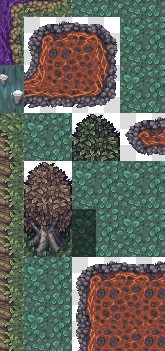
I'm having an issue with the EX Graphic Baseset Outdoor tileset, specifically with the cliff tiles.

When I place the cliff on top of a normal A2 ground tile in RPG Maker MZ, the transparent areas of the cliff do not show the ground underneath. Instead, they become blank/white (or transparent), so the ground disappears where it should remain visible.

I have verified that the tiles are assigned to the correct A slots in the Tileset settings, so I don't think it's a configuration issue.

Is this the expected behavior? Am I missing a specific setup, plugin, or mapping technique required to use these cliff tiles correctly in MZ?

Thank you for your help!

Developer

Hi, for anything transparent, you need to use Mapping Layer 2 or higher in MZ; using the automatic layers can lead to errors, so it's better to do it manually.

I hope this helps, feel free to ask if you have any further problems, and I'll do my best to reply as quickly as possible

Hello, thanks for the reply! Everything is good on my end now—thanks for the quick response!