
Indie game storeFree gamesFun gamesHorror games
Game developmentAssetsComics
SalesBundles
Jobs
TagsGame Engines

Gen5 Toolkit (PSX/N64)

Gen5 Toolkit is a package with an enhanced version of HPSXRP for Unity 6 and a lot more. · By Holomind

UI questions

A topic by rick0 created 4 days ago Views: 53 Replies: 6
Viewing posts 1 to 7
(+1)

Hi Holomind, Thanks for making this, I appreciate the improvements you've made over the original! I had a couple of UI questions I hope you can answer.

1. Are there are guides to using world space UI? I can't seem to get the UI to be occluded by the world correctly, it always shows even when it's behind another object.

2. When I have my canvas set as 'Screen Space - Camera' I can see the shader effects on my UI just fine. However this prevents Mask from correctly masking such as scroll menus, my list elements will appear outside of the masked area. Is there something I can do to fix this?

Thanks again!
Developer

Hi rick0!

Thank you very much for purchasing the Gen5 Toolkit and for your feedback! May I ask which Unity version you’re using? Meanwhile, here are some workarounds you can try:

Problem 1: World Space UI not being occluded Try disabling depth buffer clearing: Scene Volume Profile > Camera Volume > disable “Is Clear Depth Before UI Enabled”. This preserves the depth buffer before UI rendering, allowing proper occlusion. Let me know if it works.

Problem 2: Masks not working with “Screen Space - Camera” You can try using multiple canvases — one in Screen Space - Overlay (using masks) and another in Screen Space - Camera (using shaders). If that doesn’t work for your case, you can test a custom shader that preserves the stencil buffer, like this one:

Shader "Custom/UI-ScreenSpaceCamera"
{
    Properties
    {
        [PerRendererData] _MainTex ("Sprite Texture", 2D) = "white" {}
        _Color ("Tint", Color) = (1,1,1,1)
        [MaterialToggle] PixelSnap ("Pixel snap", Float) = 0
        [HideInInspector] _RendererColor ("RendererColor", Color) = (1,1,1,1)
        [HideInInspector] _Flip ("Flip", Vector) = (1,1,1,1)
        [HideInInspector] _AlphaTex ("External Alpha", 2D) = "white" {}
        [HideInInspector] _EnableExternalAlpha ("Enable External Alpha", Float) = 0
    }
    SubShader
    {
        Tags
        {
            "Queue"="Transparent"
            "IgnoreProjector"="True"
            "RenderType"="Transparent"
            "PreviewType"="Plane"
            "CanUseSpriteAtlas"="True"
        }
        Stencil
        {
            Ref [_Stencil]
            Comp [_StencilComp]
            Pass [_StencilOp]
            ReadMask [_StencilReadMask]
            WriteMask [_StencilWriteMask]
        }
        Cull Off
        Lighting Off
        ZWrite Off
        ZTest [unity_GUIZTestMode]
        Blend SrcAlpha OneMinusSrcAlpha
        ColorMask [_ColorMask]
        Pass
        {
            CGPROGRAM
            #pragma vertex SpriteVert
            #pragma fragment SpriteFrag
            #pragma target 2.0
            #pragma multi_compile_instancing
            #pragma multi_compile_local _ PIXELSNAP_ON
            #pragma multi_compile _ ETC1_EXTERNAL_ALPHA
            #include "UnitySprites.cginc"
            ENDCG
        }
    }
}

If none of these solve the issue, just let me know and I’ll test it on my side and implement a fix as soon as possible :D Thanks again for the support and your patience!

Best regards, Holomind

(2 edits)

Hi Holomind,

1. That solved it! I was sure I'd tried this but I might have hit the wrong checkbox on that line lol. Glad it works now, it'll help a lot.

2. I'm new to this render pipeline so I don't know how it operates fully. As far as I know I can't do it in overlay mode as unity will use the built-in legacy UI renderer in this mode. So I'm forced to pick between World or Screen Space - Camera if I want the UI to have the shader effect from a volume applied to it.

I tried your script but no dice! I created a new material with this shader, applied it to the UI mask but unfortunately it makes no difference. I checked out the Haunted PS1 discord and saw messages from 2023 saying that the haunted pipeline doesn't support UI Masking right now because it clears the stencil buffer. That would explain why the UI mask doesn't work by default even with your shader (I think)

Let me know what you think. It's no problem if it doesn't work, I can change my scroll lists to paged lists instead!

Also, I'm on Unity 6.2

Thanks!

Developer

Hi rick0!

Good to know you managed to solve the first issue! :D As for the second one, I believe I’ve fixed it in the new version 1.0.4 that I uploaded to the package page.

Basically, as you mentioned, the pipeline didn’t support UI Masking because it cleared the stencil buffer, but I think that was implemented specifically for WebGL.

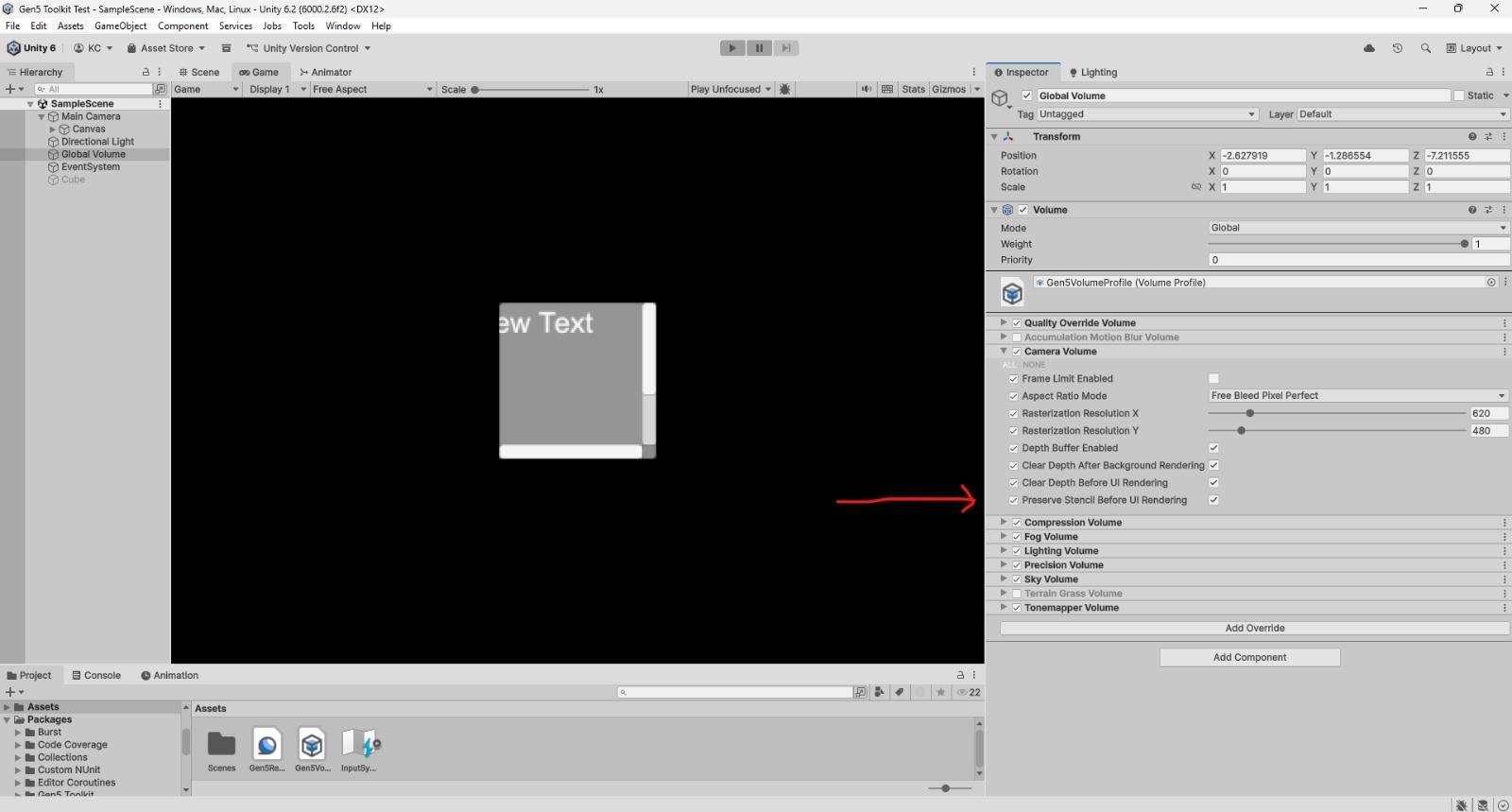
In this new version I added the option “Preserve Stencil Before UI Rendering” in the Camera Volume, and now it should work as expected. In my tests I was able to reproduce the effect and the UI Masking worked properly. Can you check if it solves the issue for you?

Check this print:


Thanks again for the feedback!

(1 edit)

Wow it works! I got it to work on my game scene successfully :)

Thanks so much for looking into this problem, I was trying to fix it myself but I don't know enough about shaders yet so I couldn't get it to work haha. 

You're the best!

Developer

I really appreciate your patience and your feedback. If you need anything else, I’m always around! I also followed you to keep an eye on what you’ll be creating next 👀! Haha Thank you again!

(+1)

I'll hopefully have something to show in a month or two!