


Plugin can sort and group properties, either for the Object property at the top level or for the Nest property set with [ToolkitDrawer] (Refer to Setup section).
Sort
Use [PropertyOrder] to sort
Example
public int Value1;
[PropertyOrder(-1)]
public int Value2;
[PropertyOrder(10)]
public int Value3;
public int Value4;
| Property | Default order | Actual Order |
| Value1 | 1 | 1 |
| Value2 | 2 | -1 |
| Value3 | 3 | 10 |
| Value4 | 4 | 4 |
Actual display
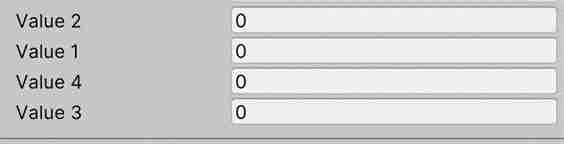
You can use [ShowPropertyOrder] to display actual order for debug
Grouping
Attributes can be grouped using [BoxGroup], [FoldoutGroup], [TitleGroup], and grouping supports hierarchical
Example
[BoxGroup("Group1")]
public int Value1;
[BoxGroup("Group1")]
public int Value2;

[FoldoutGroup("Group2", ScopeType = GroupScopeType.ScopeBegin)]
public float Value3;
public float Value3_2;
[TitleGroup("Group2/Panel")]
public float Value4;
public float Value4_2;
[FoldoutGroup("Group2", ScopeType = GroupScopeType.ScopeEnd)]
public float Value5;

[BoxGroup("Group1")]
public int Value2_1;

public int Value101;
Group info
| Group | Property |
| Group1 | Value1 |
|
| Value2 |
|
| Value2_1 |
| Group2 | Value3 |
|
| Value3_2 |
| Group2/Panel | Value4 |
| Group2 | Value4_2 |
| Group2 | Value5 |
| [Root] | Value101 |
Actual display
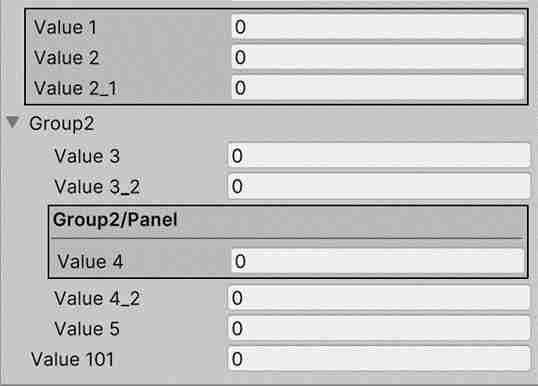
Explain
- Properties all have belonging a group, if there is no [XXXGroup], it belongs to [Root]
- Group can set up a parent group through the path(similar to g1/g2/g3).
- The Group determines the scope of action via scopeType, which defaults to Single. Just the current property that are applied
- ScopeBegin: indicates that a range is applied, and subsequent properties are considered within the scope if there is no [XXXGroup]. Automatically assign to Group
- ScopeEnd: indicates that a range is end Group's order was determined by the PropertyOrder of the first Property