Indie game storeFree gamesFun gamesHorror games
Game developmentAssetsComics
SalesBundles
Jobs
TagsGame Engines

WeShipEventually

7
Posts
6
Topics
3
Followers
4
Following
A member registered 32 days ago · View creator page →

Creator of

Recent community posts

War Pigs community · Created a new topic Audio for menus

Author Sam Shockley

Posted 7/17/2026

Blog entry 1: Problem

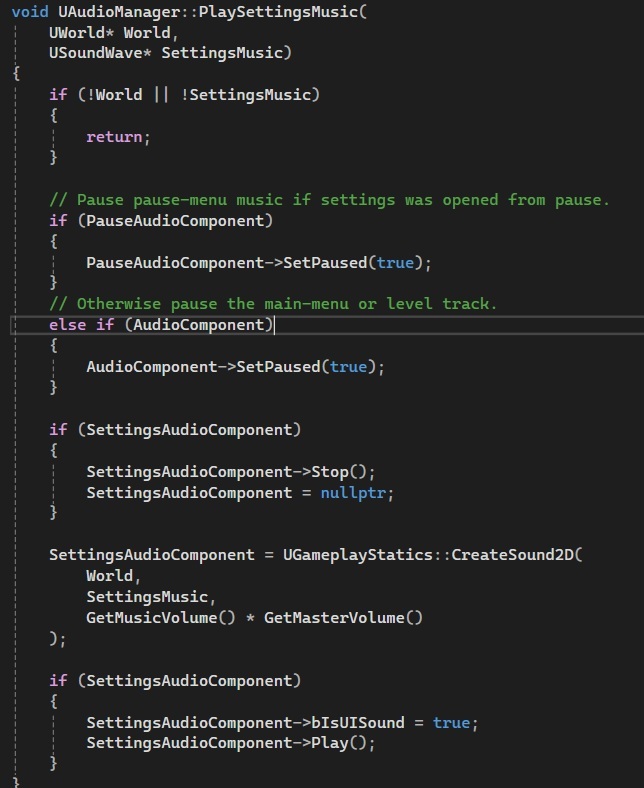
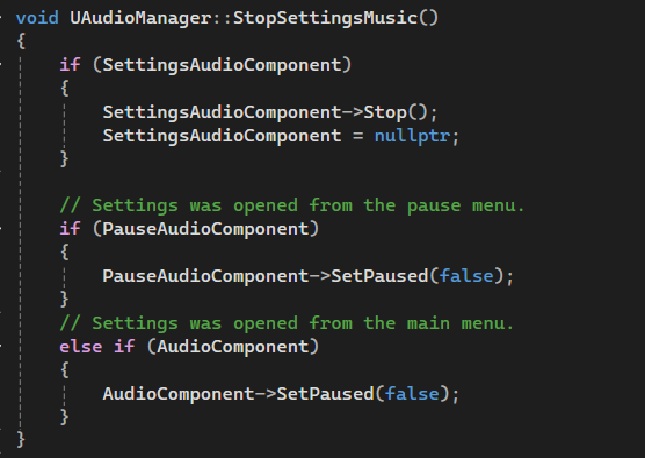
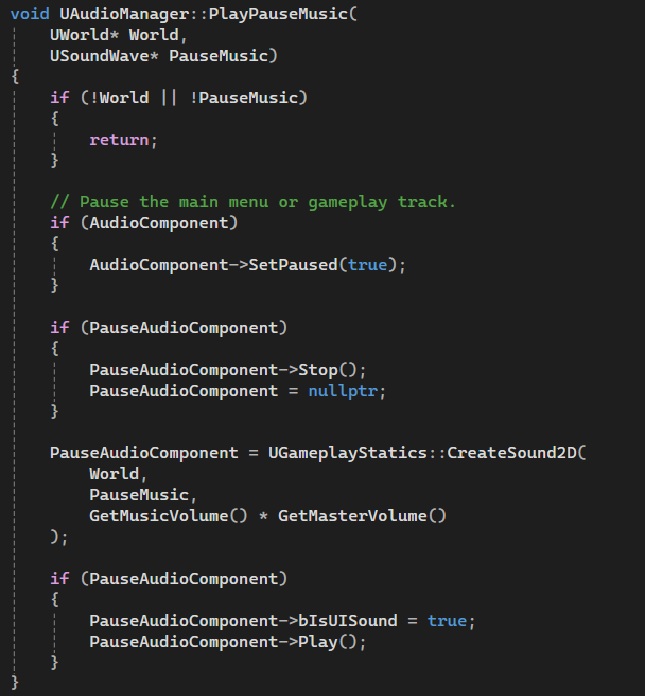
The main problem i encountered this week was trying to find a way to utilize an audio manager to change what audio track is being played depending on what menu is open. On top of that i wanted to make it so rather than flat stopping the previous audio track being played it just paused it until the menu was closed. While from the outside that may seem like a simple problem, it wasn't extremely hard but rather tricky to work out the logic on where to call and how to code it.

Blog Entry Part 2: Problem Solution

After creating the background music system, I expanded the audio manager to support the game's pause and settings menus. When a menu is opened, the currently playing background music is paused and the appropriate menu music begins playing. When the menu is closed, the menu music stops and the previous track resumes from where it left off. By pausing and resuming audio instead of starting new background tracks, the system also prevents duplicate music from playing at the same time. This approach keeps the audio transitions smooth, organizes all music playback in one place, and makes the system easier to maintain as more menus or audio tracks are added in the future.
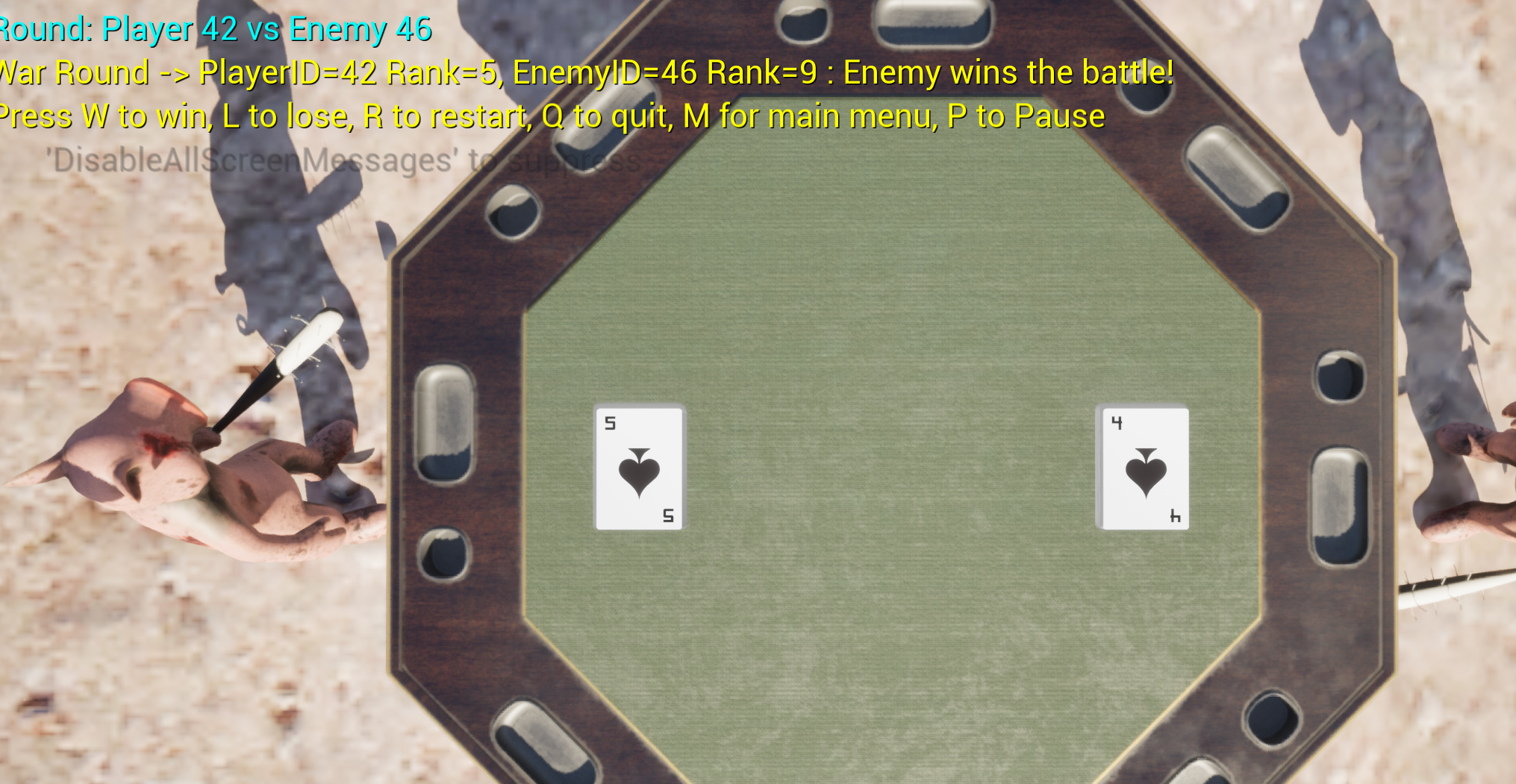
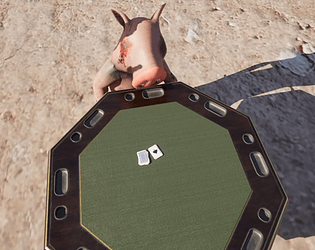
Core Systems, Cards, Audio, UI, and Game Flow Update

Gameplay Systems

  • Implemented full War card game loop inside WarPigsDefaultGameMode
  • Set WarPigsDefaultGameMode as active GameMode for gameplay level
  • Bound WarPigsPlayerController as PlayerControllerClass
  • On BeginPlay, GameMode now spawns table, camera, player deck, and enemy deck
  • Created single 52 card FullDeck using integer IDs
  • Shuffled FullDeck once using randomization
  • Split deck into PlayerIDs and EnemyIDs, each containing 26 unique cards
  • Ensured no duplicate card IDs between player and enemy decks
  • Initialized both decks using InitializeDeckWithIDs
  • Called SpawnDeck for both player and enemy decks after initialization

Round Flow and State

  • Added LastPlayerCard and LastEnemyCard references
  • Added bRoundInProgress flag to block overlapping input
  • Added RoundCleanupTimer for delayed cleanup
  • Implemented HandlePlayerCardClicked as main interaction entry point
  • Blocked input if a round is already in progress
  • Verified clicked card belongs to player deck before processing
  • Revealed clicked player card using RevealCard
  • Selected enemy top card using PeekTopCardActor
  • Revealed enemy card automatically
  • Stored both cards for round tracking
  • Called ResolveWarRound after both cards revealed
  • Started 3 second timer before cleanup
  • Implemented CleanupRound to remove cards after delay
  • Removed cards from deck arrays using RemoveCardActor
  • Destroyed both card actors after removal
  • Reset round state flags after cleanup
  • Displayed debug message indicating next round is ready
  • Called CheckForGameEnd after each round

Round Resolution

  • Implemented ResolveWarRound using CardID comparison
  • Displayed Player wins when player card is higher
  • Displayed Enemy wins when enemy card is higher
  • Displayed WAR when both cards match
  • Logged results to output log and on screen debug

Game End Handling

  • Implemented CheckForGameEnd using GetRemainingCardCount
  • Triggered win when enemy deck reaches zero
  • Triggered lose when player deck reaches zero
  • Routed results through WarPigsPlayerController

Card Actor Framework

  • Created reusable ACardActor class
  • Added hover support for visual feedback
  • Added selectable state for future gameplay expansion
  • Added configurable hover scale variable
  • Added configurable hover lift variable
  • Refactored card visuals to support front and back states
  • Added CardBackSprite property
  • Added bIsFaceUp state tracking
  • Set cards to spawn face down by default
  • Updated BeginPlay to show card back initially
  • Updated InitCard to assign CardID only
  • Removed automatic front sprite assignment on spawn
  • Implemented RevealCard to switch to front sprite
  • Used CardID modulo CardSprites array for indexing

Card Interaction

  • Enabled query only collision on CardSpriteComponent
  • Configured collision to block Visibility channel
  • Bound click events to card actor
  • Implemented OnCardClicked handler in C++
  • Logged click events with CardID and actor name
  • Forwarded click events to GameMode
  • Centralized round logic inside GameMode
  • Verified card flipping behavior in PIE

Deck System

  • Implemented ADeckActor for deck management
  • Added DeckArray for card IDs
  • Added CardActors array for spawned actors
  • Added TopIndex for tracking draw position
  • Implemented InitializeDeckWithIDs using external ID lists
  • Removed old internal deck initialization
  • Implemented ShuffleDeck using random swaps
  • Implemented SpawnDeck using scene component spawn point
  • Stacked cards along up vector
  • Implemented DrawTopCardActor advancing TopIndex
  • Implemented PeekTopCardActor without advancing index
  • Implemented GetRemainingCardCount with clamping
  • Implemented HasCardActor for validation
  • Implemented HasAnyCardActors for quick checks
  • Implemented RemoveCardActor for cleanup

Card Stacking Fixes

  • Fixed z fighting issues on card stacks
  • Adjusted card offsets along up vector
  • Reduced spacing for tighter stack appearance
  • Fixed Blueprint transform issues in BP_WarCardActor
  • Corrected scale and positioning inconsistencies
  • Restored missing assets and cleaned references
  • Created BP_WarCardActor for visual control
  • Added BP_WarPlayerDeckManager
  • Added BP_WarEnemyDeckManager

Audio System

  • Implemented background music system in CodeGameInstance
  • Added BackgroundMusicTracks array
  • Added AudioComponent for playback control
  • Configured track index 0 for Main Menu
  • Configured track index 1 for gameplay map
  • Implemented PlayRandomBackgroundMusic
  • Implemented PlayBackgroundMusicForLevel
  • Hooked menu music in UMainMenu NativeConstruct
  • Hooked gameplay music in GameMode BeginPlay
  • Ensured music starts after initialization completes

Audio Fixes

  • Fixed GameInstance initialization crashes
  • Corrected constructor access patterns
  • Added missing include for CodeGameInstance
  • Created BP_WarPigsGameInstance Blueprint
  • Assigned music tracks in Blueprint
  • Validated audio assets and playback

Sound Effects

  • Added card shuffle sound effect
  • Added card flip sound effect
  • Added button click sound effect
  • Added button hover sound effect
  • Integrated SFX into UI interactions
  • Integrated SFX into card reveal flow

Menu System

  • Implemented MenuPlayerController for UI input
  • Set input mode to UI only in menu
  • Created MyMenuPlayerController Blueprint
  • Created BP_MenuGameMode for menu level
  • Assigned menu GameMode override in level
  • Removed redundant PlayerController assignment in C++
  • Verified widget spawning in PIE
  • Began wiring Start and Exit buttons
  • Routed menu actions through GameInstance

Game Flow and Testing Controls

  • Verified correct GameMode and Controller usage per level
  • Added developer test inputs in PlayerController
  • W triggers win state
  • L triggers lose state
  • R restarts current level
  • Q quits application
  • M returns to main menu
  • Displayed debug controls on screen at startup
  • Cleared debug messages when returning to menu

Player Controller

  • Enabled mouse cursor for interaction
  • Enabled click and hover events
  • Centralized input handling in controller
  • Implemented HandleWin flow
  • Implemented HandleLose flow
  • Implemented HandleRestart flow
  • Implemented HandleQuit flow
  • Implemented HandleMainMenu flow
  • Added WinLoseTimerHandle for delayed transitions

Pause System

  • Implemented pause functionality on P key
  • Created pause menu widget
  • Added WBP_PauseMenu
  • Wired pause toggle in PlayerController
  • Ensured game pauses and resumes correctly

UI and Debug Improvements

  • Added on screen control instructions
  • Included pause instruction in debug text
  • Ensured debug text clears appropriately
  • Improved overall UX feedback during gameplay

Camera and Table Setup

  • GameMode now spawns table at runtime
  • Removed level placed table actor
  • Replaced tag based camera lookup
  • Used scene component reference for camera anchor
  • Updated CameraAnchor type to USceneComponent
  • Positioned CineCameraActor above table
  • Configured top down view
  • Adjusted focal length for framing
  • Cleaned up legacy camera code

Project and Asset Updates

  • Imported playing card assets
  • Imported poker table assets
  • Organized assets into project library
  • Created Blueprint managers for decks
  • Updated VisualStudioTools plugin in project file
  • Ensured build compatibility
  • Verified all systems compile and run correctly

Author Sam Shockley

Posted 7/10/2026

Blog Entry Part 2: Problem

During this week of development, I worked on implementing the background music system for our game. The primary challenge was deciding how to structure the audio system so that each level would automatically play the correct music track. My initial goal was to create an array of audio assets where each index corresponded to a specific level, allowing the game to determine which background music to play based on the current level. Before I could implement this system, I had to evaluate the different methods Unreal Engine provides for playing audio, including Audio Components, Sound Cues, and 2D sound playback.

Choosing the appropriate implementation was important because each method serves a different purpose. Using the wrong approach could make the system unnecessarily complex, increase maintenance as additional levels were added, or cause audio to behave incorrectly during level transitions. Since background music is not tied to a physical location in the game world, selecting the correct playback method was essential for creating a clean, scalable, and reliable audio system that players would experience throughout the game.

Blog Entry Part 2: Problem Solution After looking into Unreal Engine's different audio options, I decided to use Play Sound 2D for the game's background music. Since the music isn't tied to a location in the level, 2D audio was the simplest and most effective choice. I then created an array that stores the music for each level. The game uses the current level's index to select the correct song from the array whenever a new level loads. This makes the system easy to update because adding music for a new level only requires adding another audio file to the array. This solution keeps the code organized, makes it easier to maintain, and ensures players hear the correct background music as they move through the game.

Author: Chelsea Adams

Posted on 07/10/2026


Part 1: The Problem

While not necessarily a problem with the game itself, Perforce was giving us issues when we tried to push and pull each other's work. For some reason, some things wouldn't get pushed or others would be lost when pulling, making the code break or make the blueprints not work. If we didn't get this fixed, it could have resulted in the end user having a broken game with elements that either didn't work, or something that would crash entirely.

Part 2: The Solution

After several days, a couple of arguments, and constant research into trying to figure out this problem, one of us had figured out exactly why this happened. For some reason when working in Unreal and Perforce, creating a new C++ class would save and push just fine. However, if working in an existing C++ class, you couldn't just write in the file you wanted and then push the changes. Instead, we had to go to Perforce and individually check out the files that we worked in. Then they would push to the repo when submitting. After learning this, it made our work so much smoother, and receiving each other's work much easier and with near-zero problems afterward. Now, the end users would never know that we were having such issues in our version control, and they wouldn't encounter bugs resulting specifically from parts of the shared work being lost between computers.

(1 edit)

Author: Joyce Shen 

Posted: July 10th, 2026

Part 1: The Problem 

During this point, most of the core gameplay systems had already been assigned to other programmers on the team, so I looked for an area where I could contribute without overlapping with anyone else’s work. I noticed that our card interaction logic was tightly coupled with the current implementation of the War game mode. While the cards could already be clicked, the interaction system wasn’t designed to be reusable if we wanted to expand the project into other card games in the future. The biggest issue was that the Card Actor class was making gameplay decisions on its own. When a player clicked a card, the card immediately revealed or hid itself before the Game Mode had a chance to validate whether the click was actually allowed. This created an architectural problem because the visual representation of the card could change even if the click was later rejected by the game logic. It also made the class difficult to reuse, since every future game mode would inherit behavior that might not be appropriate for its own rules. 

Part 2: The Solution 

To address this, I designed and implemented a reusable interaction framework directly inside the Card Actor class. I added configurable properties to control whether a card is selectable, how much it scales while hovering, and how far it lifts from the table. I also implemented dedicated hover begin and hover end functions that provide visual feedback while keeping the interaction logic isolated from the game rules. These values were exposed through Unreal’s property system so they can easily be adjusted without modifying code. The more important architectural change was moving gameplay decisions out of the card itself and into the Game Mode. Instead of revealing itself immediately when clicked, the Card Actor now simply reports the click to the War Pigs Default Game Mode. The Game Mode is responsible for validating the interaction and deciding when the card should actually be revealed. I also integrated the new framework by enabling interaction only on the player’s current top card at the start of the game and corrected the deck spawning order, so the logical top card matched the card that was visually on top of the deck. This eliminated inconsistencies between the gameplay logic and what the player actually interacted with. Although the current sprint only integrates this framework into the War game mode, the interaction system is now flexible enough to support future game modes such as Poker, Blackjack, or other card-based mechanics without requiring significant changes to the Card Actor class. Separating presentation from gameplay logic also makes the codebase easier to maintain, easier for teammates to extend, and reduces the chance of introducing bugs as the project grows.

Title: Enemy deck is not visually consistent
Author: Jeremy Cahill
Posted on: July 10, 2026

Part 1 - The Problem:

This week I ran into a visual and logic bug where the enemy deck does not reliably show the front of its card during rounds. When the player clicks their card, the correct enemy card is usually selected and the round result text shows the right IDs, but the enemy card on the table stays face down in about 20 percent of the rounds. From a user’s perspective that makes it look like the enemy is not playing a card and it breaks the feeling of a fair War game even though the compare logic is mostly working. Joyce, my teammate, also pointed out that the cards might be spawning or revealing in reverse order, which could contribute to the confusion. On top of that, the War condition only triggers sometimes when ranks match, so edge cases in the round logic still need more work.

Part 2 - The Solution:

I started by tightening the debug output around the round flow and the reveal function so I could see exactly which player and enemy card IDs were being used every click. The logs confirmed that RevealCard() was being called for both cards most of the time and that the enemy card’s sprite was being set, which means the bug is tied to how sprites are mapped to IDs or how the enemy deck orders its cards. I updated RevealCard() to validate indices and use the card ID modulo the sprite count, then added checks for empty sprite arrays so I can catch any cases where the enemy deck is missing visual data.

To improve consistency, I added a simple configuration flag on the deck actor that controls whether a deck starts face up or face down and applied that to the enemy deck when spawning its cards. The GameMode still drives the round flow by taking the clicked player card, selecting the top enemy card, revealing both, comparing their ranks, and starting a short timer before cleaning up the table. With these changes the enemy card now flips correctly in the majority of rounds and the War outcome text is visible when ties happen, but there are still intermittent cases where ordering or tie detection does not behave as expected. My next step is to step through the deck arrays during play and verify the exact order of card IDs so I can fully fix the remaining 20 percent of rounds that still feel wrong to the player.