Indie game storeFree gamesFun gamesHorror games
Game developmentAssetsComics
SalesBundles
Jobs
TagsGame Engines

tightly

105
Posts
4,609
Followers
9
Following
A member registered Feb 09, 2022 · View creator page →

Creator of

Recent community posts

there is no timeline of the next modifications - since what get's implemented next is voted on by my supporters!
futanari and muscle growth are on the list!!

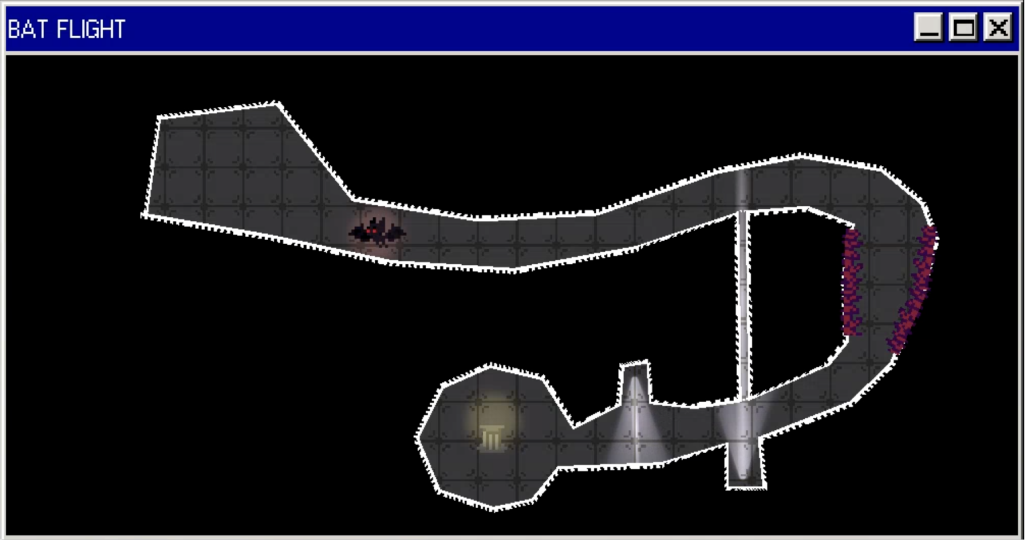
the bat minigame does not have any time limit or energy mechanic?
you just need to slowly and carefully move the bat around the maze, avoiding the spikes and lights.
also on the second bat minigame, that is not a shortcut, that gap for the light is way too small for the bat to fit, you need to go around.

Sorry, I saw that you replied (and I can still see the text) but my moderation bot saw the link from the image you sent and auto deleted your previous message.

I fixed the bot, and it should work, and not delete it now.

If you can paste the screenshots again, it'd be very helpful.

(2 edits)

Okay, I just tried and was unable to get this on my side.

Are you able to replicate the issue - meaning, if you close the game, load a save and try again does it still happen?
If so, please do the following steps:

  1. Open the cmd on the folder with the game (you can do this by going to the top bar with the path on the file explorer and typing cmd)
  2. Run .\ModificationApp.exe (This should open the game, while keeping the command line window)
  3. Load the save, play the event until the floor with the missing artwork.

What messages shows up in the cmd window?
Any error message? If so please paste the error message here.

(1 edit)

Hey, sorry to hear that, can you please let me know some addition information,

  • Which version are you playing (windows, mac, web, web on mobile device)?
  • On Mind Control 4 scene, does the game not show anything? Or does the dialogue or sound still work, but no graphics show up?
  • Does it stop working right after beating the minigame or later on when she moves down?
(1 edit)

Thank you for the feedback!!
While reset will always bring her to the Default state (future gameplay reasons), in the future I do plan to add an item to be able to quickly travel between MODIFICATIONS!!
House and additional events are planned for future content updates as well!!

Thank you for the feedback!!
This game is still very early in development, and the main focus so far has been on getting the main gameplay loop and the scenes working.
The UI and navigation system are planned to be improved in the future, as well as adding more variety to the exploration (since currently Mia is always in the same spot every day)!

Hey, this is the first report I've gotten of this issue.
I tried a few paths on the web version and couldn't replicate the problem.
What specific modification did you skip and still saw Mia on screen?

(1 edit)

Nudist (which includes Exhibitionist/Voyeuristic) path is on my list.
The other animals paths you mentioned are also on my list (not all from pet though. Cow will be started from the Breast Expansion path).

That being said, all MODIFICATIONS are voted on by my supporters, so when/if they are added is decided by them!!

Confirmed the issue.
When playing the vampire special, the lighting of the normal rooms is disabled to allow for the spooky lighting on the vampire dungeon - and was not being re-enabled once the event finishes.
Quitting to the main menu and reloading a save does fix it (since it forces a reset).
I'll fix this in the next update, thank you for reporting!!

Thank you, more is coming!!

I was unable to replicate this issue, so can you provide me with some more information,
- Does this happen every time? Or if you close the game and load a save it works?
- Does this happen immediately after beating the minigame, or after some dialogue? Does no dialogue start at all? If you press "Z" or the Space bar, can you hear Mia speaking?
- What browser are you using? Chrome/Firefox/Safari? Also are you on pc or mobile?

Currently, the web version is still experimental, and not designed for mobile.
One of the issues with running on mobile is that the audio effects used on modifications (like the echo) can cause weird audio artifacts depending on the device.
I might add a setting in the next updates to disable the audio effects for a quick fix - though mobile is still not officially supported, so there might be other problems in the future.

hey, could you please let me know if this is specific to a single path or in general?
additionally, which version are you playing? windows, mac, web?

currently not planning of having different voice lines for the different pronouns.
however, when I send the script over to Miera, I do try to slightly change the lines to be pronoun neutral so it fits all of them - but I realized I missed a few lines on the new Pet path, so I might try and update those in the future.

I'm not currently planning on making the path's tree more than 3 paths deep - if that makes sense.
Instead, I want it to be wide (a lot of branches from early on), rather than having to do like 5 paths, one after another after another.

yes muscle is on my list of possible future MODIFICATIONS!!

very strange...
could you please verify if you open the cmd again, but now run the game with the following command:
.\ModificationApp.exe --rendering-driver opengl3

does this fix it?

Hey, I couldn't replicate this issue, and I don't see why this would happen from the code.
Does it happen if you reload a save?
What path were you in when you saw this happen?
Did the text on the top left still change between Morning/Afternoon/etc.?

(2 edits)

Hey, I removed the bat file because I believe it would not be necessary anymore, since I changed the rendering driver.
Is the game open and not showing anything, or does it crash?
Can you please open the command line window (by opening the folder with the game, going to the top with the path and typing cmd), and then running .\ModificationApp.exe - what error or message shows up?

while not full paths, there might be some specials or sexy scenes where Mia or the Player might change the MC

(1 edit)

hey, i just released a new version that changes the rendering driver to Compatibility - which can solve a bunch of issues on some pcs.
if it still doesn't work, please let me know what is happening.

yes MILF is on the list of possible future MODIFICATIONS!!
(whether it gets implemented will be up to my supporters who vote on the theme for the updates)

it's here!!

sorry, I don't understand the issue well.

you should not rename any of the files. downloading the latest version and exporting it to a folder should be all the steps required.

the final folder should contain 3 files. The .exe, the .pck, and the .bat.
is any file missing?

No, I'm incredibly happy and grateful for Miera's VA, and I wish to keep her as Mia's voice actress!
There is a setting in the options menu to turn off the voice lines, if you wish to play the game without it.

Yes, both cowgirl and lactation are on my list of future MODIFICATIONS!!

Muscle girl is on the list of future modifications, and will be a sub path from the Growth path!!

Sequel/Continuation paths are not something that will be added soon, as I'm trying to add some gameplay and path variety first, since this is still only update 5.

That being said, while a continuation might be further away, there are plans to before that make additional sexy scenes for already existing paths, to flesh them out further (which path will have additional sexy scenes will be voted by my supporters)

(2 edits)

From my research, Godot games sometimes get false flagged by windows.
The only solution seems to be to pay microsoft a bunch of money to get a certification...
I tried on my old laptop to test it out, and it didn't get flagged.

I've just released this new update that adds the Store, and in the future I want to put items to either skip minigames, or move to a specific (already unlock) MODIFICATION - so yes it will be a option in the future!

Thank you for reporting. I've confirmed the issue.
It will be solved on the next release!

Crap, I forgot to include the CompatibilityLauncher.bat on this bug fix.
I just updated the zip file, so if you download the game again, it should now include it.

Once you have it, clicking it should open the game in Compatibility Mode, which should solve the Vulkan issue!

I'll be honest, I'm very incompetent when it comes with social media, so thank you for your suggestions!
From my (limited) understanding, DevianArt and Pixiv are more for artists to post full artworks, no?
I could just post stuff from the game there, but I thought they would be a bit out of place.
Do you have any examples of game devs that use those platforms, so that I could have a look?

Regarding slice of life sections, I enjoy more "lovey-dovey" sexy scenes, so that will happen sometimes.
Additionally, (much) later on, there will be a evolution of Mia's and MC's relationship - which will probably focus on more slice of life/grounded scenes.

Muscle is planned to be a new branch starting from the Growth path!
That being said, my supporters on patreon and substar are the ones who vote on what the next MODIFICATION will be!!

hey, sorry to hear that. does running the game with the CompatibilityLauncher.bat solve the issue?

if not, please do the following steps:

  1. With the File Explorer on the folder with the game files, on the top where the path is, type: cmd
  2. This should open the windows terminal on the folder. Then inside it type:  .\ModificationApp.exe
  3. This should open the game, while still leaving the terminal open.

Let me know what shows up in the terminal when the game crashes

hey, sorry to hear that.
does running the game with the CompatibilityLauncher.bat solve the issue?

if not, please do the following steps:

  1. With the File Explorer on the folder with the game files, on the top where the path is, type: cmd
  2. This should open the windows terminal on the folder. Then inside it type:  .\ModificationApp.exe
  3. This should open the game, while still leaving the terminal open.

Let me know what shows up in the terminal when the game crashes

i keep reporting them and deleting the comments when I get the notifications, but they really won't stay dead.
i wish itch had an option to not allow people to add links in comments.

sorry to hear that! I am unable to replicate this on my side. Does running the game with the Compatibility Launcher.bat fix this?

if not, please do the following steps:

  1. With the File Explorer on the folder with the game files, on the top where the path is, type: cmd
  2. This should open the windows terminal on the folder. Then inside it type:  .\ModificationApp.exe
  3. This should open the game, while still leaving the terminal open.

Let me know what shows up in the terminal when the game crashes

sorry to hear that!
I am unable to replicate this on my side.
Does running the game with the Compatibility Launcher.bat fix this?

if not, please do the following steps:

  1. With the File Explorer on the folder with the game files, on the top where the path is, type: cmd
  2. This should open the windows terminal on the folder. Then inside it type:  .\ModificationApp.exe
  3. This should open the game, while still leaving the terminal open.

Let me know what shows up in the terminal when the game crashes