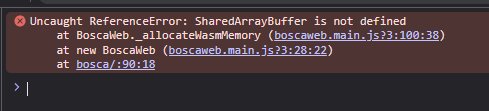
Thanks for that info, I eventually got it working!
To simplify things for anyone else trying to do this with a server running Plesk this is how I got it working:
1. From the Plesk administrator page (not logged in as client) go to: Domains -> Yourdomain.com -> Hosting & DNS -> Apache & nginx
2. If using nginx add the following to the Additional Nginx Directives section at the bottom of the page and hit apply:
add_header Cross-Origin-Opener-Policy same-origin;
add_header Cross-Origin-Embedder-Policy require-corp;
2b. I didn't have to do this step but I think if you're using just Apache you can instead add the following to Additional Apache directives mid-way down the page both in the HTTP and HTTPS sections:
<IfModule mod_headers.c>
Header always set Cross-Origin-Opener-Policy "same-origin"
Header always set Cross-Origin-Embedder-Policy "require-corp"
</IfModule>