

Some more thoughts: in fact it would be smarter if the (multilingual) text used in the compiled installer are separate files so that the user can change the texts or add translations. At least it should be editable inside the tool for the chosen language (english or russian for now).
A member registered Jun 06, 2015 · View creator page →
Creator of


Create different resolution images of your splash screen or icon template
Recent community posts
NSIS Builder - Professional Installer Creator comments · Posted in NSIS Builder - Professional Installer Creator comments
Hi Ewenloy, I purchased your tool two weeks ago and have some problems and/or suggestions.
- Switching language to english has to be done on every start of your installer. Would be cool if language settings could be saved and loaded on startup.
- Would also be cool if the settings for all the 4 steps could be saved for the last generated installer.
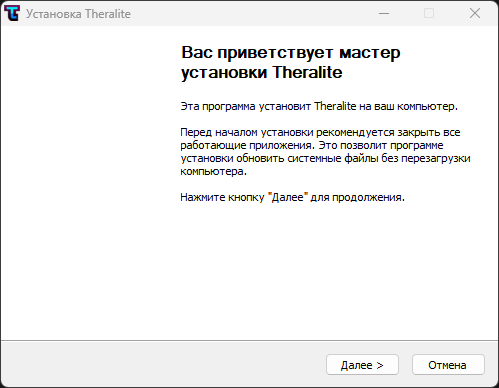
- The generated installer has Russian text although I have english settings (see screenshot).
- After successful compilation the tool resets the Compile window and the log is gone. Would be helpful to have that saved.
- Might be good to create a separate directory under "builds" directory for each new installer. Directory name should be the game name plus version number (similar to the generated output name). That would allow developers to have a demo installer and a full version installer in the same subdirectory. Then you could also save the compilation log file in that subdirectory.
- Might be helpful to also save the generated NSIS script for each installer in the same subdirectory.
- Finally it would be helpful for automated builds to start your nsis-builder from a command line with stored settings (see step 2) or parameters (version number, input directory, etc.) to automate the build pipeline to create installers for different versions (Demo, Full Steam version, Full itch.io version, etc.).
Anyways, nice tool but the biggest issue/bug for me right now is the russian text in the compiled installer which makes your tool unusable for me right now.
Finally do you plan to support other languages?
Cheers,
Thomas