Hi Iocchi, are you using Vocal Slice regularly still? Most of the other users seem to be translating english so I wonder how your experience has been with more use?
terranivium
Creator of
Recent community posts
Hi everyone!
Thank you all for your continued use of Vocal Slice and support! Sorry for the silence aside from product updates, I'm working steadily on larger updates for Vocal Slice in the background.
I have also been looking at a more easily accessible version of Vocal Slice which can be used in a web browser, so it can ben opened wherever you are, regardless if you are away from your regular machine. Is that something that you would find useful, or would time be better spent improving the user experience of the main desktop app?
Other comments and feedback appreciated, big updates on the way!
- Wesley, terranivium
Vocal Slice FAQ
═══════════════════════════════════════════════════════════════════════════════
WHAT IS VOCAL SLICE?
Vocal Slice is a desktop application that uses OpenAI's Whisper AI model to automatically transcribe, search, and extract voice lines from audio files. Simply load your audio, let it transcribe, then search for specific text or highlight dialogue to create precise audio slices instantly.
═══════════════════════════════════════════════════════════════════════════════
SYSTEM REQUIREMENTS
Windows 10/11 64-bit:
• Intel: Haswell generation (2013) or newer (i3-4xxx, i5-4xxx, i7-4xxx+)
• AMD: Ryzen series (2017) or newer, or Excavator APUs (2015+)
• WARNING: Older CPUs not supported (Sandy Bridge, Ivy Bridge, Bulldozer, etc.)
macOS 10.15.4 (Catalina) or later:
• Intel Macs: 2013 or later (automatically uses CPU for optimal performance)
• Apple Silicon: M1, M1 Pro, M1 Max, M1 Ultra, M2, M2 Pro, M2 Max, M2 Ultra (uses Metal acceleration)
═══════════════════════════════════════════════════════════════════════════════
AUDIO FORMAT SUPPORT
Vocal Slice supports a wide range of audio formats:
• WAV files (.wav, .bwf) - Primary format with full support
• AIFF files (.aiff, .aif) - Full support
• FLAC files (.flac) - Lossless compression support
• MP3 files (.mp3) - Compressed audio support
• OGG Vorbis files (.ogg) - Open-source compressed format
• macOS: Additional formats via Core Audio (AAC, M4A, CAF, and more)
• Windows: Additional formats via Windows Media Foundation
Note: All output slices are saved as high-quality WAV files regardless of input format.
═══════════════════════════════════════════════════════════════════════════════
MULTILINGUAL SUPPORT
Vocal Slice works with audio in multiple languages:
• Automatic language detection using Whisper AI
• Supports 99+ languages including English, Spanish, French, German, Chinese, Japanese, and many more
• No need to specify the language - Whisper automatically detects it
• Search and extract dialogue in any supported language
═══════════════════════════════════════════════════════════════════════════════
GPU ACCELERATION
Windows:
• Vulkan-compatible GPU required for acceleration
• NVIDIA: GTX 900 series or newer
• AMD: GCN 3.0 or newer
• Intel: Arc series graphics cards
• Automatically falls back to CPU processing if GPU acceleration isn't supported
macOS:
• Apple Silicon Macs (M1/M2 series): Uses Metal for optimal performance
• Intel Macs: CPU processing only (no GPU acceleration available)
═══════════════════════════════════════════════════════════════════════════════
HOW TO USE VOCAL SLICE
1. Launch Vocal Slice
2. Load an audio file using "Select Audio File" button
3. Wait for transcription to complete (progress is shown)
4. Search for specific text using the search box, or
5. Highlight any text in the transcription
6. Click "Create Slice from Selection" to extract that audio segment
7. Files are automatically saved with descriptive names
═══════════════════════════════════════════════════════════════════════════════
PERFORMANCE TIPS
1. Close unnecessary applications to free up RAM and CPU resources
2. Use shorter audio files (under 30 minutes) for faster processing
3. Ensure adequate free disk space for temporary files during processing
4. Use lossless formats (WAV, FLAC, AIFF) for best quality
5. Enable GPU acceleration if available for faster transcription
═══════════════════════════════════════════════════════════════════════════════
COMMON ISSUES & TROUBLESHOOTING
Slow Processing:
• Check if your system meets the recommended requirements
• Ensure you're using a supported audio format
• Try closing background applications
• Enable GPU acceleration if available
Audio Not Loading:
• Verify the file is a supported format (WAV, MP3, FLAC, AIFF, OGG, etc.)
• Check that the audio file isn't corrupted
• Ensure the file path doesn't contain special characters
• Try converting the file to WAV format if issues persist
No Voice Segments Detected:
• Ensure the audio actually contains speech
• Check that the audio volume levels are adequate
• Verify the audio isn't heavily distorted or noisy
• Try using a different Whisper model size
Search Not Finding Text:
• Check spelling and try different variations
• Whisper transcription may not be 100% accurate
• Try searching for partial phrases or individual words
• Consider the audio quality may affect transcription accuracy
═══════════════════════════════════════════════════════════════════════════════
TECHNICAL DETAILS
AI Model:
• Uses OpenAI's Whisper model for speech detection and transcription
• Processes audio locally on your device - no internet connection required
• Model files are downloaded once and stored locally
• Multiple model sizes available (tiny, base, small, medium, large)
Audio Processing:
• Converts input audio to mono 16kHz for AI analysis
• Output slices maintain original audio quality and sample rate
• Supports various bit depths and sample rates
• Automatic gain normalisation for consistent output levels
Privacy:
• 100% offline processing - your audio never leaves your device
• No data is sent to external servers
• All processing happens locally using the Whisper model
• Your audio files are never used to train AI models
═══════════════════════════════════════════════════════════════════════════════
FILE MANAGEMENT
Input Files:
• Place audio files in an easily accessible folder
• Avoid file paths with special characters or very long names
• Ensure files aren't open in other applications during processing
• Supported formats: WAV, MP3, FLAC, AIFF, OGG, and more
Output Files:
• Choose a dedicated folder for voice line outputs
• Files are saved with timestamps and descriptive text
• Original files are never modified
• All outputs are high-quality WAV files
• Automatic file naming with text sanitisation
═══════════════════════════════════════════════════════════════════════════════
ADVANCED FEATURES
Text Search:
• Search through transcriptions to find specific dialogue
• Navigate between search results with keyboard shortcuts
• Case-insensitive search with partial matching
Slice Settings:
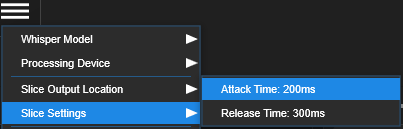
• Adjustable attack and release times for precise extraction
• Customisable output location
• Multiple Whisper model options for different accuracy/speed trade-offs
Model Selection:
• Choose from different Whisper model sizes
• Larger models = better accuracy, slower processing
• Smaller models = faster processing, good for clear audio
═══════════════════════════════════════════════════════════════════════════════
NEED MORE HELP?
If you encounter issues not covered in this FAQ:
1. Check that your system meets the minimum requirements
2. Verify your audio file is in a supported format
3. Try restarting the application
4. Consider processing smaller audio segments if performance is poor
5. Try a different Whisper model size
6. Check the log tab for detailed error information
═══════════════════════════════════════════════════════════════════════════════
Josh - I have released version 0.1.11 which replaces CUDA with Vulkan support - having looked into your issue and thought about overall compatibility concerns, this decision made the most sense at this time. Please give it a try - assuming you have the appropriate GPU drivers installed, it may be possible for you to run VocalSlice via Vulkan.
Josh - having spent some time on benchmarking this, without going too much into the technical side of it, changing the binary to support these older CPUs would require a change which would negatively impact the performance for all users utilising CPU as their chosen device. I was looking into having a separate build to support older CPUs, but I personally just wasn't happy with the performance in testing on a much faster CPU than the i3-2100, so I think for you as my customer, the performance/experience on your current hardware would be sub-optimal.
Typically when trying to transcribe a very short recording, it should take a couple of seconds, but when compiling for older CPU support, it was taking a noticeably longer time.
I will update the minimum specs for Intel to the Haswell generation (2013). I'm very sorry for the inconvenience caused.
Thanks Josh - VocalSlice can function without a GPU so that wont be an issue thankfully.
That is an older CPU - having taken a look into it, it seems that the library i'm using for transcription is compiling with certain features that CPU does not support, but I'm keen to get you up and running, so I'm currently implementing a solution that should unblock your work. Keep an eye out for 0.1.11, i'll try post it up in the next 24 hours, if you could give that a try when it releases.
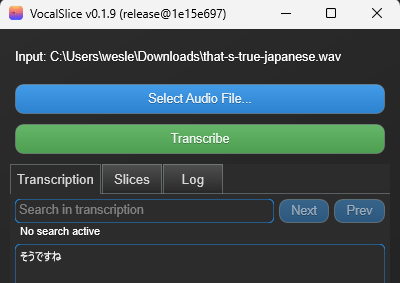
Hi locchi, thank you for your interest in VocalSlice. The program does have the ability to transcribe and slice Japanese! However I noticed when testing today that there were some issues displaying Japanese and other international characters in the search box and transcription editor.
I will release a fix for this today (VocalSlice v0.1.9) which will fully support rendering of Japanese characters. I would really appreciate you trying it out and providing feedback.
VocalSlice should be great for slicing phrases/sentences out of larger recordings, but may struggle with precision if you try slicing letters/syllables within words. You can try changing your selections and attack/release times in settings to add buffering around what you are trying to slice if you have issues with accuracy.
I've re-uploaded the v0.1.5 binary, please give that a go!
https://terranivium.itch.io/vocalslice/devlog/941055/v015
Hi everyone, developer of Vocal Slice here :wave:.
We are in the very early stages of Early Access/Beta testing at this stage, new features and improvements will be coming thick and fast.
The project has been underway for the better part of 8 months as of May 2025. I'm very keen to get feedback and start a dialogue with those that Vocal Slice can help most with their audio editing workflows.
Have you tried using Vocal Slice on singing, or creature speech? Having trouble getting started, or issues with performance? Would love to hear from you!
- Wesley, terranivium
