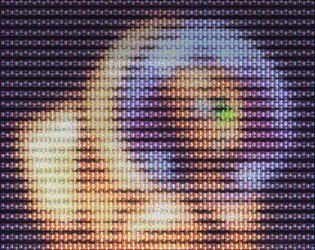
The shader is designed to tile the phosphor mask against your screen at a 1:1 resolution, as is common in CRT shaders for emulation and retro gaming. There is, however, a parameter in the presets called mask_scale, that will simply resize the mask relative to your screen. If you want a fully consistent look regardless of screen resolution, I would probably recommend disabling the phosphors altogether, or using a neutral mask like the shadow mask. If you're hard-set on it, then what you would need to do is pick your "default" resolution, like 1080p, and then set crt.mask_scale = (1080 / window_get_height()) when necessary, such as after room transitions or when the window resizes. This would ensure there are a consistent number of phosphor triads between resolutions, but it can begin to look very broken at lower resolutions, so use with caution.
SittingDuck
Creator of
Recent community posts
Sorry to hear about the issues. My first suggestion would be to ensure that it works on your own machine both in debug mode and as a packaged executable. Then, I would try setting your monitor to a few different resolutions and try running the game in and out of fullscreen mode. If all of those work, then I can only assume the issue lies with the other computer. Some possible things to look at include making sure graphics card drivers are up to date, DirectX or OpenGL are up to date (depending on export target), and that the other computer supports GameMaker's shader model. The shader doesn't use any extensions or HLSL-specific features, so my guess is that one of the above steps should expose the source of the issue. I hope this helps!
Hello,
The random noise in the glow can be removed by changing one line in the glow() function of the shader:
Before: vec2 texel = gold_noise(uv * 1000.0, u_random_seed) * u_glow_spread / u_game_size;
After: vec2 texel = 0.5 * u_glow_spread / u_game_size;
This should give you the result you're looking for
Hello,
The random noise in the glow can be removed by changing one line in the glow() function of the shader:
Before: vec2 texel = gold_noise(uv * 1000.0, u_random_seed) * u_glow_spread / u_game_size;
After: vec2 texel = 0.5 * u_glow_spread / u_game_size;
This should give you the result you're looking for
If I'm understanding you correctly, you're saying that the phosphors appear too big relative to your game screen when running in a small window. This is actually by design; the shader reads your window size and outputs the phosphors in sync with your actual screen's resolution. For example, if you are using a phosphor mask with 3 columns (red, green, blue), it will always tile every 3 pixels on your real-life screen, and it can't go any smaller without completely breaking the effect. If you need a finer pattern, you can swap the mask out for the included 2-column wide (green, magenta) texture that takes advantage of your screen's RGB subpixel layout to squeeze everything as small as physically possible. If this still isn't acceptable for your needs, then you may want to disable the phosphors when your window size is very small. This effect generally requires an output resolution of 720p at the very least to begin looking correct.
As far as your code, it looks like it should generally work fine. However, this shader comes with built-in aspect ratio correction, meaning that you should be able to resize your output window to any shape at all, and the shader will automatically ensure the simulated CRT screen has the correct 4:3 ratio (or whatever your game is) with reflective borders filling any leftover space. I'd generally recommend just setting the output width and height to the actual window width and height (window_get_width(), etc), and let the shader handle everything else with constant game height, width, and aspect ratio settings.
hello,
You can edit the preset’s variable definitions directly! By default, they’re simply set to inherit from the base preset. You can either edit the parameters of the base preset object, or untick the lock icon next to each variable definition in the VGA preset object to allow them to be overwritten. GameMaker doesn’t have very easy to find documentation on this, so I understand being confused!
Hello,
The room size can be anything you like! By default, the example project uses the Viewport 0 surface as the source for the CRT screen. That surface gets drawn directly to the real-life screen using a shader. Setting the game_width and game_height variables in the provided CRT object will automatically resize your viewport to whatever you specify. Your game's rooms themselves are free to vary in size to accommodate scrolling, etc. Be sure to take a look at the provided documentation for in-depth explanations of the underlying systems.
I'm a bit confused about what you mean by afterimage; are you saying something remains on the screen after you close the game? This asset isn't doing anything nonstandard (it all comes down to drawing a fullscreen surface in a Draw GUI event), so if you find your game isn't closing correctly, this might be more of a bug on YoyoGames' side or perhaps a driver issue. If you can provide a bit more information to sittingduckgamesco@gmail.com, I can at least ascertain whether or not I can resolve your issue with a patch to the asset pack.
Copied from another comment: GameMaker has a tendency to resize the display buffers when switching (or restarting) rooms. Calling the included crt.resize_surfaces() method after each room change with a persistent crt object should do the trick, but please let me know if it doesn't, and I can take another look.
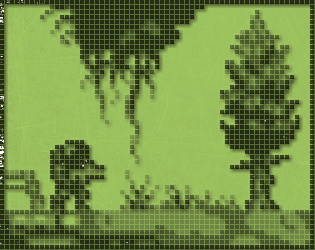
If you're looking for the public domain art used in the screenshots, you can find it here: surt | OpenGameArt.org
I just took a look, and it seems that the screen edge antialiasing is responsible for that 1 or 2 content-pixel reflection. For a quick fix, just change line 134 of shd_crt from this:
float width = max(1.0 / u_output_size.x, 1.0 / u_output_size.y) * 8.0;
Into this:
float width = max(1.0 / u_output_size.x, 1.0 / u_output_size.y) * 1.0;
Hope this helps! I'll most likely fix this in the download at some point in the near future.
Hi, thanks for using my asset! If you want to be able to resize your game window, you’ll need to resize the GUI surface; GameMaker doesn’t do this for you except at the start of the game. In either a step event or the resize event, you’ll just need to check if the window dimensions are different from the GUI surface size, and if so, call display_set_gui_size(), and grab the window dimensions with window_get_width() and window_get_height().
Thank you for trying my asset! I would suggest taking a look at the "Draw GUI" events for the CRT object, where you'll see that the rendering is wrapped up in a single function call. If you call this function while your surface is the current target, the CRT screen will be drawn directly to your surface instead of the GUI surface. You'll need to ensure that crt.output_width and crt.output_height match the size of your surface, and I'd also recommend disabling the phosphor mask if your surface will be zooming or stretching around the screen.
Hello,
Thank you for trying my asset!
This asset hijacks the application surface to use as the basis of the simulated CRT screen. If you want your HUD to appear on top of the CRT screen, then you'll need to draw it after the CRT object calls crt_apply() in the Draw GUI End event. Alternatively, if you want the HUD to be included inside the CRT screen, then you'll want to draw it directly to the application surface in the Draw GUI event using surface_set_target(application_surface) followed by surface_reset_target().
Hello,
Thank you for trying my asset!
Whenever you change any of the CRT object's settings at runtime, you'll need to have it call the function "update_uniforms()" to see the changes reflected in-game.
To disable the effect at runtime, If deleting the CRT object causes issues, you could also choose to disable it by setting its "shader" variable to shd_raw. This shader is more or less a passthrough shader that only handles aspect ratio and optionally curvature (which you could disable for a raw pixel art look).
I hope this helps!


