Indie game storeFree gamesFun gamesHorror games
Game developmentAssetsComics
SalesBundles
Jobs
TagsGame Engines

Sazem

12
Posts
2
Topics
79
Followers
116
Following
A member registered Jan 08, 2017 · View creator page →

Creator of

Recent community posts

I'm sorry I didn't find this option you mentioned about "Editable children from collision group".
I did check all of the options in the plugin docker. Do I have to disable that option in the .gd script?

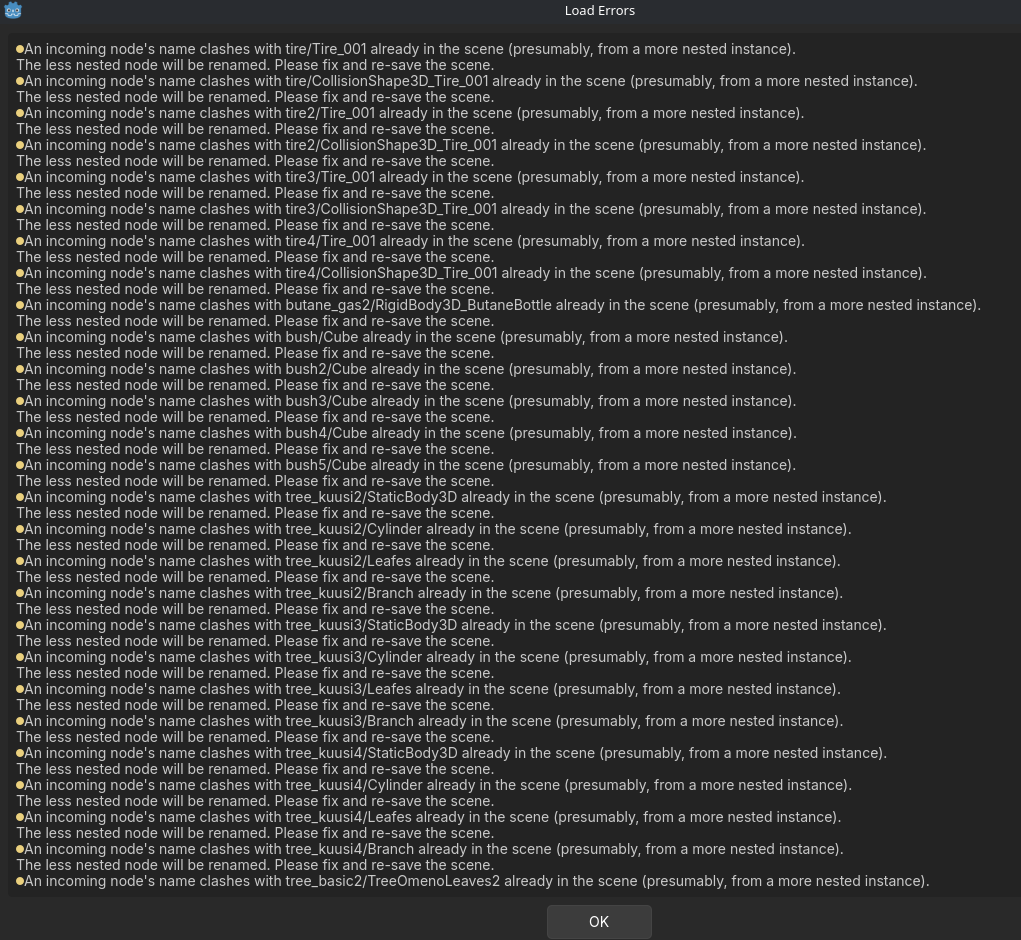
Im pretty my issue is caused because of that. Somehow if the child (ex; the mesh) has same name as other prefab with the same name of the child, it causes that error. It gave error for another object with same name for AudioStreamPlayer3D. 
Which is strange, because they have their unique parent name and somehow this causes the error.

How I reproduce this is just use the plugin with .tscn files to place assets. It works fine at first. I might even try the game and everything is fine. After a while that error pops up, usually when reopening the scene that I am working, those meshes are doubled. I use Godot 4.6.

It seems like the "mesh" itself is one and another duplicate is in the parent. Because If I move the parent/root node, I can see only one, but if I take the mesh node, it moves away but there is duplicate at the root. (this shows in the game too and both will "work" in the scene as unique rigidbodies).

If I try make this before the error and I move only the mesh, the root does not have another mesh and works correctly. 

If I just could find the option to disable "editable children", It would most likely fix the issue. Thank you for your help!

Hi,
I couldn't find your email to give you feedback.

Anyway promising looking plugin.  It has some improvements if comparing to some alternatives (one I was using doesn't support Godot 4.6 currently, which is why I wanted to try yours).

I got one issue currently which holds me using the plugin in production. Firstly, all of the prefabs instantiated using the plugin seems to have like the option "editable children" enabled.
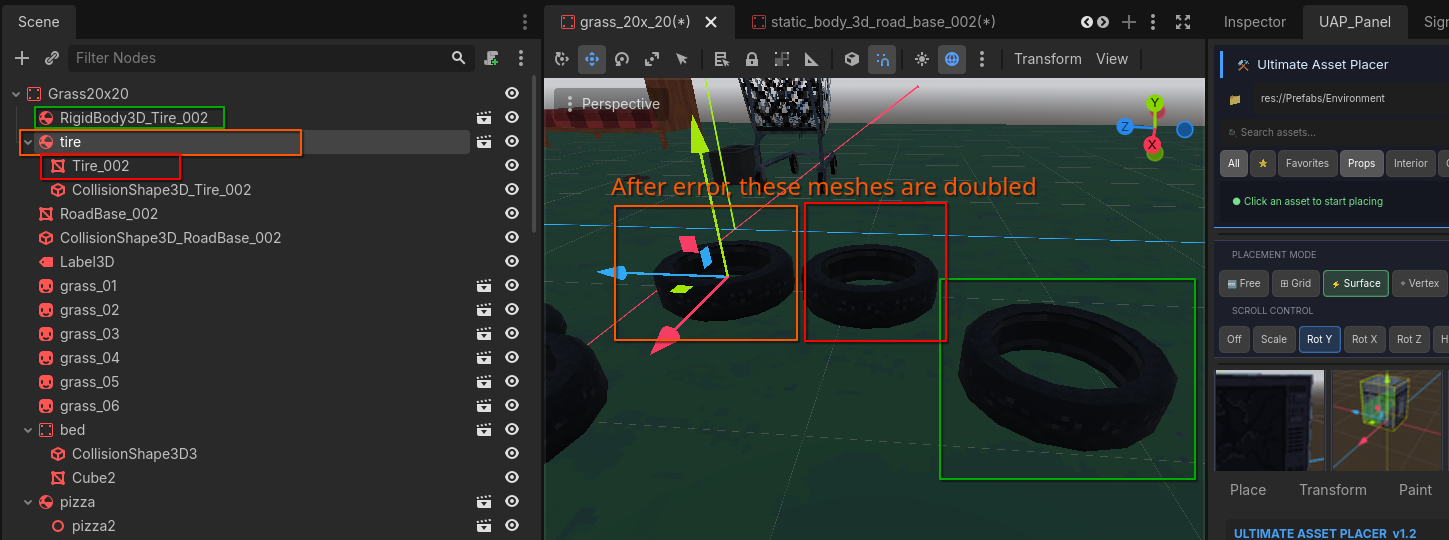
(in the picture one that is highlighted green was placed without the plugin, no "editable children")
 
Which I mean that If I get the prefab into the scene, it has all of its child's visible (colliders, meshes etc). If I drag manually the same object from the inspector, it only has the "parent" object visible in the hierarchy.

All that is fine, but after getting this error, every prefab in the scene has doubled its meshes. And I mean every prefab in the scene (in this example just the tire)

Pic of the mesh issue:

Pic of the error:

Btw I think forum type discussion would be better fit for your plugin. Easier to report issues. I hope you can find solution for this, because without it, I could totally use this building my game.

Thank you!! Im happy you tried it out! :)

You might be right about the stamina system. I will think about that after implementing the skill & progression system.. Generally I noticed that the stamina systems are pretty hated in gaming :)

Thank you for the feedback!

Thanks for your kind feedback! Lets hope :) 

That was actually next in my todo list.
Unfortunately I can`t really promise any release date (2yo daughter taking most of my freetime and these asset takes time).

I was planning basic knight, skeleton, zombie etc type of character with idle, walking, running, death and attack animations.

Do you have any characters which you would like to see?

Thank you for posting this one.
Yes the restart level didnt really work like planned. I fixed this issue already and its coming to next update :)

I have to admit that the art style is so cool! Gj :)

Thank you! I will look into it. Most likely duplicated hud somehow left in the scenery. :)

hahaha, great video!! I was really laughing the bugs you found there. Not sure if I could have found them myself. 

That ghost, I kinda used that to debug the game earlier ( althou it was on enemy team, so you could shoot it). But now it really shouldnt be there.
Im 99% sure where it came... when you tried 2 players game but you didnt have the controller, you assigned the player 1 with keyboard. Then when you went back.. that player 1 was still as assigned. When you started new level, you assigned P1 again. So it should be easy fix (remove all assigned players on init screen).

Gotta fix the resolution bug too, it seems it doesnt really save it.

I will try to add more destructable stuff in the game. Its true that the normal guns should make more damage to environment, would be cool to shoot stuff with shotgun :P

Also I have to add somesort of shooting range to test out the weapons and shoot some targets or something. No promises when, currently trying to tackle network code. Atleast I hope I can fix those bugs and push update in next week or so.

Got some ideas or feedback, let me know. I love to hear em! (no promises on adding any thou) :)

Scatteria community · Created a new topic Report bugs!
(8 edits)

If you encounter bugs, please let me know about them here and I will try to fix them in the coming updates.

Know bugs:
-Restart level doesnt work always (0.11)
-If timelimit, timer might come into mainmenu. And definitely doesnt work with restart! (0.11)
-If players dies in covermode: after respawn the neck is twisted.. (0.11)
-Scoreboard camera in all levels are at origin (0.11)
-Player makes extra high jump in tight areas near tiles. (0.09... +)

Fixed bugs:
-Extra hud flying arount the scene (0.12)
-Timer bugs out after restart (0.12)

-Restart level doesnt work(0.12)
-Controllers moves every player in the game(0.10)
-Players are able to shoot throu one tile (0.10)
-Sfx slider doesnt effect on all sounds effects in game.

-Duplicated Player1 (v0.10)
-Resolution change isnt saved (v0.10)
-Resolution list has all the resolutions double (0.10)