On Sale: GamesAssetsToolsTabletopComics
Indie game storeFree gamesFun gamesHorror games
Game developmentAssetsComics
SalesBundles
Jobs
TagsGame Engines

SableTheRed

110
Posts
3
Topics
2
Followers
A member registered Jul 24, 2023 · View creator page →

Creator of
Recent community posts

Ooo I like this. Simple, but clever

Nice, I like this! I'm not part of the jam, but I think you excecuted this really well

Nice job, but there are a couple bugs:

Daily requests currently loop back when you collect the reward, instead of being completed just the once
Upgrade prices seem to scale with the number of times you bought them, but the price displayed doesn't update, so it doesn't make clear how many points the game will charge you

I like this so far!
All levels are playable, and interesting too, they make you think.

Things I'd suggest are sound (if pico supports that, i've never used the engine), and some kind of indication when you've completed all the levels as I accidentally started playing from the beginning again.
It would also be nice if the viewport could be in the centre of the screen (as it's where your eyes naturally fall)


Great concept though, keep going!

Nice! I'm not even part of the jam, but I like sherriff's attacks. I was a little confused about why I couldn't shoot or lassoo at first as it wasn't mentioned that you wouldn't start with them. Deaths are a little slow, especially the amount of time the level name takes to display, but nice work overall. Good luck with the jam!

Awesome :)

Thanks for the feedback :)
Btw, would you be open to me continuing it outside the jam at some point?

Hey, day 6 dev here. I was thinking about possibly taking this beyond the jam at some point. Would that be ok with you?

I really liked doing cave crunch (day 3) because I really started exploring with pixel art that day. I also enjoyed hex dungeon (day 6). I learned so much from it, but I also had a lot more that I wanted to add

Not sure what I’ll be up to then, if I can then I will

thank you, I had a good time too :)

Heyyy, nice work. I had this on day 6 - would you mind if I were to continue this independently of the jam at some point?

Heya, day 6 here... Is it alright with you if I continue this outside the jam at some point?

I fixed the errors... Separate question, would it be OK with you if I worked on this outside the jam? I'd like to give it some more time at some point

Ok, cool! :)

Me too tbh... Not seen anything on the blackthornprod channel in a good couple of weeks

Thanks! :D

The health never quite worked properly... I apologise for that. I might try to patch it up a little, maybe once the jam's been judged

Thanks for the feedback :)

I actually wanted to do a lot more with it but my brain had started leaking out my ears a little by that point...

Ima ask the other devs too, but do you have any objection if i tried to do more with it at some point this summer?

I saw mama octo when picking for day 2, so glad it's getting picked up cos it was pretty cool :)

I've never done a jam before so I have no idea how this works.  I think the video said something about the audience voting on the best game, so: does anyone know how we're supposed to go about that?

Aww :(

I'd be interested for sure, though I'm not certain on how much free time i'll have

Forgot to say, it worked :)

OK, thanks everyone! I'm looking now

It was submitted as Galactic Crate Runner on day 5 :)

No matter which version I load it from, or whether it's the fill set of files minus library or from just assets, packages and project settings I keep getting told to open Unity in safe mode due to compilation errors, but I can't understand what I'm supposed to do once I'm in safe mode. Can anyone help me get it working please?

Some of the errors:
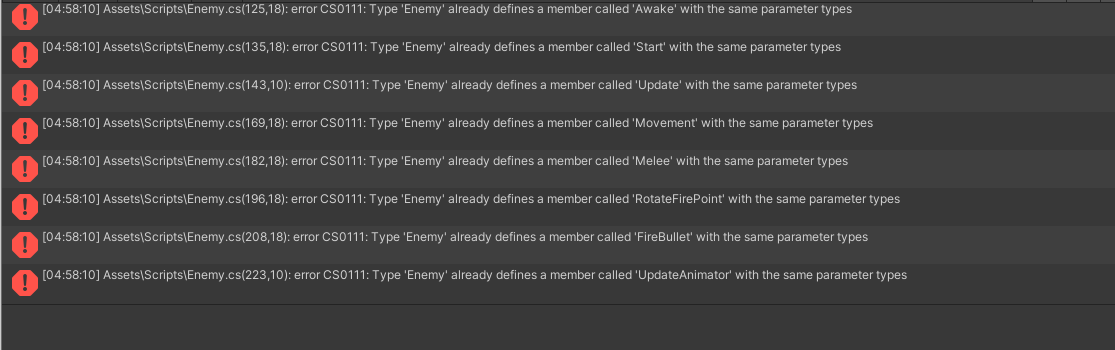
Heya, it's saying the project has compilation errors when i tried to open it in unity... Any ideas on how to fix pls?

I'm looking at HexDungeon by QuantumPrimus, but first I will be getting some sleep

https://quantumprimus.itch.io/hexdungeon

I know what's up, I was having the same issue on day 1! It's because your project uses Brotli compression. If you go to build settings, select WebGL and look at the configuration, somewhere it should let you go to player settings. If you open the publishing settings from the dropdown, change the compression from brotli to gzip (or no compression also doesn't break) and build. It should then run in browser :)

It really is a great feeling, thank you again :)

Well dev 4 certainly knows how to leave a surprise! Good job though, game looks good :)

Wow... I got eaten by some massive creature that took up half the screen! was not expecting that at all... was that your addition?

Just seen this...

Okay so you want to have "using UnityEngine.SceneManagement;" at the top of your script.

To restart the active scene: SceneManager.LoadScene(SceneManager.GetActiveScene().name);

To load a different scene in: SceneManager.LoadScene(scenenumber); where you find the order of the scenes in the build settings. You may need to add active scene to the build list, but that's just one button click at the bottom right of the box where you're ordering the scenes

OK! No worries :)

Also if you haven't already, try looking up "How to add a menu to my endless runner unity", or something similar that fits your issue, because although your game isn't what you generally think of when someone says endless runner, I reckon a lot of the concepts (and their code if you really need!) could very easily be applied to it

If it makes you feel happier about changing stuff, you could duplicate your project folder so that you have a working backup to revert to? I don't know if you do that already but I only figured it out a couple days ago :)

Really sorry to hear that, that sounds like a pretty deflating situation to be in... I honestly do wish I'd had more time on listen to the toys on day 4, it was actually a really beautiful project. I could see how much thought you put into it, and your code was so easy to read, so thank you. Even though your game didn't make it through, I'm glad I got to experience it :)

I'm assuming the menu is a seperate scene?
My usual command is SceneManager.LoadScene(0); (or whichever number scene you wish to load)

Another thing if things are being changed by a script, are the values assigned at the start or just updated as the script runs?

I honestly don't know how much difference the second one makes as I've never had the issue before, and haven't been at this very long (As in, i've tinkered through the years but never made any actual games until just over a week ago)

no worries, I didn't make day 5 either. I spent maybe 4 hours or so stuck for ideas on which game to pick, finally downloaded one and started tinkering. When I opened the code though i just had a complete mind blank, and with 40 minutes left there wasn't really enough time to implement and upload, especially as it was something I had never done before. Just make sure you take care of yourself and don't beat yourself up too much :)