Indie game storeFree gamesFun gamesHorror games
Game developmentAssetsComics
SalesBundles
Jobs
TagsGame Engines

RetroNick2020

5
Posts
45
Followers
86
Following
A member registered Jan 23, 2023 · View creator page →

Creator of
Recent community posts

Hi Tia, did the payment go through? I don't see anything on my end. if you can send me an email with screenshot of your  My Library purchases at nickshardware2020@gmail.com i can take care of it. Otherwise you will need to wait for itch.io to sort this out. Itch.io was down earlier today, it might have  affected certain transactions.

thanks! I just updated some things. take a look if something is not working as expected.

I have added C64 support.

Very nice! I like the simplicity, single color and animation in 2 frames!

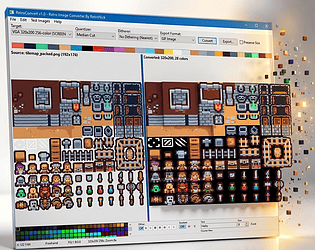
The idea is to use your favorite Draw/Paint program and create a sprite sheet/page (or use existing sprite sheets) that has all your graphics that are going to be displayed on the screen at once on your retro system. 

RetroConvert allows you to take that sprite sheet/page and apply color reducing algorithm's and dithering options to reduce the colors that match your target system. Different algorithm's will give different results so you have to play around and use one that gives the best results.

Multipaint looks like Deluxe Paint which has a different approach just by looking at the description. You are basically choosing your Target system first and working with the limitations of that system. Which really doesn't give you the options to reduce colors or apply dithering. You are already working in a mode that can't be reduced down any more.

Right now my target is just PC Modes and QBasic, but i will start adding more targets soon. if Multipaint supports Windows clipboard you may just be able to to use any Draw/Paint program copy to clipboard, run through RectroConvert, copy from clipboard and convert, go into Multipaint and copy from clipboard. Then you can just use Multipaint to save for your target system.

So at some point you will be able to take any image and select target and it will create a loader to display the image on that system.

Best is just to try playing around with some of you existing art and see how it converts.