Indie game storeFree gamesFun gamesHorror games
Game developmentAssetsComics
SalesBundles
Jobs
TagsGame Engines

red335

13
Posts
48
Followers
A member registered Jun 09, 2025 · View creator page →

Creator of
Recent community posts

https://discord.gg/JeNSBba8XU Here you go try this 

Hi join the discord the scans are on the discord, files have been sent to ms for a bit now waiting on their response, i can send you the direct files in there if you want to do the installation manually just message me, the only reason it flags it its because the .exe are not signed and its false positives another thing you do not have to pay for this you can download it for free its a free application

This installs where you have aseprite if your aseprite is at C it will install at C under the aseprite extensions like any other extension to delete just remove the folder simple as that

https://discord.gg/p2rsy3u6 Could you join the discord server i can assist you better here cause i am testing the logic right now and it appears to update fine for me and same in the other machines i am testing at the moment

Right, the Helper detected your system Python 3.14. PixelAI’s local AI server doesn’t support Python 3.14 yet because some of the libraries don’t work correctly with it.
Because Python 3.14 was found first, the Helper didn’t install use PixelAI’s bundled Python 3.12.8 runtime. I’ll release a patch shortly so this won’t happen again, the Helper will use the correct bundled Python even if another Python version is already installed.
For now, you can either wait for the patch, or uninstall, remove Python 3.14 from PATH and then run Install / Verify Python again in the Helper so it does a clean setup with Python 3.12.8.

I will take a look at it

25 minutes to generate mean 1 or two things, the server dint find your gpu and switched back to cpu or you simply have a under performing pc,i would suggest waiting for the next update as the server and the extension have been updated upgraded and tested on multiple gpu's like rtx 3080, 5090s, A40, H100, A100 also the new extension will have an support ticket system with a log viewer and if you are still having issues i can better assist you there 

At the moment i am focusing on making this stable enough for windows for this next update,but yes the plan is to add linux support and mac support but that will be later

Yeah it will be in there If the models support it you will be able to use

If you're having trouble with 50-series cards, please wait for the major update in a few weeks. It features a full system redesign to fix these issues people are experiencing . I'll also be opening support tickets alongside that update to provide one on one help for any remaining problems.

First one yes second one no as of now

Yeah i mean if you are handy with coding it's pretty easy to add your own models just gotta modify the script a bit, also i am gonna release a new update here in a bit where you can add your own models and some other features and etc, was not expecting this to get as much publicity as it got so yeah this was like something i worked for like 2 days so a lot of things missing 

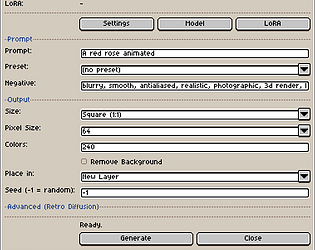
Make sure your local ai server is running, the extension will try to connect to it, the extension does not work without you first opening the local server which is called start_server just run that and it will do everything automatically just keep it open if you close it the extension fails