On Sale: GamesAssetsToolsTabletopComics
Indie game storeFree gamesFun gamesHorror games
Game developmentAssetsComics
SalesBundles
Jobs
TagsGame Engines

Tore Lehmann (aka. pr0te)

55
Posts
2
Topics
67
Followers
A member registered Sep 07, 2016 · View creator page →

Creator of

Recent community posts

Glad you found a solution! I'm still, unfortunately, hung up on other projects and won't have the time anytime soon to make improvements. I hope to find the time next year though, as there are several things I'd love to add on top of the bug fixes and other QoL changes.

Alright, well, I obviously have too little to go off of here, but I'm assuming you mean that you get the popup telling you that spr_gmlink_base is missing and you should create it. It pops up if the file "sprites/spr_gmlink_base/spr_gmlink_base.yy" does not exist. If it does and you get it, then I have no clue. I'd say make sure you've connected the correct project file and all that.

Hi Shrimpy. Is the base sprite located in the root "sprites" folder of your project?

They are disabled when you've left "Control default values with" to GameMaker, as it will then use spr_gmlink_base as its template for these settings. Set it to Aseprite if you want to control those settings through the config window.

Hey! Thanks for the email. I just replied to it. I will say though, I work more than full-time on other projects and thus cannot always justify spending that much time on GM Link or other free side projects. Therefore I can never guarantee a timely reply or fix, but I appreciate people reporting bugs and problems so I can stuff them on my list and get to them eventually. I hope you can understand :)

Np, glad you figured it out!

Hey! And you are on the newest version, right? Thanks for letting me know. I'll add it to the list and get around to it once I have a bit of time.

Not sure I can help you with the second issue. Maybe you can change a setting for .ase files to open as tabs instead?

I wanted to fake an old palette shifting fade from the NES/Gameboy era and did exactly something like what you wrote, yeah.

I have not released the source code no. I'm actually developing a full-scale version of this game right now. It's also called Bobls and is on Steam if you are interested.

The slopes in this classic version are extremely simple and basically only works for 45 degree angles. If I remember correctly, I simply do two or three precise collision_point checks to determine if it's an upwards or downwards going slope and move the player directly according to it, or something like that. It's been a while.

Hey! Glad you're still enjoying GM Link and that it helps your workflow!
Ah, sorry to hear about all of that renaming you had to do. I hadn't thought of that scenario, so thanks for mentioning. My immediate thoughts on your input is that I agree with that. It should probably just slide the prefix in there during updating instead. I'll add that to the list!

Okay - I'm still not really sure what you need GM Link to do. Do you want it to be able to import Tile Set assets into GameMaker? The error you linked comes from the other extension, so it doesn't help me that much unless I really start digging. It could also be that the issue lies with that extension and not GM Link. Feel free to drop me any more information you have about this as well as how you reproduce that error, and I'll see if I can find some time to look at it. I cannot promise you it'll be soon.

Hi Laura. Glad to hear you're finding GM Link useful :) - I have never heard of the extension you've linked to. Can you explain what you're trying to achieve with it and how GM Link doesn't comply with it, as well as what you'd want GM Link to do differently? Thanks :)
- Tore

Just to add a bit of context to this: Aseprite scripts/extensions all run on the same thread as the rest of Aseprite and thereby also the UI. So anything the script is doing will be blocking for the UI, ie. if it takes a bit of time, the UI will be frozen while it carries out. When you switch tabs, I need GM Link to adjust to the project info that has been configured for that file, and it does so by reading from the config file on disk which is usually really fast but can still be felt briefly. I'm not saying it's impossible to do something about it, I just haven't been looking long enough for it. I will try to implement it if I figure something out at some point. :-)

It's briefly loading your settings for that document when you switch, so it is normal.

Thanks for sharing your issues and observations so we can make sure GM Link stays useful! Glad it works :)

Are you able to email me a screenshot of the config window and maybe your aseprite file as well? I would also love to know the GM IDE/runtime version you're using. prote1337@gmail.com

That's really weird as there is no magic to that at all. It's simply a file selection dialog to help you select a file and then that path is saved. What path has been saved in the config file? (In the extensions directory, you can go there through the aseprite settings). Have you saved it somewhere that changes? Onedrive-y path? Something?

Seems weird. Not something I've seen before or can guess to why. Let me know if you find more clues and I'll see what I can do.

Ah, I seem to have missed this scenario. It happens because you try to configure GM Link without having a document/sprite opened. Just create a new doc or open an existing one for now before you press Configure.

It's not possible as of now and would have to be added in. It might be a little bit too niche to justify spending a lot of time on currently. What prevents you from just putting them next to each other?

This has now been added in 1.7 :)

I just released a new version, but the fix for this isn't included unfortunately. I tested GM Link with your aseprite file and the newest LTS version of GM and everything worked perfectly, so I wasn't able to reproduce it this time around. Hopefully we can come close to the root cause soon so it can be smashed. I'll continue pondering about what could be causing it.

Hey! Turned out my little side project "TRIMJOB" took more of my free time than expected, so I couldn't find the time to do GM Link. That game has just been released now though, so I should be able to get to this shortly. Thanks for sticking around with the tool :)

Alright, it's fixed and the patch is out. :)

(1 edit)

It baffles me, as that never came up in testing! You being a fellow dev must've had that happen many times as well I can imagine! :). Thank you so much for your patience with it! If you have the time at some point, feel free to email me those files as they might help. In the meantime, I'll get my sherlock holmes hat and pipe (I mean that).

EDIT: Okay the hat and pipe helped. I just replicated the bug thanks to your newest info, and it all makes sense now. I'll patch it shortly. Thanks again for your help and support! :)

Thanks, I was just about to reply to it :)

I really appreciate all the info. It's invaluable in order to more easily solve problems like these. For sure, I understand that it's worrying, so it's great that you're using version control! I just released a game and work full-time, so I can't promise exactly when I'll get this one fixed, but I promise I'll be as quick as I possibly can. I never used LTS myself which might be the main culprit behind this in itself. I think I'll get that version you're using and see if I can find the issue. And yes, if you wouldn't mind, I'd like to look at the yy files as well. Please drop me a mail at prote1337@gmail.com. :)

(1 edit)

Okay thanks for the info. Were you able to continue playing after restarting the game at least? EDIT: And if not, would you mind sending me your settings.data, stats.data, and your save file from this directory: %localappdata%\TrimJob - that way I can try my best to replicate it on my end and get that sorted out. My email is prote1337@gmail.com.

Can you remember what happened right before the crash and what game mode you were playing? :)

Oh no! I'm sorry about that. Thanks for letting me know! I'll have a look and get back to you :)

Thanks for posting all this and digging around! It does seem strange yeah. Are you able to single out anything that could be different for the sprites where you get the error? Another thing, if it wouldn't be of too much hassle for you, could you try a newer version of GM just as a test? It's difficult keeping a tool like this error free as the .yy format is so damn specific, at times ever-changing and non-documented. :)

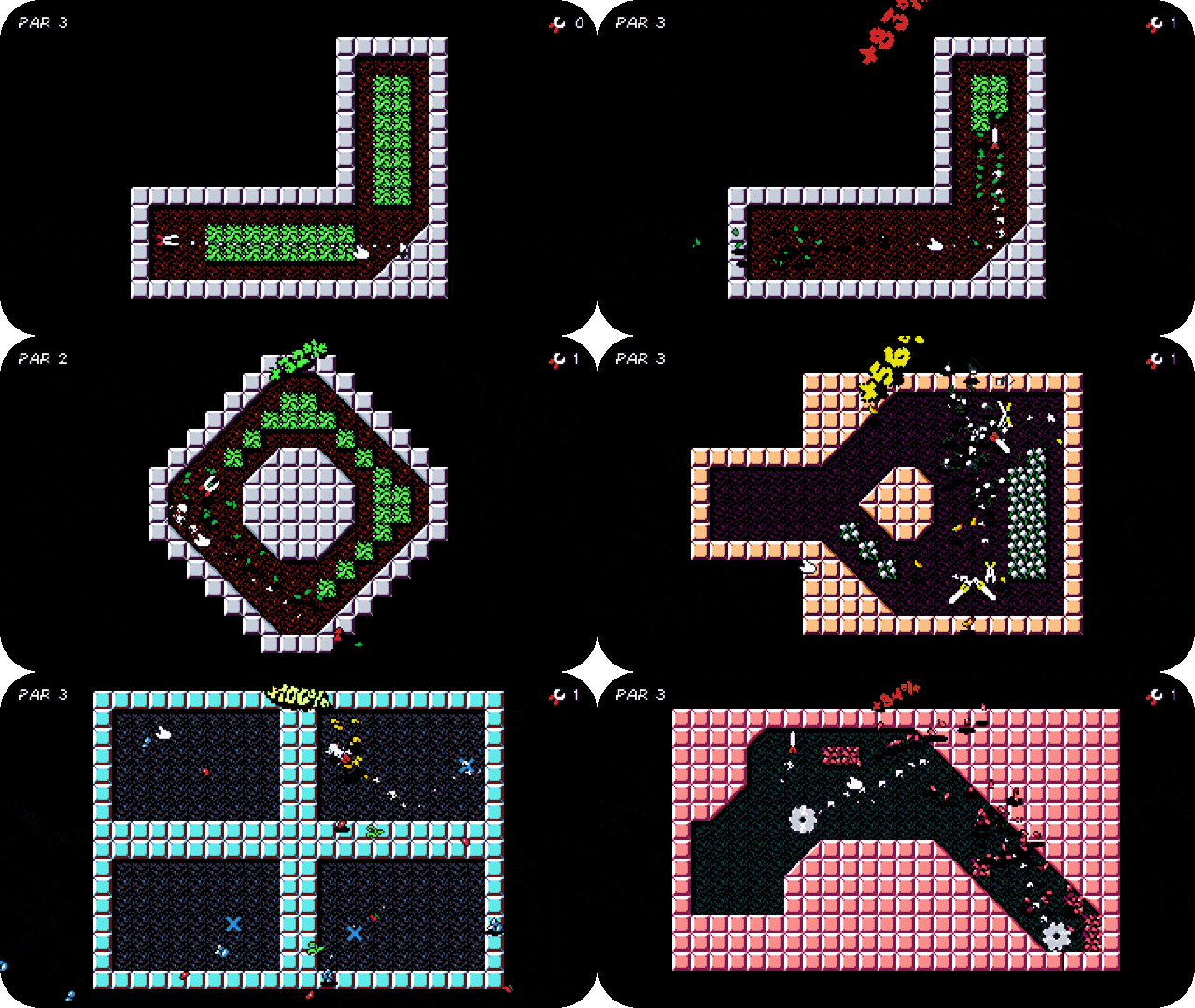
TRIMJOB is a small arcade-style game about trimming weeds in a minigolf-ish way. You aim, click and trim throughout 4 different gardens with 18 levels each, and try to get as close to that satisfying TRIM-IN-ONE as possible in all of them. The game was developed mainly during the christmas holiday period and a few weekends and contains lots of smaller parts and systems I had made over the past few years. It also features custom arcade-style voice lines by Hans Haave from Save & Sound! Other than that, this was a one man effort and I hope you'll give it a look. :)

- Tore

https://pr0te.itch.io/trimjob

Thanks for checking it out - we spoke on your stream. I've noted your great suggestions and are looking to implement them hopefully in january :)

That would be lovely and would really help me out! Could you also confirm that the texture group gets reset even after having updated that sprite with the newest version of GM Link once?

Btw, little sneak-peek: the next version includes a new toolbar that allows you to bulk edit origin, bbox and subfolders on slices! I've also added the slice name prefix option in the sprite settings.


Hey! Love to hear that it saved you some time. Nice! Yes, so I'm actually quite new to Aseprite. I moved over from years with Pyxel Edit just because I had the idea for GM Link and wanted to change my workflow up. So I want to learn how people like to use it and accommodate that in GM Link. With my limited understanding of tags, I see them as global groupings of cels, right? So they're not tied to a slice in any way for example? How would you like them to work with GM Link? I'm interested in your suggestion as tags were mentioned before as well. Thanks for using the extension :)

Would you by any chance be willing to send me a .yy of any sprite before and one after you update and the texture group and fps is reset? I have not been able to replicate the issue on my end.

In regards to the bounding box being a single pixel in the top left corner when set to automatic, I did notice it in the beginning. I'm currently unsure if I have any control over that since it seems that it's something GM decides upon. Have you noticed whether, if left as is, actually compiles to that single pixel bounding box in-game? Worst case it could be calculated within GM Link.

Ah okay, seems like I missed a couple of things. Once again, thank you so much for the feedback. It helps a lot and I really appreciate it. I'll get those things sorted as soon as time allows! Great suggestion with the prefix. I assume you mean so a slice could simply be named "player" but in GM that would become "spr_player" if your prefix was "spr_"?

You have a great week too! :)

- Tore

I've put up a new version (1.5 beta) that should, hopefully address the issues you had. Please check it out and let me know what you think. :)