
On Sale: GamesAssetsToolsTabletopComics
Indie game storeFree gamesFun gamesHorror games
Game developmentAssetsComics
SalesBundles
Jobs
TagsGame Engines

Platiname

5
Posts
A member registered Mar 11, 2025

Recent community posts

Bow to you good sir for making this thing. Looking forward for future updates.

If I may, I'd suggest you add option to show body accesories (such as hair, beard, ears, wings, bloody eye, ... ) when "Show Body" option is unchecked. 

Addition of grayscale palette or "white color" to each item would be cool. It would open up an option to have items in any color people want via modulation.

Yes, turn "export_large_sheets" to "always" - this is responsible for outputting ONLY spritesheets with "type": "single". These are those oversized spritesheets with frame size 192x192 that will export individually when you have weapon on, one sheet for slash, walk, etc....

Open lpc.layout file and in the very first spritesheet with "name": "universal" change the value of "type" from "universal" to "single", just as is shown in my previous screenshot (highlighted part in the notepad on the right). This will export that default big spritesheet, but in oversized format,

Turn all the other animations to "type": "universal".
Now your export should be only one big spritesheet with oversized frames, regardless if you have equipped oversized weapon or none at all, or if you export the full equipped character or only a piece of armor, or only a weapon with hidden body.

However, that default spritesheet does not have "smash", "whip" and "fish" animations. You will have to add them to the "frames" yourself if you want them in that same single sheet. This is where you can change the layout of your spritesheet, if you want to make your own. Just be careful about commas and typos, or the app will crash. Doesn't hurt to backup the whole data folder.

(2 edits)

Inside a downloaded CharGen folder is  a "data" folder with single chargen zipped file. Open it and there you will find "export" folder. There should be 3 .layout files inside. Edit the "type" (in the screenshot, I edited a default universal lpc layout from "universal" to "single") in the layout you are using (as per chargen.ini). You should change the value to "universal" for spritesheets you don't want to be generated. In chargen.ini file edit "export_individual_sheets" and "export_large_sheets" key to have value of "always". You can open and edit those files with Notepad.
Hope this helps.
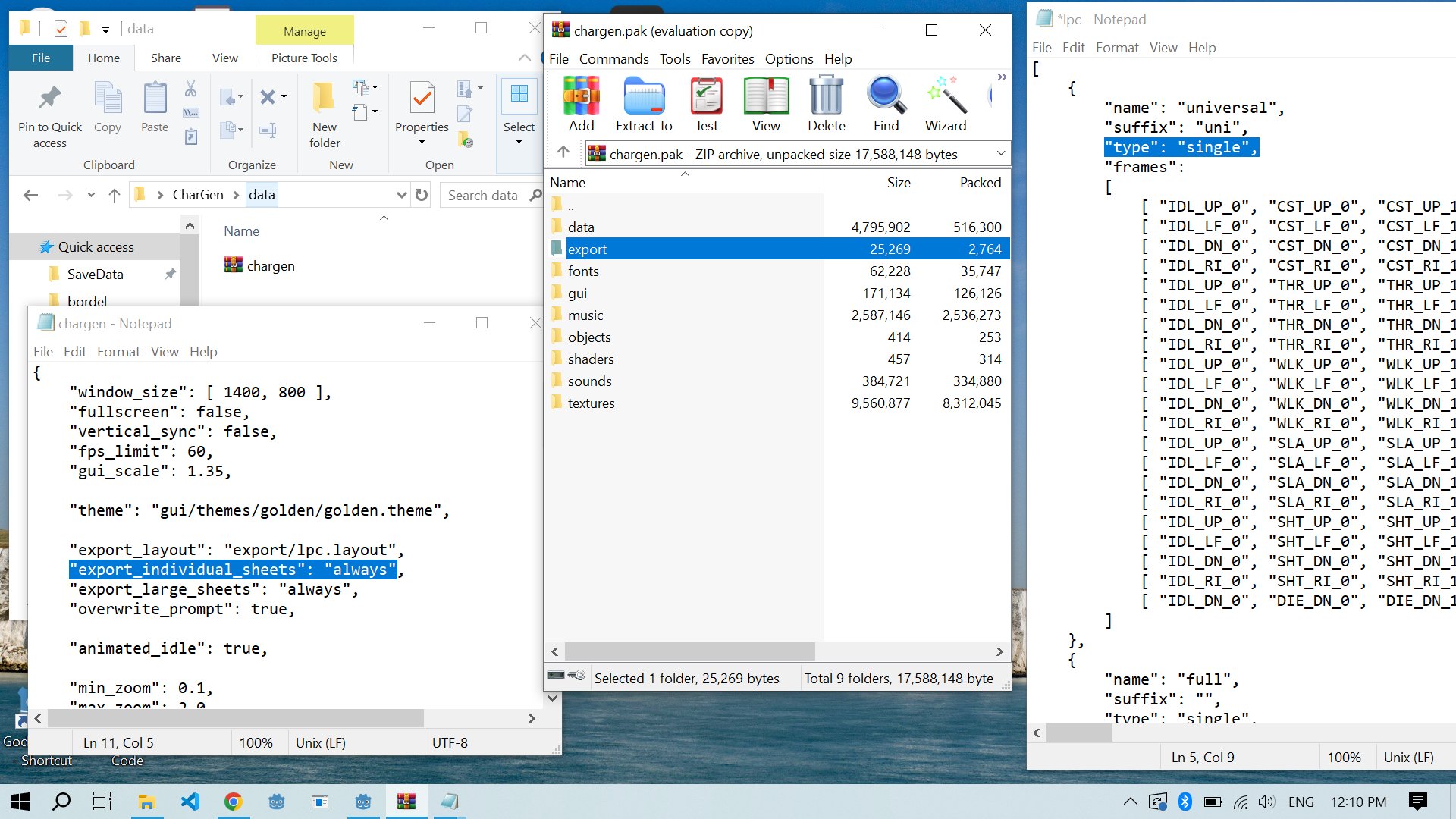
Edit: so I've just been playing around and it appears it will work with just "export_large_sheets" set to "always".

Turns out I could export it into one file all along, and the solution was extremely simple: just by changing the "type" from "universal" to "single". This is ridiculous, thank you so so much,
This app is a must and should be standard for LPC character stuff.

(2 edits)

Absolutely phenomenal app! 

Unlike some other similar online versions of this program, this one does NOT include "trash" animations like run or jump with very few clothing options that will end up only cluttering your output.

Cozy UI with cozy music and sounds let's you test out animations.

I can freely change palettes, add more items, and change the layout of the spritesheet. I feel like I have freedom to do and change anything to my taste.

The ability to have all spritesheets in uniform sizing, regardless if you have big weapon on/off is a godsend. As is also the ability to output only certain item, without rest of the character.

The source files on OGA tend to be messy and unorganized, with different layouts. It's a hustle to navigate through them, but this app makes it so easy to get the items you want in format you want.


I have only one suggestion/request:

Since all individual spritesheets have the ability to have universally the same size per frame of animation, would it be possible to add the option to output one large sheet? Even better if I could alter the layout of said file.

Currently I use Aseprite to glue all those individual sheets into one large file, and, well, my lazy self is being lazy.


10/10