Indie game storeFree gamesFun gamesHorror games
Game developmentAssetsComics
SalesBundles
Jobs
TagsGame Engines

OldManBrad

24
Posts
1
Topics
1
Followers
4
Following
A member registered Sep 27, 2023 · View creator page →

Creator of
Recent community posts

I've been trying to get this tool to work.  It turns out if you set the animation to be too short it won't render right.  Once I learned this, I set the time above 20 frames.  That's usually too much.  So the workaround is to: render frames, export frames, then import into Aseprite and finally remove the unnecessary frames.  

PS. I also noticed you updated your other utilities too.  so I grabbed the updates, now, they all are working for me without the artifacts.  thanks for the updates!

Hey, thanks Carbs, I just gave it a whirl and see no artifacts like I did before.  I clicked through all the normal options I use and it was beautiful. Thank you!

Hi, I am not great at shading, so I bought your normal generator and normal shading tools.  I'm having some problems figuring out how to get the tools to work together.  For instance, I wanted to just shade a simple ball.  I created a simple 64x64 sprite with a red circle filling in the frame.  I duplicated that to a heightmap layer, and used the gradient tool in Aseprite to do a light to dark gray gradient from the middle of the circle outward. The middle squares being white the outer pixels being black.  The heightmap looked like a perfect sphere.  (See images attached)

When I used the normal map tool, I tried dozens of settings but it always came out looking like a cone shaped object with the color(s) removed.  When I used your shader tool on the Normal file, it again looked like a colored cone shaped object.  Note: It was impressively shaded.  So I am excited to figure it out

Would you be up to doing a quick video or tutorial showing how to do a ball  utilizing both tools so I can get a better grasp of how to use the tools together?  Thanks so much!
(1 edit)

Ok, I updated it with 300% export above.  I have a water weapon in my 16/32 bit game.  This little guy will be used to upgrade that weapon. 

Do you have any shading tips?  I'm  new to shading and lean on your shading tool to pick shading colors, but otherwise, I don't really know what I'm doing.  

yes, I am on Win 11 with on a 16 in screen set to 2560 × 1600 (QHD+, 240 Hz). General screen scaling is default at 150%. So maybe there is something I need to change on this side?  Thanks for looking at this!

Hey Carbs, hope this is the right place to post a small bugor not.  Due to my poor eyesight, I set Aseprite screen scaling and UI Element Scaling both to 200%.  In Carbs Toolbar, and The Tween Machine I am having what I think are screen redraw issues where if I have one option selected, and click on another, Carb Toolbar sort of plops the new panel on top of the other.  The former options still appear behind the new panel - distorting the selected panel.  I have been just grabbing the panel and moving it around the screen to "erase" the old panel info.  But since I use your tools almost daily, thought I'd ask if something can be done?  

(4 edits)

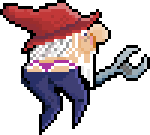
Well, ok, here's one.  I don't have the original blob.  When I looked at it, I thought "Is that a dwarf mooning me?"  Which I hereby present to you as the dwarven plumber:


P.S. I use Carb Code color shader utility to help me with the shading!  

This is another great plugin, Carbs!  When I'm thinking about drawing something, but not sure what to draw, this gets the ideas flowing.  Usually, it only takes me a couple of clicks and then I find myself shading in a unique NPC or item that I would have never thought of otherwise.  

This is great.  You're a very talented developer.  

That's a very high score!  congrats!

Nice job!  I got up to 1 plant.  The jump scares are a unique mechanic I wasn't expecting.  haha. 

Thanks for playing my game!  I did implement a suggestion from another player that makes the game a bit easier.  Now when you catch 4 balls, you grows larger. Hopefully, it makes the game more fun.  For the teleport, I admit it's challenging.  it has to be timed almost perfectly to work.  I'll work on smoothing that out.  

I love the growing mechanic.  I went ahead and added it - along with some garageband music I whipped up.  Thanks Jad!

Thank you!

PS.  I added the fullscreen button.  thanks for the feedback.

Thank you so much!

This looks like fun, but I can't figure out how to start it.  I get to the start screen and can choose start, options, and info.  But hitting spacebar or Enter doesn't launch anything.  How do I start the game?  Thanks!

Thank you.  That worked perfectly

Hi, I downloaded the trial for your PixelOver software.  It looks very helpful.  But when I run the software, the font is ultra small ( like 6 or 7 point.)  Is there any way for me to scale the interface so I can make out the text?  thank you.

Yes, this works now!  Maybe just add on to your written procedures that the user needs to add some frames for the plugin to work properly.  In messing with it, it might be helpful at times to autodraw on 1 frame.  like if you're trying to do some careful fill ins that aren't too agressive.  just my thoughts...  

ok, I think I see what the problem is, in your video it says to put some frames down.  I wasn't adding frames.  After adding frames it seems to work well.   

I did shoot a video, but not sure how to post here without a Youtube account.   So I am posting an image to give you an idea.  

Today, I created a fresh drawing 256 x 256.   I did the procedures above on the tree drawing. It does drop the leaves in a pretty pattern, but it's all on one frame.  

Hey Carbs, I bought this as part of one of the bundles.  I seem to be having a problem with it.  I tried reproducing your Tree leaves scene.  I programmed 3 hotkeys as your tutorial recommended buttons 1, 2, and 3 (loop and draw).  But when I go to loop, it may create 2 additional frames, but it stops there.  Drawing seems to sometimes work, but at other times, I can't get anything to appear by just moving my mouse.  If I click to place leaves, they all end up on 1 or 2 frames, so it looks like they are blinking.   Any thoughts about what might be happening?