If that's the case, the only thing I can think of is that the folder holding the images and the .xml file are in different places so they can't find each other. If those two files are in the same folder, then I genuinely don't know what the issue is. My apologies
Nera Nos
Creator of
Recent community posts
Just re-downloaded to test, works fine for me. Just to be sure, are you using the model in the RahiTuber program or something different like pngtuber+? It likely won't work in other programs.
If that isn't the issue, ensure you've extracted both the "LostTheCat-Portable" image folder and "LostTheCat-Portable.xml" file to the RahiTuber folder on your computer and try opening the .xml in RahiTuber.
The last thing I can think of is the fact that I made the model with the application full-screen on a 1440p monitor, and if your monitor or application window is a different size you may need to make some adjustments to the Canvas Settings if for some reason the model is off-screen by default.
Fair enough! The layer stack is perfectly usable as it is now, and I'll probably go ahead with the multiple-folder solution I mentioned for this particular issue. I will say that a filter search in the states menu would be very helpful if you get around to it, as I occasionally get lost in the layer list looking for specific layers I need to toggle.
Good to know about identical layers not affecting performance, though for some reason the idea of duplicating the entire model multiple times to change expressions is equal parts interesting and hilarious to me~.
EDIT: Wait it just clicked, I'd use folder-toggling states to control my expressions and the "bald" toggle state to toggle all of the hair layers on/off throughout the entire project. Still might be a tad excessive for this particular project, but that is good tech!
While I haven't yet run into any issues with the layering system as it is now, I'm realizing as I explore more complicated set ups with increasingly more layers that it would be nice to have more advanced options available to directly control where an image sits between other images on the avatar irrespective of it's place in the layer stack.
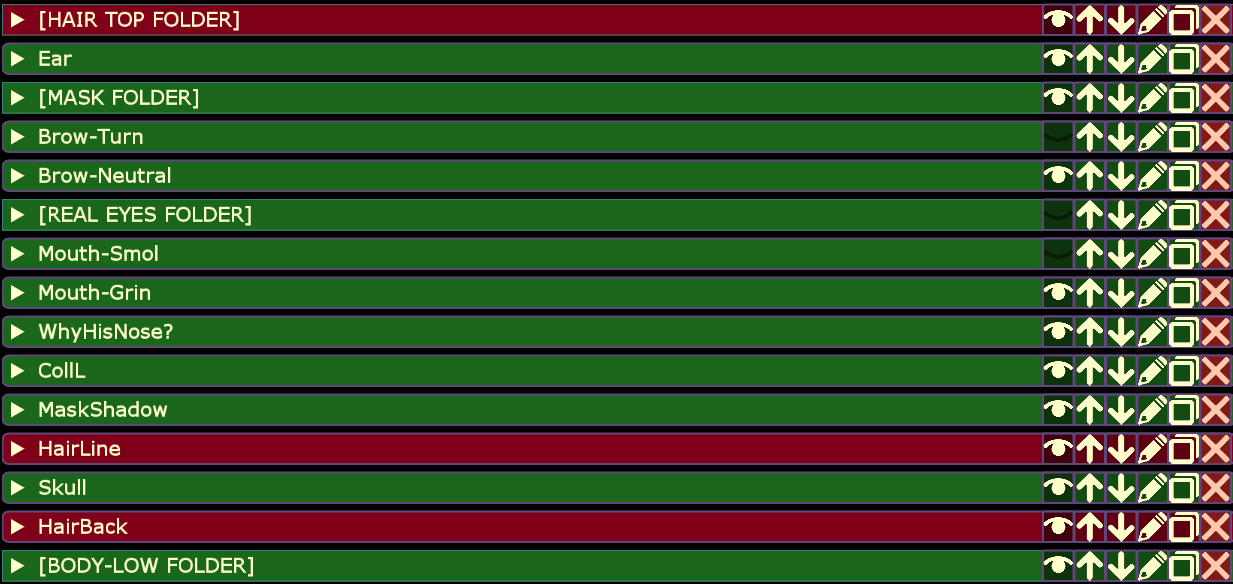
As an example, this avatar has a "bald" toggle, which means I need a state that can disable all hair layers across any other states I may be using. The easiest way to do that is to have all the hair in a folder, then toggle off the folder; that way if I trigger another state that changes any of the hair pieces while I'm "bald" I'll stay bald. The problem (marked red in the image) is that some of the hair is behind the head and some of the hair is above the head; I can't have it all in the folder without breaking the avatar.
I could just make more folders (in this example, one for the 'HairLine' and one for the 'HairBack' layers). But if it were possible to have all of these hair layers in the same folder and just manually assign index values, the layer stack could be cleaned up a bit and controlled easier.
Now, if this is already a feature that exists and I just haven't found it I'm going to feel very silly.