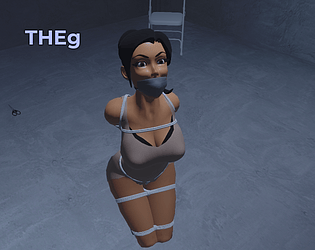
I’ve been working on implementing new features and general improvements to the game. One of the biggest is the replacement of the female model by an improved one.
NPCs needs to have a “leashable” restraint, as of right now, either collar ropes, wrists ropes, ankle ropes or the armbinder, you can equip them all at once too.
Equip ropes in your hand, aim at the NPC to leash them, you can leash them to each other and create a line of captives following you. If you want to leash them to a ceiling hook to create strappado or suspension position, you have to create a leash from the ceiling hook first then on the NPC.
I will improve this process in a future update so you can create positions without having to create the leash from a specific object.
At the time i am writing this comment, the only version published on this page is the free version of the game which is older than the latest one. If you want the current one, look at the description of the game on this page.
Hi. You need to grab the NPCs from behind and hold a restraint item in your hand by either opening the inventory and clicking on the item or by using the quick access menu (Q by default).
The game is still a work-in-progress, while i’m building the game, the current version available here is the free version. If you want the up-to-date version of the game, check the end of the description.
Sorry about the delay. Aim with ropes equipped in your hand. You can create a leash from an anchor point or a character, the character needs to have crotch or collar ropes if you want to make them follow you.
Don’t worry, when the time comes, i will make a proper tutorial for the game explaining all of the features.
Open the inventory, if you want to change the body and hairstyle of your character, there’s a “Body customization” button. If you want to change the outfit of the character, go to the wardrobe page.
Thank you! I do freelance programming for about 7 years now and been doing game dev for around 10 years. I learned everything on my own and by reading/watching tutorials. I needed a lot of patience, especially on the modeling part of it since i’m not an artist. It takes a while but it’s worth it. :)
In terms of places to be, you are right, it’s still the two floors. As i previously said in my devlogs, i’m working on features and base systems first. It will allow me to work on actual content and the story of the game without too much trouble.
That’s because i originally compiled the prototype without static linking libraries on Arch Linux. In recent releases for subscribers i did recompile it using static linking which i don’t know if it has fixed the problem since i’m not using any Debian based distros.
If the problem persist, i’ll try to make a Flatpak version of it.
You need to open a command prompt inside the game folder and launch the game with the following command:
THEg.exe --rendering-driver opengl3
You can watch a tutorial for that if you don’t know how to do these things, i will however make a shortcut in the game’s folder to launch the game in OpenGL mode to make this easier.
Keep in mind, you may be able to run the game but it won’t be as pretty as the Vulkan version. If you want to play the Vulkan version, you will need to upgrade to a graphics card that supports it. :)