
Indie game storeFree gamesFun gamesHorror games
Game developmentAssetsComics
SalesBundles
Jobs
TagsGame Engines

myolden666

13
Posts
2
Topics
1
Following
A member registered Sep 22, 2025

Recent community posts

Plugin has been working great (using the Electron.js version) but I've noticed that whenever my game is run through steam and I hit the escape key, it exits fullscreen mode? Is there any way to disable this considering the escape key is also meant to pull up and close so many menus?

That worked. Thank you!

(1 edit)

Hey there,

Trying to get this plugin set up with my existing custom options menu, and an issue has popped up.

Essentially, when the menu loads a script is run that checks if the filter is active or not. The code is this:

if ($gameSystem.setCRTEffects() === true) {menu stuff happens here}

For some reason that if statement always returns false? Is there any way to check if the filter is active during runtime?

Thanks

Thanks, I appreciate that! I commissioned a buddy of mine for the logo. The gold trim (and backgrounds for the battle screen, plus a few other odds and ends) were taken from Marumugi's 8 bit all in one pack.

Hey Willibab, I used a bunch of your assets in my game that is now available for wishlisting on Steam! Thanks for making all of this great stuff, I definitely plan on using more of your work in the future.

Here's a link to the game on steam... it releases in September. If you'd like a Steam Key I can send one your way as soon as Steam allows me to generate them.
https://store.steampowered.com/app/4847780/Chaos_Warrior/

Okay, so I repeated the exact steps that I did before, only this time after compiling all of the files into the "Build-Windows" folder I attempted to run the game. It crashed on the first run just like you said it would, and created the replace_done.flag file. THEN I uploaded it to steam using the SteamPipeGUI tool. After that, the game boots properly AND the achievements work!!!! Thank you so much for taking the time to reply and help me diagnose and fix this issue!!!

(1 edit)

Ah, I see where I failed. I hadn't actually implemented the SteamworksPlus_SteamUserStats.js, since the translation plugin had all of the plugin commands for achievements I didn't think I was missing anything.

However, when I add SteamUserStats.js, I now am unable to boot the game in steam. No error message, just a loading screen that spins endlessly. If I disable the Steamworks plugins, it works fine. This is with the Electronjs version.

I went back and tried again with the NWjs version with all of the changes I've made, but then I get the initial Node error again. I'm going to try to go through the steps again with the Electronjs version...

EDIT: Tried again with the Electronjs version, still get the infinite spinning circle...

(3 edits)

I'm using the 1.3.0 version of NW.js (I just updated this morning). Not sure what the Electron.js is for... is that required with NW.js, or is it like an alternate version? The installation instructions didn't seem to mention it...

I did manage to launch the exe directly through steam. I was initially getting an error that prevented me from installing the uploaded build but that went away when I restarted Steam. Now I'm able to boot the exe from steam but I still get the above Node error message.

I am using Windows 11.

EDIT: I started the process from scratch using the files in the Electronjs folder, and I am now able to boot the game from Steam successfully! However, it appears I am still unable to actually unlock achievements. Pretty sure I configured the plugin commands correctly and all that, but I'll dig through everything again to make sure.

Do "NekoGakuen_SteamworksPlus.js" and "NekoGakuen_SteamworksPlus_en_US.js" need to be on the same version? I notice that the former is 1.3.0 and the latter is 1.2.1

Trying to implement this, but when I attempt to launch my playtest build on steam I get the following:

This engine is based on Node 14.12.0, but koffi requires Node >= 14.17.0 in the Node 14.x branch (N-API >= 8)

I tried googling and found some posts about koffi and Nodes but it's might as well be ancient Egyptian hieroglyphs. Is there a simple solution? Or does this point to a step that I performed incorrectly while implementing? Any help at all would be greatly appreciated.

I figured out the issue, turns out I accidentally included a few extra characters in the "All Characters" plugin parameter that were not in the png file. Removing those characters from the parameter fixed the issue. Figured I'd leave the post instead of deleting it in case someone else made the same mistake I did.

(2 edits)

Hey, trying to get this plugin working and I'm running into an issue with the text apparently misaligning ingame. I've verified that the png file for the font is set up correctly (all of the letters are on a 16x16 grid) but I just can't seem to work this out. Below is a screenshot of the name input screen, along with a copy of the png file I'm using.

I've also disabled all other plugins except the two (Book and Bitmap Font) and the issue persists.

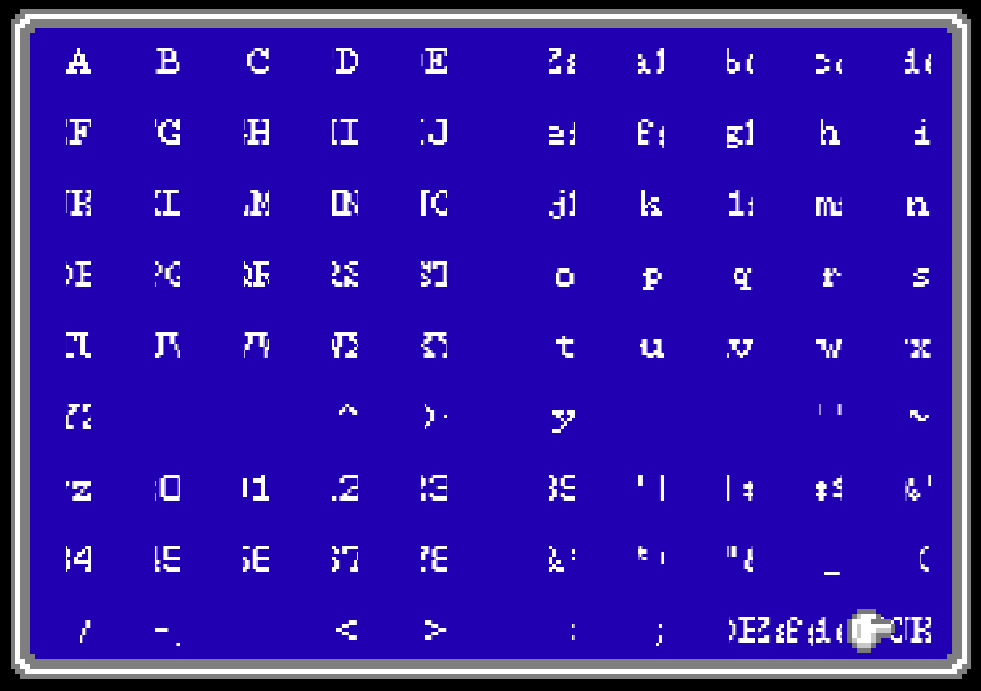
Link to png file


(1 edit)

Using these for a game I'm working on, and I just have to say they are amazing! Super easy to get working and they look great in game. Well worth the price.

These 8 bit retro resource packs are amazing! I'm working with them and it's so easy to make something good looking with them. I'd love to see some camp-themed stuff, too. You know - tents, campfires, sleeping bags, etc.