On Sale: GamesAssetsToolsTabletopComics
Indie game storeFree gamesFun gamesHorror games
Game developmentAssetsComics
SalesBundles
Jobs
TagsGame Engines

MrMBag

3
Posts
A member registered Mar 04, 2025

Recent community posts

Yes. That I DID actually know about. LOLza! Thanks again!

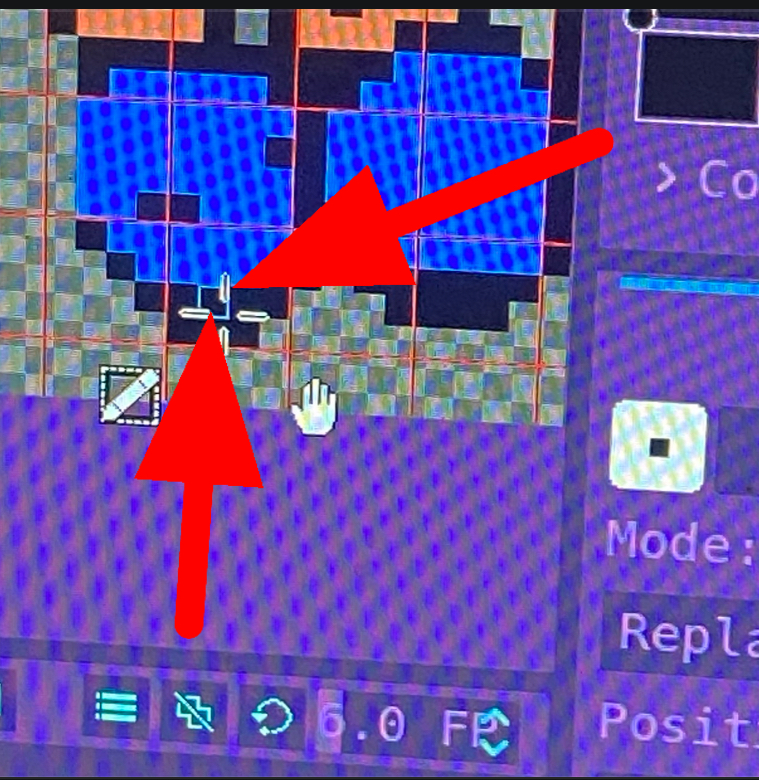
Holy cow do I feel silly!! Well that's super rad, and thank you very much!! I actually really like pixelorama a lot. The way you can customize the UI, and the tools is really really killer. I don't think I'm color blind, but I'm wondering now because I could NOT see that blue square unless I had my nose pressed against the monitor.  I kept coloring in the wrong pixels, it was making me bonkers! I'm not sure how I missed that setting, or maybe I thought it did something else, I'm not sure, but THANK YOU! I've been using "RealWorld Cursor Editor" for all my sprites. It's actually REALLY REALLY cool, but I see ACTUAL sprite editor programs that are geared towards video game making that have functions RWCE doesn't have, but I'm really amazed at how much functionality it does have, and it's really quite intuitive, and you can write your scripts to add custom functionality, but I'm not quite that advanced yet... Anyway, thanks again!! 


  >M<

(1 edit)

See the Green box indicating which pixel I have selected? (Hint if you didn’t… Follow the red arrows). Is it possible to change that color?? I cannot see it, but I love this program, and I’d HATE to have to quit using it because of that dumb thing. Please help!!


EDIT : I’m not sure if this matters, but I’m using the Linux ARM version of pixelrama too.