On Sale: GamesAssetsToolsTabletopComics
Indie game storeFree gamesFun gamesHorror games
Game developmentAssetsComics
SalesBundles
Jobs
TagsGame Engines

milkerman

8
Posts
7
Followers
19
Following
A member registered Apr 27, 2020 · View creator page →

Creator of

Recent community posts

(1 edit)

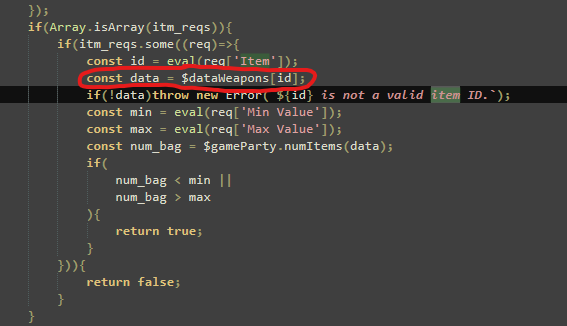
I was looking through the code, and I think that line is the error. The code is checking for weapons there instead of items, I think.


Edit: That was indeed the issue, once I changed it to $dataItems, it started working as expected.

They are, yes. I made sure of it and tested it multiple times. The item part won't work on conjunction with the switch, unless the item number is 0.

Hey, so I've added some item requirements for some text to show up. But the text only shows up if the item requirements are 0. 

When I set the requirements to: Switch 43 on, item 37 min 2, max 2. The text won't show up in the menu. It works fine when the requirement is only a switch.

Question, but is there any way to prove steam ownership and be allowed to download over here? It seems the steam uploads take some time.

Awesome, thanks a lot.

Hey Casper, is there any chance you could add self switches to this?

I'd say they're the only thing missing. The way I'd format them would be:

Name of switch: ID : ON/OFF

Thanks,

Milkerman

Hi Neon,


Thank you for the detailed answer. For the moment, I plan on using RPGmaker, but in the future, I may jump to RPG Architect, since it seems to allow more freedom. But for now, I'll probably stick to what you have.

Hi Neon, question for you. If I were to purchase this (Which I probably will when it's on sale), will I only be able to use it in RPGMaker or can I use it in other tools as well?