On Sale: GamesAssetsToolsTabletopComics
Indie game storeFree gamesFun gamesHorror games
Game developmentAssetsComics
SalesBundles
Jobs
TagsGame Engines

Kuroru

4
Posts
1
Topics
2
Followers
6
Following
A member registered May 15, 2022 · View creator page →

Creator of

Recent community posts

(1 edit)

I optimize the automation by prioritizing on primary color nodes because of buffs from early Fractured Void's star charts and tuning auto-converge to the exact value when those primary nodes are full.

Here's my ratio
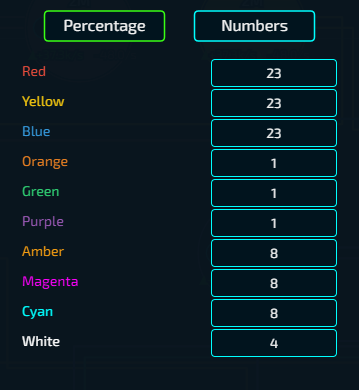
Maybe there is a better one but I haven't found that ratio yet

(2 edits)

I think the problem is from `x1.5 qubits` upgrade. 

Since you use TIC-80 and the game seems to reset every time buying `Prestige` upgrade. I'm pretty sure you use pmem and pmem can contain only unsigned int.

I have the same issue with this post (Mikochi is appeared on a black screen)
[OS: Windows 11]

For my case:

  1. Open from .exe file in the directory (outside bin folder) -> Working fine
  2. Pin the opened app to the taskbar.
  3. Close the app and open it again from the taskbar. -> The issue occurred.
Holo Pets community · Created a new topic Run on startup
(1 edit)

In version 0.9 and older, I have create the task in Task Scheduler to start HoloPets when logging in to Windows.
However my task doesn't run properly in version 0.10 (HoloPets not start).
[OS: Windows 11]
===
Suggestion: Create run on startup option.
(It 's a good to have feature but not that necessary, I'm sorry if it sounds like a command)