

Émouvant
A member registered Jun 29, 2021
Recent community posts

Hello! I don’t know if you’ve figured it out since but have some help anyway:
What you want is the latest release for Windows.
The last three files are of an old version of the game, and the ones with osx and linux in the file name are for other operating systems. So simply go ahead and download a-short-hike-windows-latest.zip.

Then open the .zip file you’ve just downloaded and start AShortHike.exe to play the game.
Another option if you have Steam is to add the game to your Steam library. Your purchase comes with a key to do so. You can redeem it by going to the download page on itch.io and clicking the button under “Claim Steam key”. Then open Steam on your computer, go to library, click this button in the bottom left corner:

and then “activate a product on Steam”
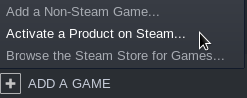
Have fun!