Thank you for giving it a play!
jupdown
Creator of
Recent community posts
Heyo, I think you missed a file when uploading your game. I tried executing both the Windows and Linux versions on my machine and I got the same error about the missing .pck file:
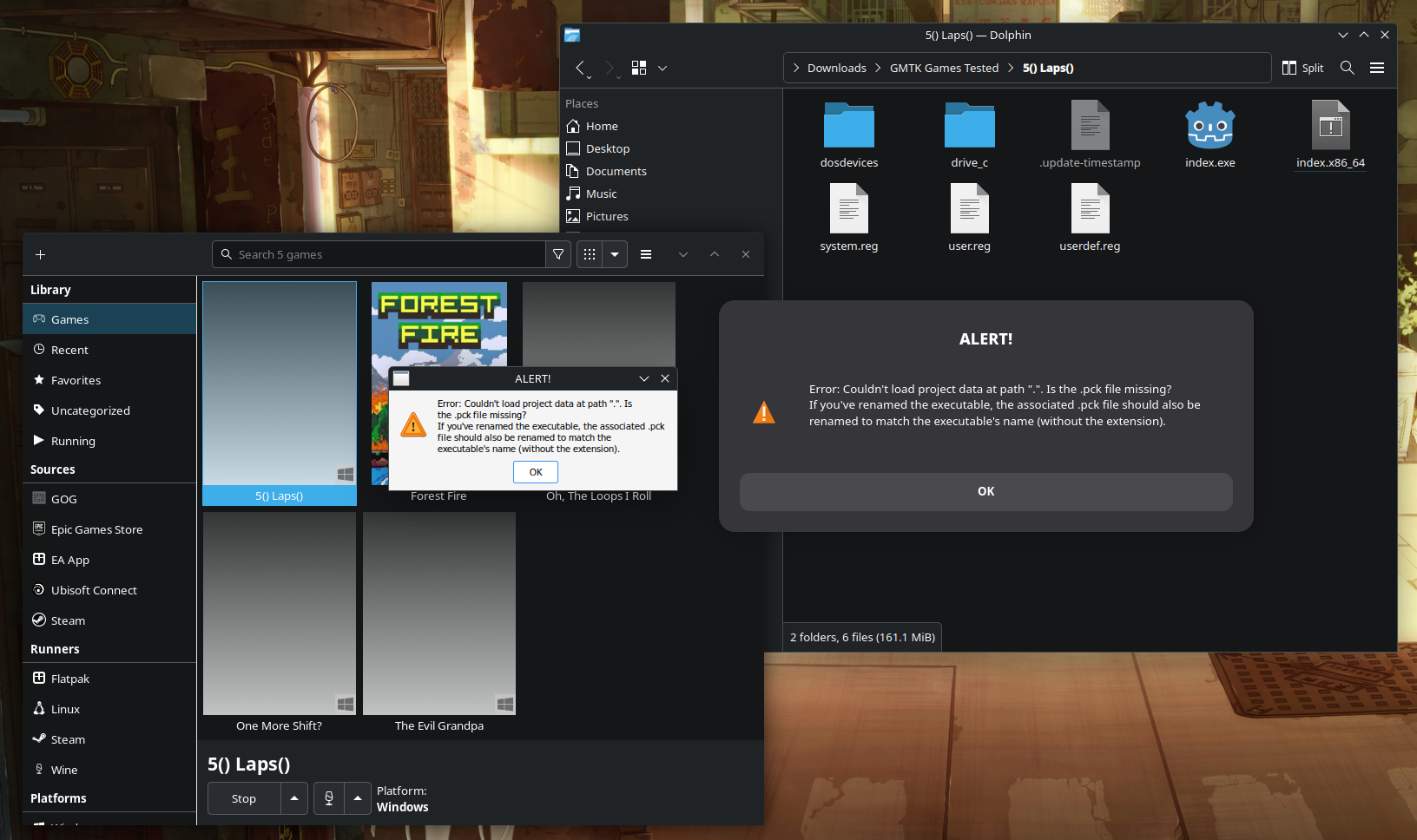
I think this is a requirement for Godot made games - to either include it as a part of the executable during export or to include it alongside the executable.
Really neat little game - I loved the theme and the art (I like trains)! I really had a lot of fun playing it. One thing I couldn't figure out is what the exit is for:
I went past it twice and couldn't figure out what to do with it. On one of my earlier runs I saw a green upwards arrow and collected it... but no clue what that did either. Maybe I didn't play it long enough?
Additionally, I want to thank you personally for distributing a Linux build of your application! It made downloading and running the game a breeze. Thank you!❤️
DOS? ON MY POSIX SYSTEM! NEVER! (joking)
Honesty I love this little game - it's so creative and fun. The art style is a nice aesthetic and it brings me the same joyful childhood vibes I used to get from the Microsoft Entertainment Pack (Specifically Chip's Challenge).
I also very much appreciate the native Linux support. I was able to download the Linux build and just execute it without any special configurations. Thank you! ❤️
Heyo - I can't play your game 😢
I think you uploaded the wrong file maybe? It's just a .dmg file which I think is an Apple Disk Image file format? Is there some other way to launch the game?
Really fun cute little game - you got me hooked boss! One question I have though is how to run this game on Linux... you've listed the game as having Linux support but I don't see a Linux executable? I ended up getting it to work on my own via Lutris / Proton-GE but I'm curious to know if I'm missing a step to making this game run on Linux natively.
Hey @janekje,
Thank you for trying our game!
The triangle button at the start is a result of what we had to cut to ship this as-is. There's no way to activate it unfortunately.
Additionally, controller support is optional - you can play with Keyboard (Arrow Keys, Shift, Space and C) or you can play with your favourite controller :)
This game has soul and I love every bit of it! I especially appreciate the Linux support! As a Linux gamer, it's always annoying to have to configure the WINE prefix with Lutris, install missing Windows dependencies all just to run a game.
Your build - it worked flawlessly! No WINE, no dependencies, just execute and fly and I really appreciate that! Thank you!❤️
Overall, I think this game was a great little demo - good job! I did however encounter some weird performance issues at the start whenever I would look in the direction of the stairwell.
To be clear: I am playing this game under Linux and I know the target platform is Windows so that could be the source of this performance issue but I would be curious to see if anyone else who is running this on Windows is experiencing the same. Here's a video of the issue:
My specifications are as follows:OS: Fedora Linux 42 (KDE Plasma Desktop Edition) x86_64 Kernel: Linux 6.15.8-200.fc42.x86_64 Display (BOE0BC9): 2560x1600 @ 165 Hz in 16" [Built-in] DE: KDE Plasma 6.4.3 WM: KWin (Wayland) WM Theme: Breeze CPU: AMD Ryzen 9 7940HS (16) @ 5.26 GHz GPU: AMD Radeon 780M Graphics [Integrated] Memory: 9.29 GiB / 27.20 GiB (34%) Swap: 641.28 MiB / 8.00 GiB (8%) Disk (/): 253.07 GiB / 1.82 TiB (14%) - btrfs Runner: Glorious Eggroll Proton 10-10 DXVK: v2.14