I think it would be cool if you also made a video translating your cel shader.gdshader into glsl
A member registered Jun 11, 2025 · View creator page →
Creator of
Recent community posts
TLDR
Anyway if anyone downloads this project make sure to go into edge_detection_compositor.gd script and add
Line 123 rd.free_rid(texture_sampler)
to make the project not crash and also double check to enable "needs normal roughness" box within the inspector
the worldenvironment
-> Compositor
-> Array[CompositorEffect]
-> EdgeDectionCompositor
-> [✓] Needs Normal Roughness
Hi, firstly thanks for this example project. It has been helping me find the visual style for my game.
However I think I've run into a similar bug to Kog_Works. I enabled "needs normal roughness" box within the worldenvironment -> compositor -> so on.
For a while the project runs great, but after some time all of a sudden I end up getting this error that spams the console and makes the engine unusable since it makes everything lag.
 ERROR: Uniforms were never supplied for set (0) at the time of drawing, which are required by the pipeline.
 ERROR: ./core/templates/rid_owner.h:294 - Parameter "mem" is null.
 ERROR: SamplerTexture (binding: 2) should provide two IDs referencing a sampler and then a texture (IDs provided: 1).
 ERROR: servers/rendering/renderer_rd/uniform_set_cache_rd.h:120 - Condition "rid.is_null()" is true. Returning: rid
 ERROR: servers/rendering/rendering_device.cpp:5221 - Parameter "uniform_set" is null.
 ERROR: Uniforms were never supplied for set (0) at the time of drawing, which are required by the pipeline.
 ERROR: Element limit reached.
I haven't learnt compositing effects from scratch yet but any help or directions is appreciated. 👍
edit: I'm using Godot 4.5 and after running a fresh version of the project for almost 10 minutes got the same error as above.
edit - 2: I tried a fresh version of the project in a fresh install of Godot 4.4 like in ur video and got a slightly different error from myself previously and Kog_works. This time it happened after running the scene for 14 minutes and 50 seconds.
ERROR: Element limit reached.
ERROR: ./core/templates/rid_owner.h:296 - Parameter "mem" is null.
ERROR: servers/rendering/renderer_rd/uniform_set_cache_rd.h:131 - Condition "rid.is_null()" is true. Returning: rid
ERROR: servers/rendering/rendering_device.cpp:5153 - Parameter "uniform_set" is null.
ERROR: Uniforms were never supplied for set (0) at the time of drawing, which are required by the pipeline.
ERROR: Element limit reached.
ERROR: ./core/templates/rid_owner.h:296 - Parameter "mem" is null.
ERROR: Failed to create uniform set for batch.
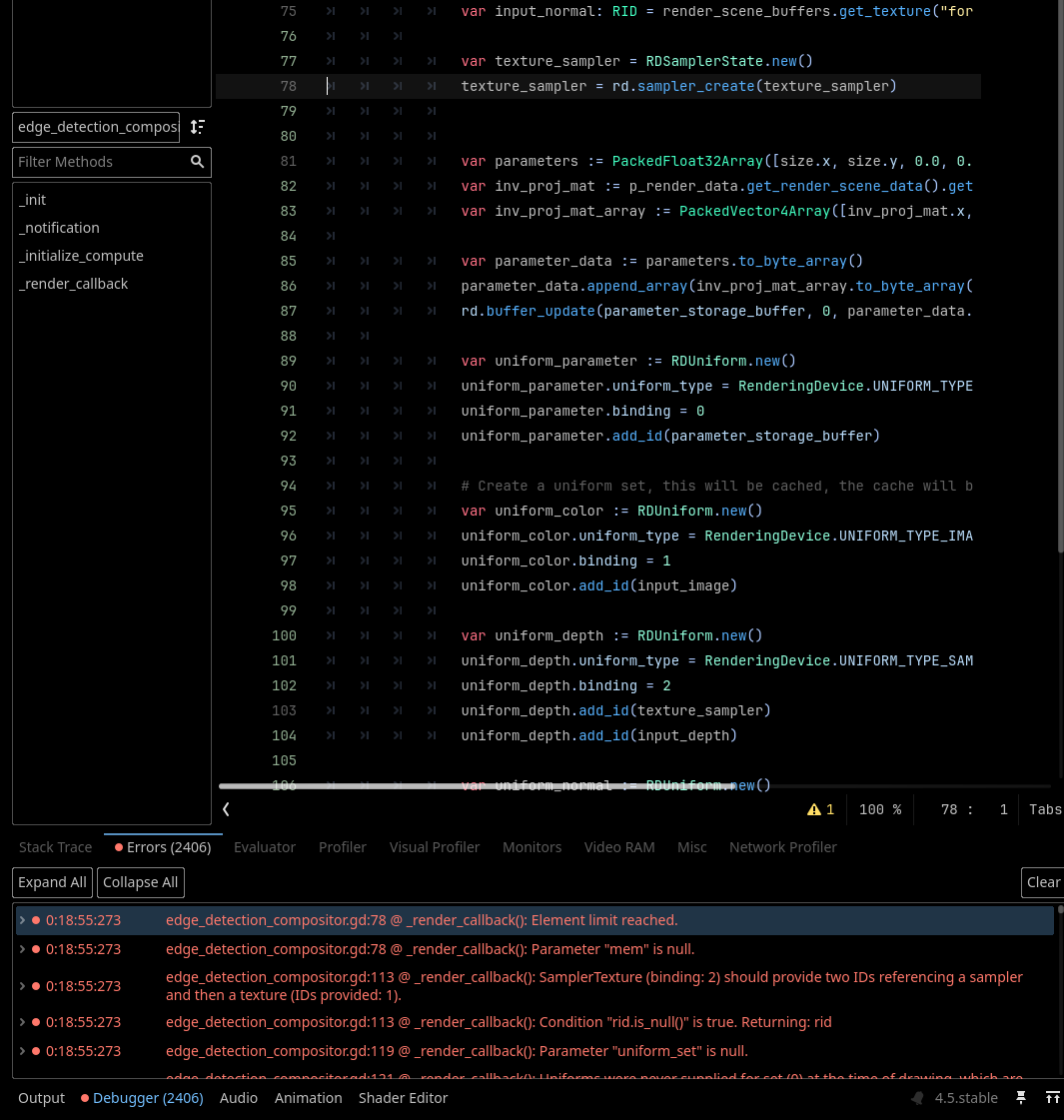
edit - 3: I think I found the problem, before I got too many errors and the whole engine becomes unusable, I went to the debugger and clicked on the first error which took me to the edge_detection_compositor.gd script, line 78. The error causing this issue has something to do with
texture_sampler = rd.sampler_create(texture_sampler)
having its element limit reached. When using
sampler_create()
The documentation says to make sure to use
free_rid()
Once ur finished using your RID.
I think var texture_sampler was constantly getting larger and eventually caused a memory leak, making the outline disappear from the game and making the engine super slow and unresponsive.
I did fix the issue by putting
rd.free_rid(texture_sampler)
on line 123 of edge_detection_compositor.gd and then was able to see memory usage in task manager wasn't slowly climbing anymore when running the project. I also ran the project for an hour afterwards and it was completely fine, memory usage actually went down to around ~200MB, probably something to do with godot in the background doing stuff with shader optimisation.
I also notice that line 120 in edge_detection_compositor.gd was commented out, is there a reason for that?