Another thing I had forgotten to highlight (it was on loading screen tips but not guaranteed to show) was that sheeps move faster and stay closer the higher the moral
Iggydus
Creator of
Recent community posts
Thanks! I always fall short on the tutorial aspect. The glowing shield thingamajig in the sky is a checkpoint that shows where to go next when you walk underneath it. The night was indeed too dark but I had only tested it along the path due to the amount of time. The charge attack was weird, it was a multisphere trace from the start of the dash to the end, and i added each person hit to an array so the same character woudnt get hit twice, but there were some instances where it wasnt triggering properly on the smaller wolves.
thanks! the world has alot of fluff as there is a path for you to follow, so alot of it is traversible but theres nothing there. I didnt point out that the glowing marks are checkpoints but I needed to finish the packaging etc with enough time to submit so I didnt do anymore tutorial work.
The sound settings actually had music, ambience and sound effects but no time to classify the sounds so I just hid those in the menu.
I have some concurrency on the different category of sounds but there were still quite a few sources (wolf growling, howling, sheep bleating, ram scream when hit and all the hit fx) so sometimes the overlap would get loud
I completely missed that! I'ma go check again.
I am a part of the proof that people don't read lol.
EDIT: Oh I see it! But its too obscure. You only see it if you remain next to the border which I didnt do. As soon as I couldnt pass I went back thinking I needed to do something behind me so i missed it. It also blends in too well with the background.
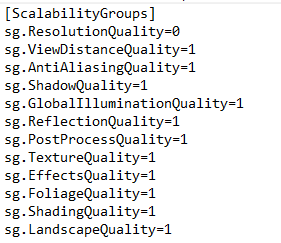
For those of us who do not have PCs with amazing specs, if you find any game running extremely slow with low fps you can turn down the quality by editing the "GameUserSettings.ini" file.
This file is in one of the following directories based on if the packaged build was shipping, development or debug
- \[Projectname]\saved\config\window
- \Users\[UserName]\AppData\Local\[ProjectName]\Saved\Config\windows
Edit the section shown below. 0 for low, 1 for medium, 2 for high
Hey, so i'm working on the spear fishing in mine and i'm trying to figure out a way to fire and retract the harpoon. If you don't mind, how did you accomplish that?
I'm tried spawning an actor but it doesnt work as well as i want it to, then i considered animating the harpoon mesh forwards and back but i'm not sure how to accomplish that
Great and amazing take on fishing. I loved the flying, the controls and animations plus the wingbeats etc. The fishing was very tricky tho. I havent quite figured out what angle you need to dive in from, and to what position. I thought you had to go from above, and slightly ahead but it wasnt hitting at all. tried going diagonally ahead and diagonally right to it but it only triggered for me about 4 or 5 times.