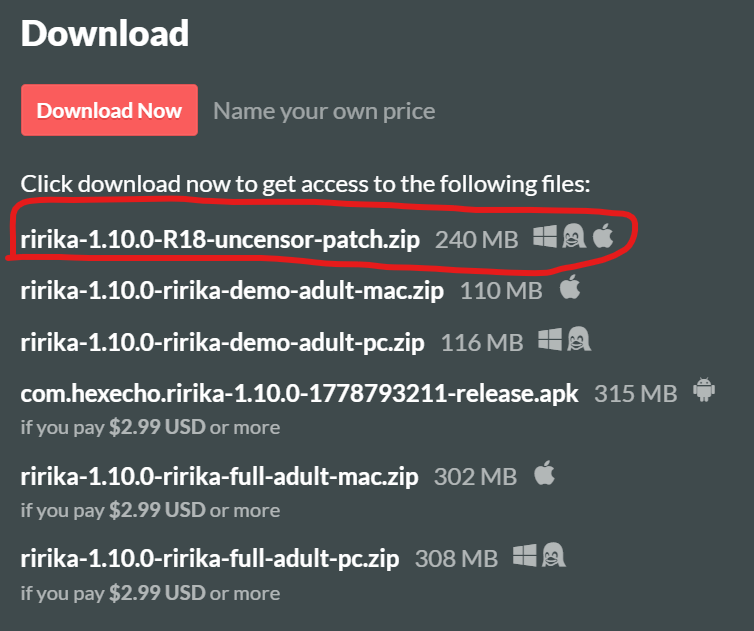
The download circled in red is the patch and it's free. That is the patch you apply to your Steam bought version. It *is* separated from the game, so I'm confused what you are referring to.
A blog post about the changes is cool, but I'd recommend an in-game guide as well. For final release, I'd shoot for an in-game Tutorial or even a guided run (tutorial first run basically), although I know that's way more work for you lol.
I also humbly ask as a fellow indie game dev, for you to check out my own game :3
https://hexecho.itch.io/ririka
I'm also trying to leverage AI tooling to establish myself as an eroge game dev. We should share notes! :)
This game is very impressive! Very effective use of AI tooling and images I think. I aspire to meet your level of quality some day soon! :D
This has probably been said before, but I think there is some balancing issues in the game that need to be addressed. The battles sometimes feel too long or drawn out.
I also wish there were some meta progression between runs.
I'm sure you are already working on addressing these though as they are both issues pretty common among rogue-lites.
Are you going to list the game on Steam soon? This will dramatically increase your sales and exposure! I highly recommend you do so. I think it would do well on there :)
If you bought the game via Steam, here is how to install the uncensor patch for the Steam version. The patch restores content that couldn't be included in the Steam release. Here's how to install it step by step.
What You'll Need
Step 1 — Locate Your Game Folder
You should land in a folder called ririka-steam inside steamapps/common/ririka-steam-pc-linux/. The full path will look something like:
C:\Program Files (x86)\Steam\steamapps\common\ririka-steam-pc-linux\ririka-steam
(Your drive letter and Steam location may differ, but the ririka-steam-pc-linux/ririka-steam part should be the same.)
Inside ririka-steam, you should see a folder called game among other files. This is where the patch needs to go.
Step 2 — Extract the Patch
ririka-1.3.0-ririka-adult-patch. Open that folder.
game folder. Copy this game folder into your ririka-steam folder from Step 1, merging it with the existing game folder already there.
Important: Don't just extract the zip as-is into your game directory — that would create the wrapper folder ririka-1.3.0-ririka-adult-patch inside your game files, and the patch won't work. You need to go into that folder and copy the game folder out of it.
Step 3 — Verify It Worked
Launch the game normally through Steam. On the title screen, check the bottom-right corner for the version label. If the patch was applied correctly, you should see:
1.3.0 - Uncut Edition
If it still says 1.3.0 - All-Ages Edition, the patch wasn't applied to the right location. Double-check that the contents of the patch's game folder ended up inside ririka-steam/game/ and not in a nested subfolder.
Troubleshooting
ririka-1.3.0-ririka-adult-patch folder inside my game directory." — You extracted the zip directly instead of copying the game folder out of it. Delete that folder, then follow Step 2 again.
Thank you for your interest in the game! The patch restores content that couldn't be included in the Steam release. Here's how to install it step by step.
What You'll Need
Step 1 — Locate Your Game Folder
You should land in a folder called ririka-steam inside steamapps/common/ririka-steam-pc-linux/. The full path will look something like:
C:\Program Files (x86)\Steam\steamapps\common\ririka-steam-pc-linux\ririka-steam
(Your drive letter and Steam location may differ, but the ririka-steam-pc-linux/ririka-steam part should be the same.)
Inside ririka-steam, you should see a folder called game among other files. This is where the patch needs to go.
Step 2 — Extract the Patch
ririka-1.3.0-ririka-adult-patch. Open that folder.
game folder. Copy this game folder into your ririka-steam folder from Step 1, merging it with the existing game folder already there.
Important: Don't just extract the zip as-is into your game directory — that would create the wrapper folder ririka-1.3.0-ririka-adult-patch inside your game files, and the patch won't work. You need to go into that folder and copy the game folder out of it.
Step 3 — Verify It Worked
Launch the game normally through Steam. On the title screen, check the bottom-right corner for the version label. If the patch was applied correctly, you should see:
1.3.0 - Uncut Edition
If it still says 1.3.0 - All-Ages Edition, the patch wasn't applied to the right location. Double-check that the contents of the patch's game folder ended up inside ririka-steam/game/ and not in a nested subfolder.
Troubleshooting
ririka-1.3.0-ririka-adult-patch folder inside my game directory." — You extracted the zip directly instead of copying the game folder out of it. Delete that folder, then follow Step 2 again.
Candidly, this is actually my first attempt at a game, much less a hentai game. Any feedback is welcome, and please be kind.
For 0.1.0, only Act 1 is included. It's very short and mainly an experiment in AI workflow and putting things together.
Speaking of AI, yes, I used AI for almost everything. For the images, backgrounds, dialogue, music, and Renpy code. The sound effects and voice are not AI. Those are provided by free open-use sources.
For future version, I obviously will include more Acts and more insanity with the story. I also plan on including translations at some point, although I am unsure which languages to translate to. Based on community response, we can decide that later.
Anyway, please give it a play and let me know what you think! Donations are appreciated but not required.