Indie game storeFree gamesFun gamesHorror games
Game developmentAssetsComics
SalesBundles
Jobs
TagsGame Engines

FrittePlayz

8
Posts
49
Followers
A member registered 2 days ago · View creator page →

Creator of

Recent community posts

You're right and my last answer was wrong — sorry. Dozers don't get a Lower mode at all; the mode list comes from the machine config, and a blade gets Grade/Smooth/Paint. Nothing misconfigured on your side.

Here's what actually decides whether it digs, straight from TerraFarm's MachineWorkArea:inputGrade():

If your machine has an input area assigned and enabled, Grade behaves exactly like Lower. Both call area:getDeformationParams() and dig down to that area's target depth — it's literally the same code path. The two modes only differ when no area is assigned.

So: get in the dozer → machine menu (Y) → input area. If an area is set there, that area's target depth is what it's digging to. Turn the input area off and Grade switches to its other behaviour.

Without an area, the target height is the terrain height under the vehicle, not under the blade (getTerrainHeightAtWorldPos at the vehicle's root node). So if the dozer sits higher than the ground in front of it — on a ramp, a pile, or heading downhill — the target is below the ground ahead and it cuts in. Keep the machine on the level you want to hold, and it grades instead of digging.

On strength: that's only the brush aggressiveness per tick, the target height is set separately. Lowering it slows the cut down but can't change where it's heading — which matches exactly what you saw.

One thing worth saying plainly: TerraFarm has no true "push" for a blade. In any input mode the material goes into the machine rather than being shoved along. If what you want is spreading a pile back out, that's the output side, not Grade.

Mining Layers isn't involved in any of this — it only sets which material comes out, never the depth.

Your dozer is in lower mode — that's why it digs. Switch the machine to grade (levelling) and it pushes instead. Blade only, no rear ripper, and make your passes long — the longer the run, the deeper it takes per pass.

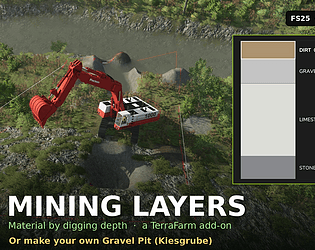
First: your map decides the materials. Whether a material exists — and whether you can dump it back onto the ground — is decided by your map and mod list, not by this mod. The base game only knows STONE; DIRT, GRAVEL, SAND, COAL, LIMESTONE and PAYDIRT always come from maps or mods. And the game caps ground materials at 63, 48 of which the base game uses itself — on big mod lists the last slots go fast. Mining Layers takes a middle road so it stays playable on every map: it checks on load what your map really provides and only offers that. A (!) in the layer picker means: digging and selling work, dumping doesn't on this map. If something is missing, it's the map — not the mod.

No — Mining Layers doesn't add or register any fill types. It only uses what the base game, your map and your other mods already provide. Paydirt itself isn't a base-game fill type in FS25: mining maps and mining mods bring it, which is why it's often there anyway. If your map doesn't have it, pick a different seam material in the layer editor (COAL, LIMESTONE, STONE, GRAVEL, SAND — anything your map knows works; the log lists them all at startup). Good question, it's in the FAQ now.

(1 edit)

New update toggle mining layer hud see github, plz give a vote on github, thanks

Thanks, bug reports here or on github, plz give a rate, 

Update: this is live now — 1.4.0 shipped today, and your comment is the reason it exists.

Both of your ideas work in the editor now, no XML needed. ESC menu → Mining Layers → Layers: the pay seam is the fixed last row — pick COAL for your coal mine, LIMESTONE and STONE for the gravel pit (DIRT, SOIL, GRAVEL, SAND work too). PAYDIRT stays the default, and the bedrock at the bottom stays fixed — digging through the overburden to reach the goods is the point of the mod.

One catch: COAL and LIMESTONE are not base-game fill types — your map or a mining mod has to bring them (RGC maps like Yukon Back Country do). If the map doesn't know the material, the mod falls back to PAYDIRT and tells you in the log.

Thanks for the nudge — exactly the kind of feedback I need.

The first two layers you can edit right now, but new release to edit all three layers came out today, stay tuned, thanks Fritte