
On Sale: GamesAssetsToolsTabletopComics
Indie game storeFree gamesFun gamesHorror games
Game developmentAssetsComics
SalesBundles
Jobs
TagsGame Engines

EldanR

14
Posts
3
Topics
1
Following
A member registered Dec 20, 2024 · View creator page →

Recent community posts

Good day! First of all, a question: what OS is on your computer? If Windows so, I can easily tell you the sequence of steps.

1. The level folders are in the archive. You must first unzip them.

2. Then put them in the game at this address "FPV Freerider Recharged\FPVFreerider_Recharged_Data"

3. Launch the game.

4. Click Level Editor

5. Click Level

6. Click Load

7. Click on the line of the desired level

8. And finally, click Play
So, several days have passed since I bought, downloaded and installed this simulator. And although at first I had to tinker a little with the drone settings (especially since I am an absolute layman in this - I have never flown such devices in reality, and have not even held them in my hands, and in general, I have only seen them in pictures and photographs :)) ), but since then my soul and body have been resting in this game! A big, just a huge, thank you, John - for your idea, your work, and patiently bringing it to perfection! Pleasant to the eye graphics (soft, light, dark, and even bright (such as the sun's rays through the clouds) tones), smooth and calm movements, without jerks (although, when necessary, you can speed up ;) ) ... You fly, soar ... If you want - like a swallow or a swift (true, you quickly get tired of such speed, you can get carried away :)) ), if you want - like an eagle or an owl. Here - you really feel like a bird, and you are not afraid of falling at all!!! And although I do not have VR glasses, and my remote control is not an app, but the simplest and cheapest (Chinese, maybe even Malaysian :)) ) PS3 gamepad. But thanks to the convenient settings, you can, in fact, just sit down at the screen, launch the location you like most (by the way, as the Bible says, seek and ye shall find - I searched and found many other maps (special thanks to the enthusiasts for this)), and fly - relaxing, throwing off all the routine accumulated during the day. I am from a small country far away from you all, Azerbaijan. I am writing these lines in Russian ... I do not speak English perfectly, but I really hope that the translator program will correctly translate (convey) all my gratitude to the author of this idea! To you, dear John... :) May God grant you health, strength, and long years of life in happiness!

Sincerely, Dan.

It will be difficult to explain, I just got this feeling))

This is what we say in such cases: “When it seems like it, you need to be baptized” :) I hope Google translator translated it correctly))

Yeah, everything is clear, we’ll do experiments on ourselves and on the computer...)) Thank you! :)

By the way, I also noticed something else... In the first, classic, versions of the program, the camera tilt angle is adjusted as if it is on top of the device, like in tiny whoops. Now, in a later, different version, Recharged, it is adjusted as if it is below, in suspension )))

Another suggestion arises... Two small windows (one for the top, the other for the bottom), you can check only one of them, making a choice, and then adjust the tilt angle.

I think, in this way, you will anticipate the preferences of all users ;)

Probably, I have already gotten to you with my suggestions and observations... ))

I hope that you will not be offended, but will understand my activity ;)

Best wishes, Dan.

FPV Freerider community · Created a new topic Map size

Hello again, it's me again ))

We are having some kind of impersonal conversation, it's somehow awkward... Dear developer, your name is John, isn't it? And my name is Daniel. You can just call me Dan for short :) That's my real name. My full name is Eldan.

I'm interested in this question... Perhaps you've already tested it in action. The question is: what is the size (weight) limit of a location map? It's clear that if the location is too big, the program will either work for a long time and with difficulty (it will load excessively), or it may even end in a crash.

Sometimes you just want to create something like a small village (urban-type settlement) to fly there. And sometimes you want a forest... )) In general, everything is like in life :) Not everyone is interested in sports racing ;) Many (including me) just want to fly, for the soul, to relieve stress after a long day at work.

Sorry if I'm distracting you with questions... The question is not urgent, and you can answer it at any time convenient for you. Especially since I still need to learn how to use the editor )) I've already taken the first steps in mastering it. Yesterday, for example, on your advice, I moved, turned, deleted, and even added something! )) And again, on your advice, I saved it under my name so as not to spoil the original. Timid steps of an inexperienced child... )) Over time, of course, I'll learn. But that will be later, later. In the meantime - little by little, little by little...

Yours respectfully, Dan.

(1 edit)

Hello again! :) Sorry for being so annoying... )) I never tire of admiring the program :) Oh, it's just a pity that the desert from the Classic version is not in the Recharged one. Honestly, I like it better. And it would probably be even better if there were two variants: just with sand and gates - for beginners, and with rocks - for experienced flyers :) But then, I'm afraid that the size of the program will increase and will not fit into the Ubuntu limit (if there is one, I don't know, I'm an absolute layman in such matters).

I also noticed this thing... When you finish a race (flight) in the level editor and go back to the list of levels, you ALWAYS end up somewhere at the beginning of this list. Although, in my opinion, it would be more logical if you were on the same level where you flew. And then, at will, you go up or down the list, and fly again ))

By the way, following your advice, I scoured the entire Internet, found and downloaded a bunch of levels (HUGE thanks to those enthusiasts who took the time to do them). Now I have a pretty impressive, long list ))

But I can't do it myself yet. I can't even understand how to edit (again, on your advice). Of course, I read the instructions... But... It's obvious that I'm such a clumsy person ))) I need to look for videos on this topic. And they should be thorough. And what I found - everything is shown at such a fast pace that it's unclear: what and where to click-move.

With respect, Dan.

It seems like I carefully reread the entire forum, in particular, about this simulator... But somehow this issue was not touched upon anywhere... Either I missed it, or I am inattentive after all :) So, a question for the future... I'm just wondering, when updating, are your own settings - all these gases, turning speeds, resistance, and the like, saved, or will you have to configure them again?

Sorry, if anything, for my writing :) I don't know English very well, so to avoid mistakes I use Google. And you know how it translates. What can you expect from it, a machine )))

Thank you too for the wonderful program! :) By the way, if you allow me, one more remark... ;) It would probably be nice if the currently active preset was highlighted. So that it would be immediately clear - with what settings we are flying ))

1) Visualization of the sticks position on the screen during the flight. I have already supported this request of one of your clients in the topic https://itch.io/t/173216/stick-indicators

2) Assigning the "low/high rates" option to a keyboard shortcut. This has already been discussed here https://itch.io/t/19821/how-to-fly-a-fpv-quadcopter-racing-drone I even asked to leave this option and not remove it. ;)

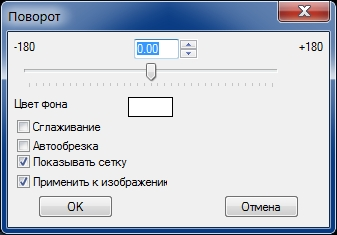
3) And finally, in the readings of all parameters in the settings, make a window with numbers, and on the right - up/down arrows. Something like this...


It will be easier to assign a digital value: without moving the slider, but by clicking on the arrows, or directly entering the desired number from the keyboard in the window.

Best regards, Dan.

No, no, please don't remove this option! It makes the program much easier to use. You can switch between fast and slow with just one click. ;) But if you remove it, you'll have to interrupt your flight, go to the settings, twist and turn and move the sliders. A waste of time, you understand? So please, leave everything as is. :)

Dear developer, You still haven't done THIS. ;) But I think it will help newbie pilots control their movements. It's one thing when your attention is torn between the sticks and what's happening on the monitor screen, and quite another when you see how the device is moving and what the sticks are in, and SIMULTANEOUSLY.

By the way... Can I ask you to make one small feature in the next update? ;) In the upper left corner there is a switch "low/high rates". It is very inconvenient to click the mouse there on the go (in flight)... It would be nice if there was at least some keyboard button for this command! :) Click quickly once - slowly, click again - quickly, beauty! )))

Thank you very much for this game, and for the addition to it! I don't have a drone, and frankly speaking, I don't plan to get one. But, I get great pleasure from controlling the toy on the screen ))) In our difficult stressful times - your game gives us the opportunity to relax. Once again - thank you, and Happy New Year! :)