

Indie game storeFree gamesFun gamesHorror games
Game developmentAssetsComics
SalesBundles
Jobs
TagsGame Engines

DogBronson

14
Posts
4
Following
A member registered Feb 17, 2024

Recent community posts

If you mean the 3.4 version I already have that. In general popups work fine with that.

There's no message in the console when I try to use a Text Popup plugin command in the action sequence - it just doesn't happen. But if I disable your plugin and try it, the Text Popup works, so something is clashing between the two.

I know since VS is obfuscated it's an uphill battle doing anything. I'd even be happy with your plugin offering the ability to trigger a text popup in a plugin command or something.

If you meant something else and I misunderstood... sorry!
Hi!

I'm liking this plugin a lot. It works very well even with Visustella plugins. One issue I'm having though is that it seems to suppress Visustella's Text Popup plugin command from Battle Core. I use this sometimes for other effects that are not HP/MP.

Is it possible to still get text popups somehow? Whether it's from Battle Core's plugin commands or your plugin, it doesn't matter. I'd just like to still have that functionality.

I'm sticking with this plugin either way, though!

No worries.

Thank you so much for adding it, it works perfectly!

Hi!

Would it still be possible to still get this feature sometime? I'm just looking for a little more consistency across my game's UI, so masking titles and allowing the player to be able to see what can still be found would be good.

Would it be possible to make it so that text from the Help Window doesn't obscure the Status Window info? Longer descriptions end up going over top of the first actor's data. Could just use a line break in the skill's/item's description, but that ends up looking strange sometimes in other areas of the game and basically renders <wordwrap> useless.

Would it be possible to add an option to mask songs that haven't been discovered/unlocked? So they would display as ???? or something and can't be played? I know currently they can just be hidden but I'd like to have the option for masking as well.

I think that's working! At first I thought it wasn't, but then I realized when putting "this.level === 2", the 2 is the level BEFORE they gained a level, not what level they become.

I only tested a few levels. It's going to be tedious entering them all one by one, but that's okay with me if it works like I want it to. I'll post back if there's a problem. I don't mind waiting on an update to the plugin.

Thanks for helping me with what is probably a very specific use case, you're the best.

(1 edit)

Thanks for the quick response!

When I try your formula I get NaN. (I did change X and Y to numbers and put the formula in both Min and Max).

Yes, I want to choose specifically which levels growth will happen. I might just be misunderstanding this plugin a little. I don't want to use Growth Chance because I don't want any randomness. I don't think LIMIT will work for me because my main concern is not having stats grow too fast but I still need room for items and equips to raise stats beyond what their natural growth may be.

EDIT: I'm using custom params where I don't want random growth, otherwise I'd just use the default engine's curves.

Hello!

For one of the stats in my game I don't want random growth. I can set Min and Max both to 1, but then it increases every level, which I also don't want. Is there a way to accomplish this?

I tried entering something like "if (this.level = x) { 1}; if (this.level = y) { 0};" into both Min and Max but it still increases by 1 every level no matter what.

Thanks, I'll see if I can sort it out that way. Regardless, it's an amazing plugin!

Sorry I wasn't clear. In my project, I have, for example. Levels for enemies and I would like to be able to display that, among other stats such as AP and Charisma. Stats beyond the basic Attack, Defense, Agility, etc.

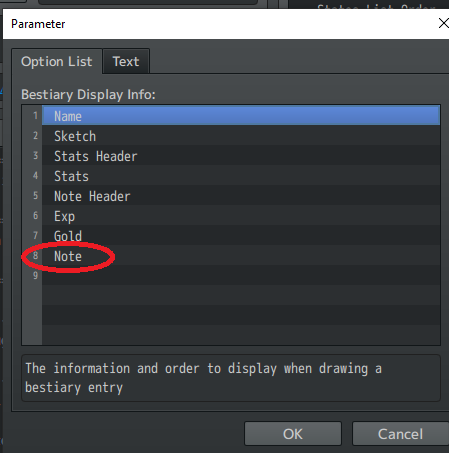
I'm able to fake some of this by using the Note information in the plugin. If there were a way to use multiple Notes  (I mean this Note, for clarity):

then I could probably accomplish what I'm wanting, but of course adding multiples of those just displays the same information multiple times.

It sounds like I'd need to set up a custom category and then basically use that as my bestiary. Since that has to be managed manually that would probably be a bit tedious, so I might just rethink some things if there's not another option.

Hi! I'm using custom parameters in my project. Is there any way to get those to display in the Bestiary? I can't seem to figure it out if there is.

I don't see anything about disabling it, but I might be missing it. Thanks for taking a look, no rush!

I get an error: "

ReferenceError

Window_StateTooltip is not defined"


I haven't done anything with the plugin yet.