Indie game storeFree gamesFun gamesHorror games
Game developmentAssetsComics
SalesBundles
Jobs
TagsGame Engines

DefiedDev

3
Posts
3
Topics
3
Followers
4
Following
A member registered 66 days ago · View creator page →

Recent community posts

(1 edit)

“Fixing Quest Persistence in Save/Load”

Author: Cody Jandes

Posted on : November 20, 2025

The Problem:

During the final week of production, my main challenge was getting the quest log to be persistent through the newly implemented save/load systems. Before the saving and loading was added, the Journal Menu and the Objective GUI were functioning as intended. However, once our team added in the save system, the quest and objectives displayed had fallen out of sync. The quest log itself would not populate correctly and the objective GUI was inaccurate as the player would play through the game. When playing the game, the user would have incorrect UI feedback, no objective, and no quest log to really give them any guide or sense of what to do in our world. This essentially left them “flying blind,” per say, and unable to rely on the UI to help them navigate through the game as intended.


The Solution:

After stepping through the save and load system that had been implemented, I discovered the root cause to be how the quest array was being initially stored. The quests themselves are defined in Unreal within the blueprint of the Journal Widget, but the quests were attempting to save them by looping as if the quests were made in code. By the time the file would save, the array would be unpopulated because it was not getting the chance to fill the quests array using the data from Unreal. Hence, this would give us our empty quest log since in code, our array was being saved as empty.

In order to resolve this, I began debugging the quest saving code to see where the array was being saved or over written. This helped me to find that instead of trying to rebuild the quest array during the save process, we could simply store the existing data in the array directly. By preserving this array as it was made, Unreal was able to correctly read the Blueprint created quest and restore them more accurately. I added a dynamic function to check for a refreshed list so that the quests set in Unreal could be dynamically refreshed to the list before the game even starts and the player can access that menu.

With this fix in place, the quest log persists as intended, even with the save and load functionality. The Objective GUI itself also accurately reflects what the player should be actively doing at that moment. The player can now lean on the UI to guide them through the game’s primary objectives, even after they restart the game or loading back into a session. This brought the final core system online for our final build and made sure that the user has a consistent and intuitive experience from beginning to end. 

“Fixing Quest Log & Objective Sync Issues in UI Systems”

Author: Cody Jandes

Posted on : November 14, 2025

The Problem:

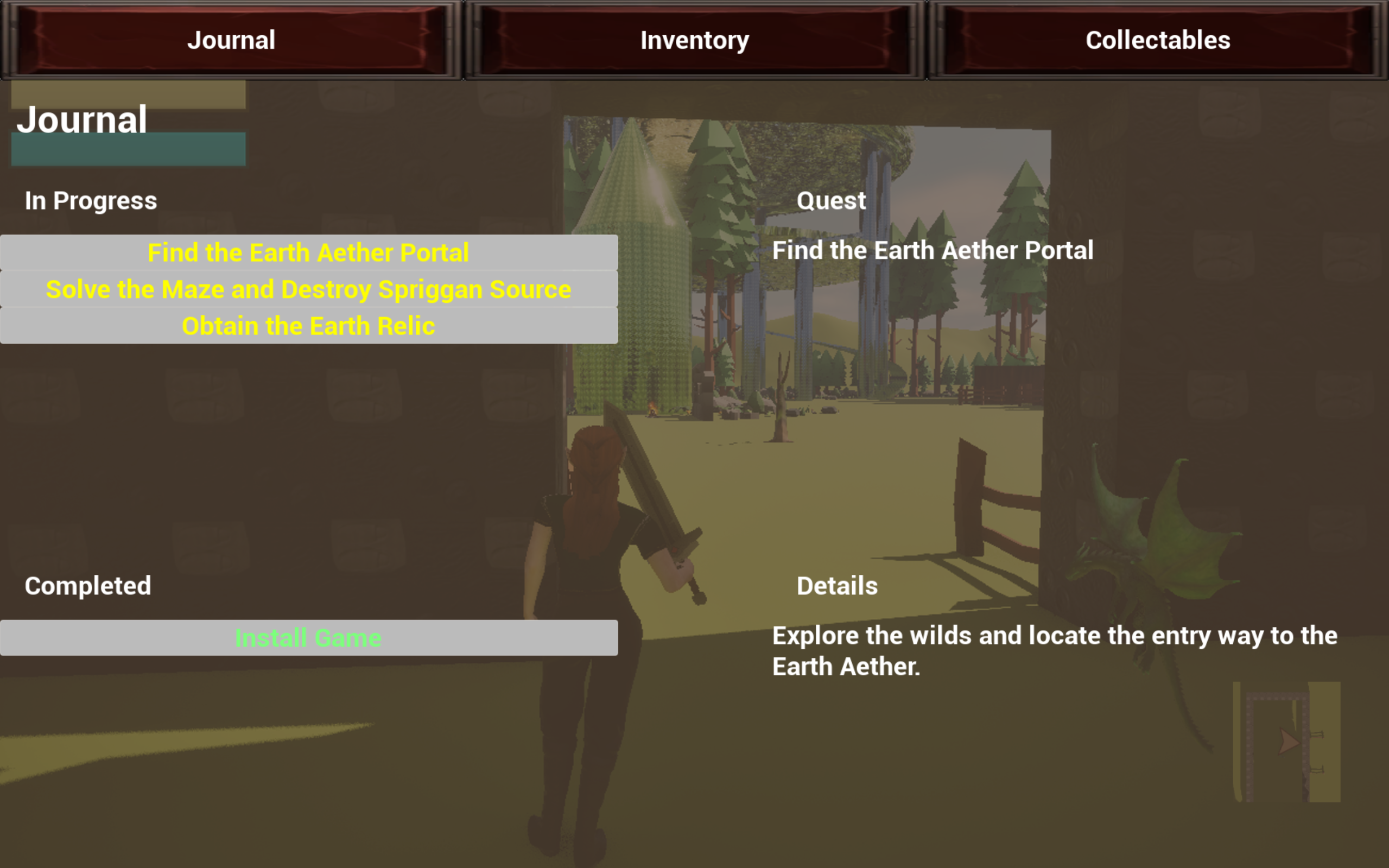
During the second week of production, I shifted the majority of my focus over to the UI systems – more specifically on the Journal/Quest menu and syncing it with the Objective GUI. What I thought would be simple UI updates turned into a couple of large roadblocks for my work this week. First, the quest logs inside of the journal were not appearing properly in-game, or showing at all for that matter. Secondly, the Objective GUI would not show the desired text, and it would get stuck on the original placeholder text that we had set for it during our first sprint. The intention behind the quest log and the Objective GUI is that they work together to help the user track their quests, see what they have done, and what they have left to do. 

With these not being properly aligned, this meant that the users quests were not showing up, not appearing in the right spot, and that the active objective would not match what they were truly working on. A mistake like this could easily cause some confusion, loss of trust in the UI, or the annoyance of having to manually go in and try to remember what you were doing based off of one’s quest log or assuming the GUI in the HUD was correct. With our game being very narrative strong, these elements were essential to get fixed. Being able to sync these up and not just set up a base placeholder became the top priority for my work this sprint. 


The Solution:

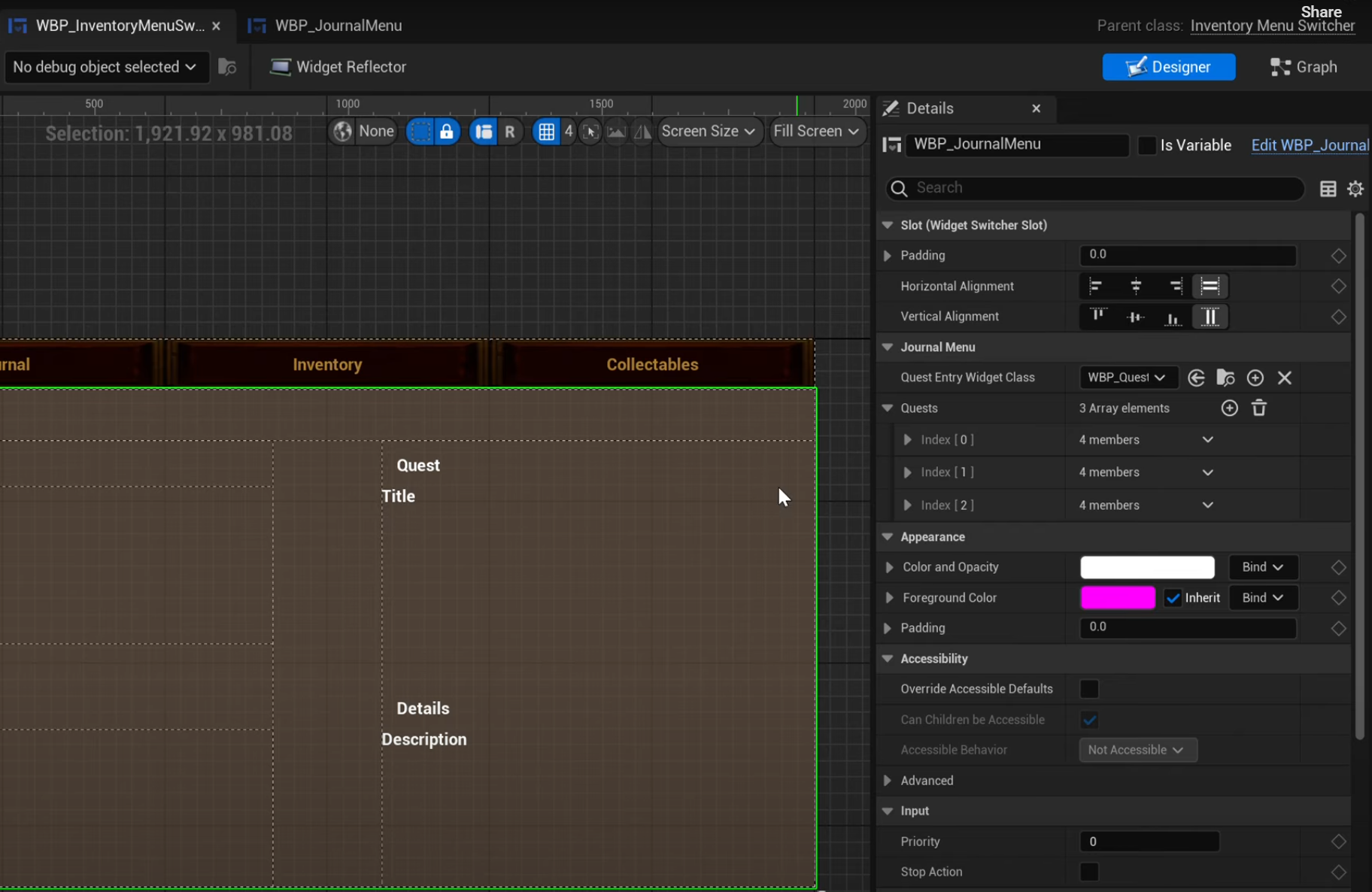
After several attempts at debugging in code, I found that the quest log issue came down to our use of a widget switcher which was not using the most recent updates done to the Journal Menu asset. I was making all of the updates for the quests inside of the Journal Menu asset itself, but the switcher was still holding onto an older instance of this menu. To confirm this issue, I wrote small blocks of debug code to see if once I started the game, the quests array was being filled even manually rather than in the details panel of the editor, and the issue still persisted. I began looking everywhere in code and blueprint for where the menu was hooked up and realized that the work I had done on the journal menu asset was not updating to the widget switcher. The fix from here seemed to be pretty straightforward, out with the old and in with the new. Once I had done this, I had solved half of the problem. The quest logs were not appearing in the Journal menu as anticipated. 

The Objective GUI was a little harder for me to figure out though. I knew that with a placeholder value appearing on screen that it had to be instantiated or stored in the code because there was no value to be found within the Unreal Editor itself. After looking through all files tied to the GUI itself such as the Game Mode, Game Instance, Player Controller, and the Objective GUI itself, I was able to find the issue. The current objective which is the value that is put onto the players HUD was being set in nearly all of these classes. There was a different value being hard coded to the current objective across all of these files. In order to solve this, I began removing them or commenting them out to find which one was the primary culprit for the misinformation being sent to the users screen. After I followed the path and narrowed down where the update would be happening, I set all of the objective updates to a single location. This made sure that the GUI was not being overwritten anywhere else in the project and now we will be able to easily find it going forward to.


With both of these issues resolved, the quest log and the objective UI now stay in sync, update as planned, and accurately reflect what the play is doing, what they have done, and what they will do going forward as well. 

“Solving Build and Packaging Failures v0.0.1”

Author: Cody Jandes

Posted on : November 7, 2025

The Problem:

During our first week of production I was confident that my menu systems, game state transitions, and other tasks were fully functioning by build day. The major roadblock I ended up running into was that I could not get a successful packaged product of Ryssa Through Time. When I attempted to cook and package the project, Unreal would either fail mid packaging or the game would crash right on launch if it did build. This was an extremely critical issue because, without a working packaged build, the game would not be able to be distributed or tested outside of just our team within the editor. This would then halt progress for testing and feedback systems for our game.

After I was able to get the game cooked and packaged, I then ran into another issue – the packaged build was now way too large. This created new problems in trying to deliver the product, as we have a size limit using itch.io as our target page. Both of these issues directly impacted our team's ability to showcase our work and also continue on with work for our next sprint. This quickly became a high priority task to resolve before any of us could move forward.

The Solution:

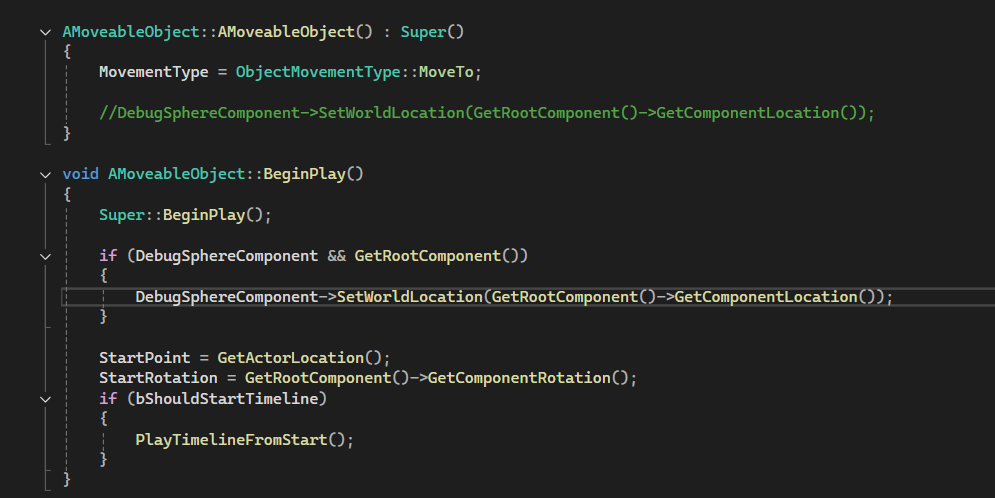
To address the build and packaging failure, I started by debugging Unreal’s crash logs, which consistently point to a specific class – AMoveableObject. Originally, the constructor of this class was trying to call SetWorldLocation() on a component before it was ever initialized, and this was causing a fatal error during packaging. Once the product was able to be fully packaged, and we were simply getting an issue opening the game, I had to pivot. 


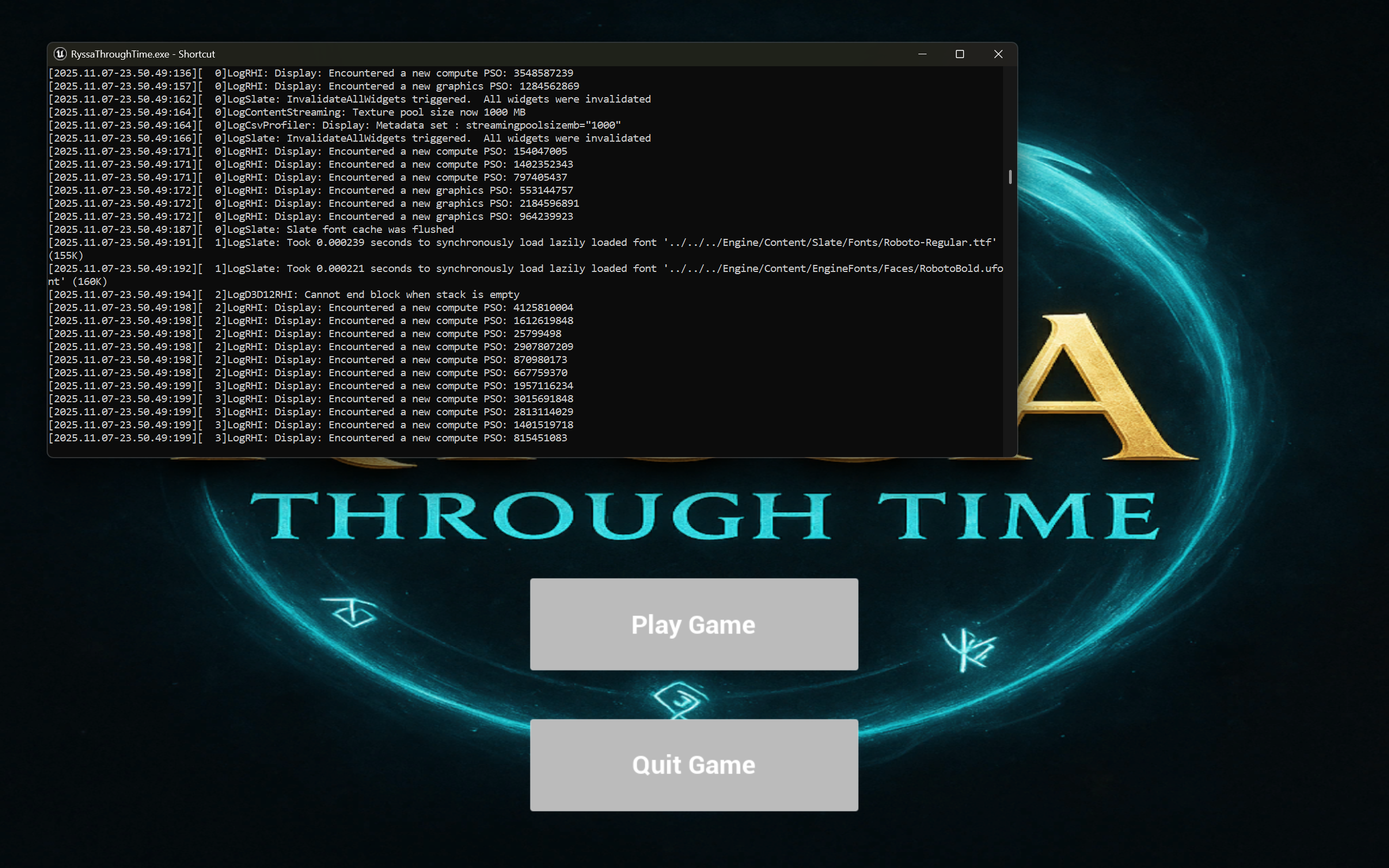
In order to find out why it was failing at runtime, I used an old trick I learned where I can create a shortcut to our executable, and in the file path, add “-log” which will allow me to get a live log console when trying to run the game. By using this log window, I was then able to see that the issue was inside of the moveable object and that the location could not be set. After seeing where the problem was, all I had to do was move the line of code to the correct override function to make sure that it was being called correctly now. I did so by refactoring the code and moving the logic from the constructor into the BeginPlay() function. This then allowed the game to be packaged and launched successfully.


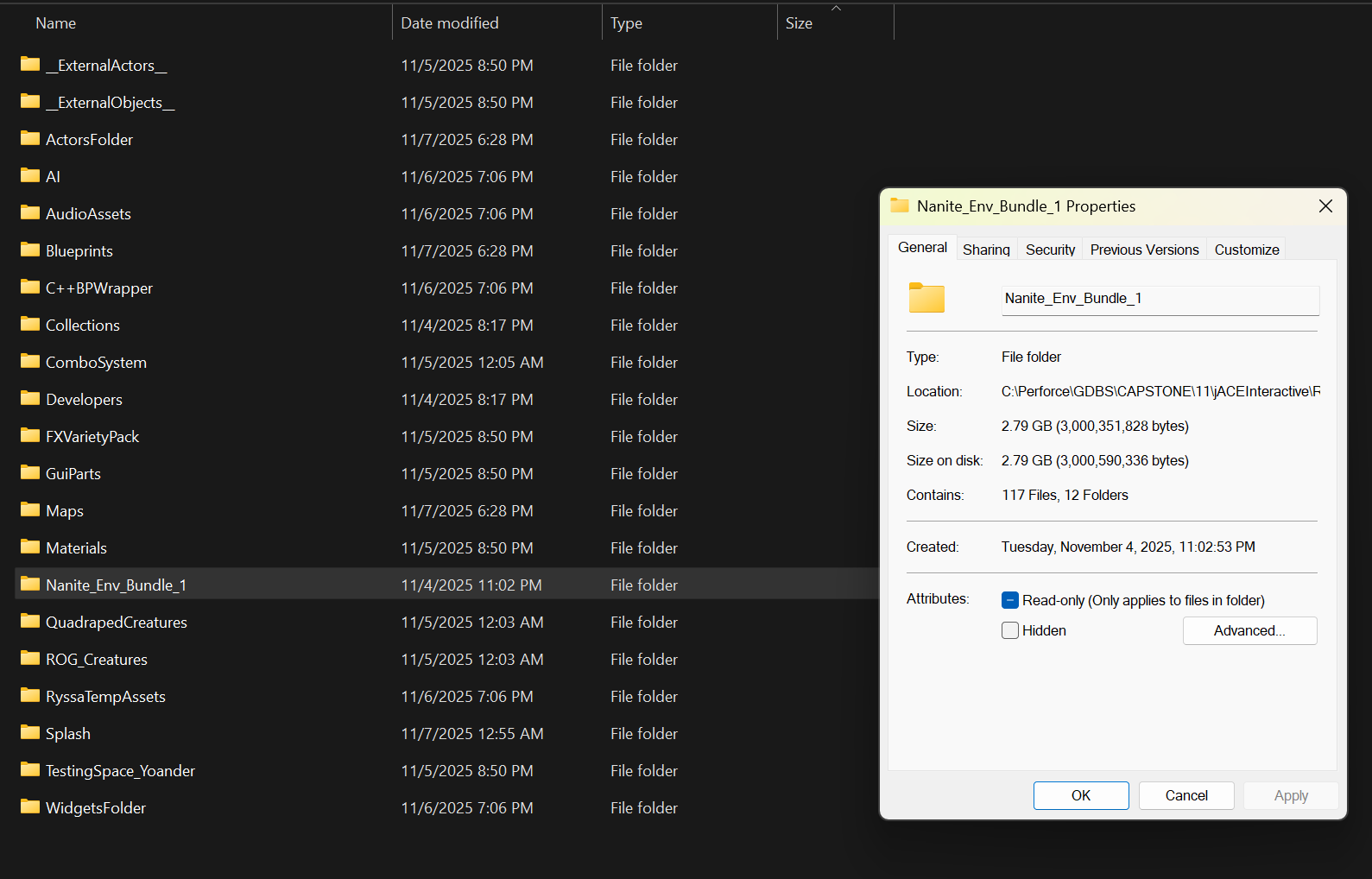
Once the game was building consistently, I then had to move on to the oversized installer. The first thing I thought to check was our asset packs and project settings for what would all be cooked into the project. I performed a full audit on all asset packs that had been uploaded that seemed to stand out on size. The biggest culprit was found to be two simple stone structures we had placed in our world that were causing the packaging to include several folders of textures and materials to be included even when most were unused. I went in and removed these assets and also fixed a packaging optimization setting, "Exclude editor content when cooking,” to make sure the file size would be reduced. These actions together brought the size of the package down about .5 GB, and this helped the installer to almost drop an entire gigabyte itself.  Fixing these issues made sure that our first development build of Ryssa Through Time could be sent out, tested, and experienced as we intended it to be. Going through this helped with overall workflow, build stability, project performance, and helped to see some tasks that will need to be prioritized going into our next sprint.