
Indie game storeFree gamesFun gamesHorror games
Game developmentAssetsComics
SalesBundles
Jobs
TagsGame Engines

coderzxy54

3
Posts
1
Following
A member registered Dec 02, 2019

Recent community posts

(1 edit)

Okay, I understand the problem, but there might be a solution :

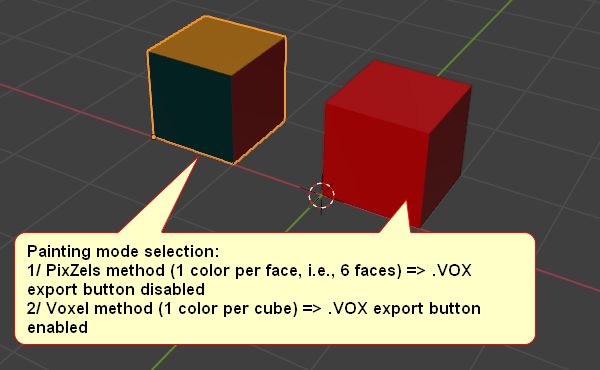
By asking users (via a dialog box) to select the painting mode for their model when creating the project, so:

Choice of painting mode:
1/ PixZels method (1 color per face, i.e., 6 faces) => .VOX Export or Slice Export button disabled
2/ Voxels method (1 color per cube) => .VOX Export or Slice Export button enabled
It’s up to you to decide which is less complex to implement.


Sincerely,
Hello @pixel_Salvaje,

Sorry for all the requests below that you have to review, but I also wanted to bring up the topic of the MagicaVoxel (.VOX) exporter.

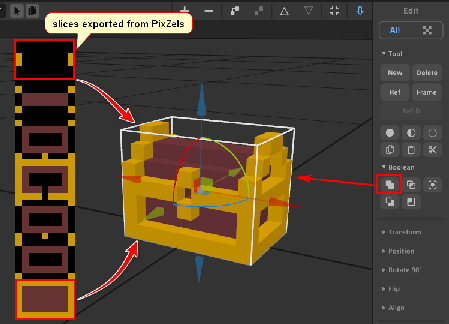
I think you can actually skip that and handle the export issue more simply. You just need to export as PNG slices. MagicaVoxel v0.99.7.2 supports importing image slices one by one. I’ve attached an example to give you an idea. Please take the time to consider my request, as I believe it would be much easier for you to program an image-slice exporter in PixZels rather than a .VOX format exporter.

A slice exporter would also allow for sprite stacking in 2D isometric games.

Thanks in advance.

Hello, congratulations on the development of Pixzels. When I import 6 images, one by one to build my model, saving the model doesn't work. However, when I import 6 views into a single image, saving works correctly. Please, could you look into this?
Also, could you add a new export format in a future version that supports the VOX format (MagicaVoxel V1 format, 126x126x126, for example)? Thank you.