On Sale: GamesAssetsToolsTabletopComics
Indie game storeFree gamesFun gamesHorror games
Game developmentAssetsComics
SalesBundles
Jobs
TagsGame Engines

ChrisXokami

4
Posts
1
Topics
A member registered Jun 10, 2020

Recent community posts

(1 edit)

Game is fantastic. I've also left (the same) feedback on the Discord.

If your high score goes over 32768 (makes sense, it's the max for a 16-bit integer), saving to the leaderboard stops working, and the results screen also never shows. Additionally, any scores over 9999 don't display properly on the game screen.

I played again, keeping track of my score so it didn't roll over 32768. I got to the results screen, but it no longer recognizes that you set a high score. The bonuses also rolled the number over in a weird way. So if the score is bumped over 32768 at any point, scores aren't saved.

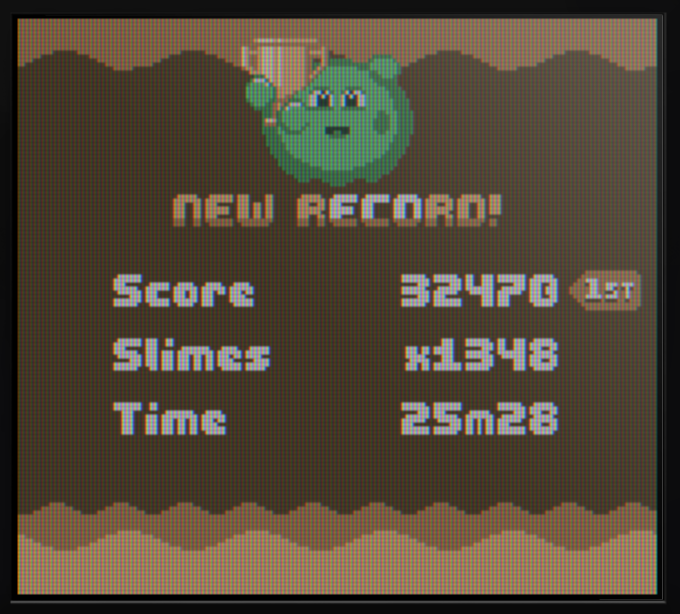
When (and if) this gets corrected, my highest score has x1807 slimes cleared, 33m15s, and score of around ~40,000.

Until then the above screenshot is probably the closest I've gotten to the (current) maximum possible score. I dare anyone to beat it! :D

Whoops! Looks like the real issue was inbetween the computer and the chair (aka, it was me not unchecking trim. Lol). Thank you very much for taking the time to respond to me and assist me with this, I was able to render at the size I had wanted!

(1 edit)

Absolutely!

I'm currently using v1.0.0.8. 

At first, my conclusion was that when rendering, the render output will crop out any unused space automatically. As you can see, during rendering, the frame size has been cropped from 544x416 to 253x366. I want to be able to prevent this from happening.


Upon further testing (and me attempting to force the program to render at the expected 544x416 canvas size) I've found that even if the canvas is flooded with particle effects, the render result will still be cropped, no matter what. I have yet to figure out how to render at exactly the canvas size I specify. I guess I'm trying to understand why the program does this, and how to force it to render at a specific canvas size without any cropping at all.

Thank you so much for reading my post, I hope that I explained my issue well enough!

I can force a specific canvas size, but when I go to render, it automatically resizes it and crops it. This is useful for saving space, however, I think it would be really handy to allow users to override that feature, as some projects (mine!) require specific dimensions in order to be used. Thank you for reading. If this feature already exists, please let me know! It would make my day.