
On Sale: GamesAssetsToolsTabletopComics
Indie game storeFree gamesFun gamesHorror games
Game developmentAssetsComics
SalesBundles
Jobs
TagsGame Engines

Baricus

4
Posts
4
Following
A member registered May 03, 2018

Recent community posts

No problem, I'm happy I could help out!  I wanted to try the software but without pressure sensitive input it was difficult.  


I also took a moment to look in X11 (I don't use it because of other reasons but the tablet still works) to see what OpenTabletDriver displays.  The only devices it seems to have are:

⎡ Virtual core pointer                          id=2    [master pointer  (3)]
⎜   ↳ OpenTabletDriver Virtual Artist Tablet Pen (0)    id=27   [slave  pointer  (2)
⎣ Virtual core keyboard                         id=3    [master keyboard (2)]
    ↳ OpenTabletDriver Virtual Artist Tablet    id=26   [slave  keyboard (3)]

(I've cut the other devices out since they're now my actual keyboard, etc)

As far as I can tell those are the only ones exposed?  Everything else in my list is something I recognize so I don't think there's any other unique names.  
(1 edit)

I double checked and I apparently can just install `xinput` so I did; I thought that it wasn't something I could run anymore even with xwayand.  I think that it won't be too helpful though since it just shows the compatibility layer.  From runing `xinput --list`, I get:

WARNING: running xinput against an Xwayland server. See the xinput man page for details.
⎡ Virtual core pointer                          id=2    [master pointer  (3)]
⎜   ↳ Virtual core XTEST pointer                id=4    [slave  pointer  (2)]
⎜   ↳ xwayland-pointer:10                       id=6    [slave  pointer  (2)]
⎜   ↳ xwayland-relative-pointer:10              id=7    [slave  pointer  (2)]
⎜   ↳ xwayland-pointer-gestures:10              id=8    [slave  pointer  (2)]
⎜   ↳ xwayland-tablet stylus:10                 id=10   [slave  pointer  (2)]
⎜   ↳ xwayland-tablet eraser:10                 id=11   [slave  pointer  (2)]
⎜   ↳ xwayland-tablet cursor:10                 id=12   [slave  pointer  (2)]
⎣ Virtual core keyboard                         id=3    [master keyboard (2)]
    ↳ Virtual core XTEST keyboard               id=5    [slave  keyboard (3)]
    ↳ xwayland-keyboard:10                      id=9    [slave  keyboard (3)]

It might just be Wayland only giving you these virtual devices rather than OpenTabletDriver that causes issues with pressure?  I'll see if I can test in x11 at some point as well.  (also hopefully the code block formatted properly)

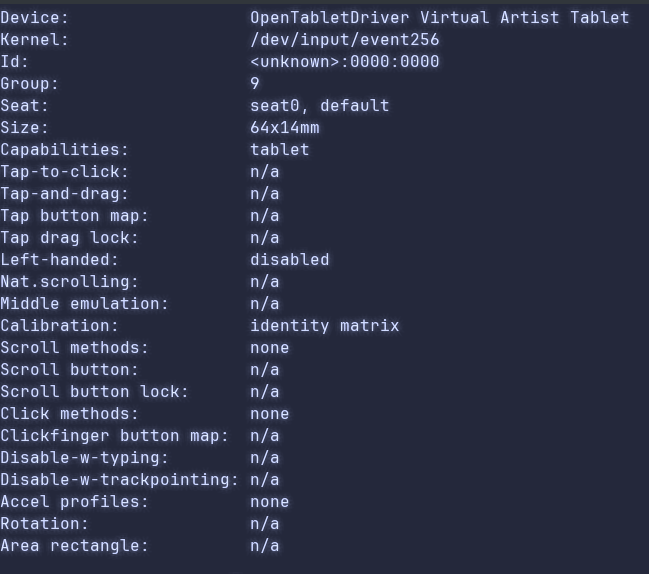
Not the original commenter, and I'm also stuck on wayland, but the equivalent information for my Huion tablet with OpenTabletDriver is


The output of libinput list-devices cut to the OpenTabletDriver device

If I can supply more information let me know.

I thought the hard part of this game would be the math.  The math was hard but developing a mental model of how a dice rolls was harder! This game was a blast and the eureka moment when I figured out how to "line up" a dice to go in the hole was awesome.  It could use some creature comforts like an undo button, but I had a really good time.  Awesome work!