Indie game storeFree gamesFun gamesHorror games
Game developmentAssetsComics
SalesBundles
Jobs
TagsGame Engines

azagaya

420
Posts
1
Topics
1,577
Followers
163
Following
A member registered Mar 13, 2019 · View creator page →

Creator of
Recent community posts

Also, have you tried the appimage from github? i ported it to Qt 6

hey! thanks for reporting. Can you report this on github?

Oh thanks! ill have to fix that.
Probably some property name changed, it happened with other versions upgrades too.

No way to use your own normal map, but i guess you could use any game engine for that, like godot.
Ive been trying to add an option to limit the pallete but no success so far.

Hey! First of all thanks for wanting to credit me!

 You can just write "Ui theme by Azagaya" where you find convenient!

I have more updates in github, still didnt had time to upload them here.

(1 edit)

hey, this button is the "About" section 

it should work out of the box. Ill try it tomorrow to see if there is any issue. Can you contact me in discord (azagaya) so we can solve this?

sorry for the late response. Can you tell me your windows version, laigter version, and opengl support?

Great! im glad you find it useful! Gonna check out the game

ah ok, ill take a look at that

Oh, ill have to check. Perhaps something broke when upgrading to Qt-6. Thanks for letting me know

Hi! is not a bug. Given that you can have more than one sprite opened at the same time, you have to select the sprite you want to change the settings to. So just click on the sprite you want to modify after moving the light.

you are welcome! I'm glad you liked it!

Thanks!

Awesome!

Hi! Thanks for the suggestions.
Yeah many things are missing because this was done for godot 3 and then ported. Still didnt have the time to add more stuff.

Thanks!

Im not familiar with rpgmaker maps, can you share me an example?

mmm the image did not appear

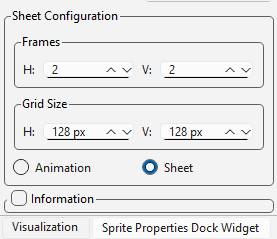
I added this, so you can config the size instead of the number of frames:

expect it in the new version :)

Hey, right now the tilemap feature works only with the number of tiles instead of the size. This is something i should add.

Ill try, but im not sure how much work it would need. This was mostly a proof of concept.

Hey, can you tell me what steps you dif to use it? what version of godot? you can reach me on discord so is easier to help

I should see what changes he made, probably yes, or perhaps ill have to do a new one.

Not yet, sorry, i've been very busy with my day job. Ill let you know soon

Thanks, ill check them on the weekend

Thanks for the feedback! At the moment im only doing maintenance of the tool (fixing bugs) because of lack of time, but perhaps the first two requests are simple enough to add them.

you can join the discord and send it there, or maybe through filebin or something similar?

Can you share me the file that is giving you issues?

I'm glad you find it helpful!

Im glad you found it useful!

Thanks!

Great!

I uploaded a 4.x version!

Sorry for the long delay, i uploaded a 4.x version!

Just uploaded the 4.x port, let me know if it works for you!

I just uploaded a 4.0 port, please test it to see if it works for you!

I just uploaded a 4.0 port. Could you test it if to see if it works for you?

Is this godot 4? The theme is for godot 3 and im porting it to 4 this week. I was on a trip, sorry for the late response.